Hardware
Connect IT 4 hardware and LEDs
This section includes details about the front and back panels.
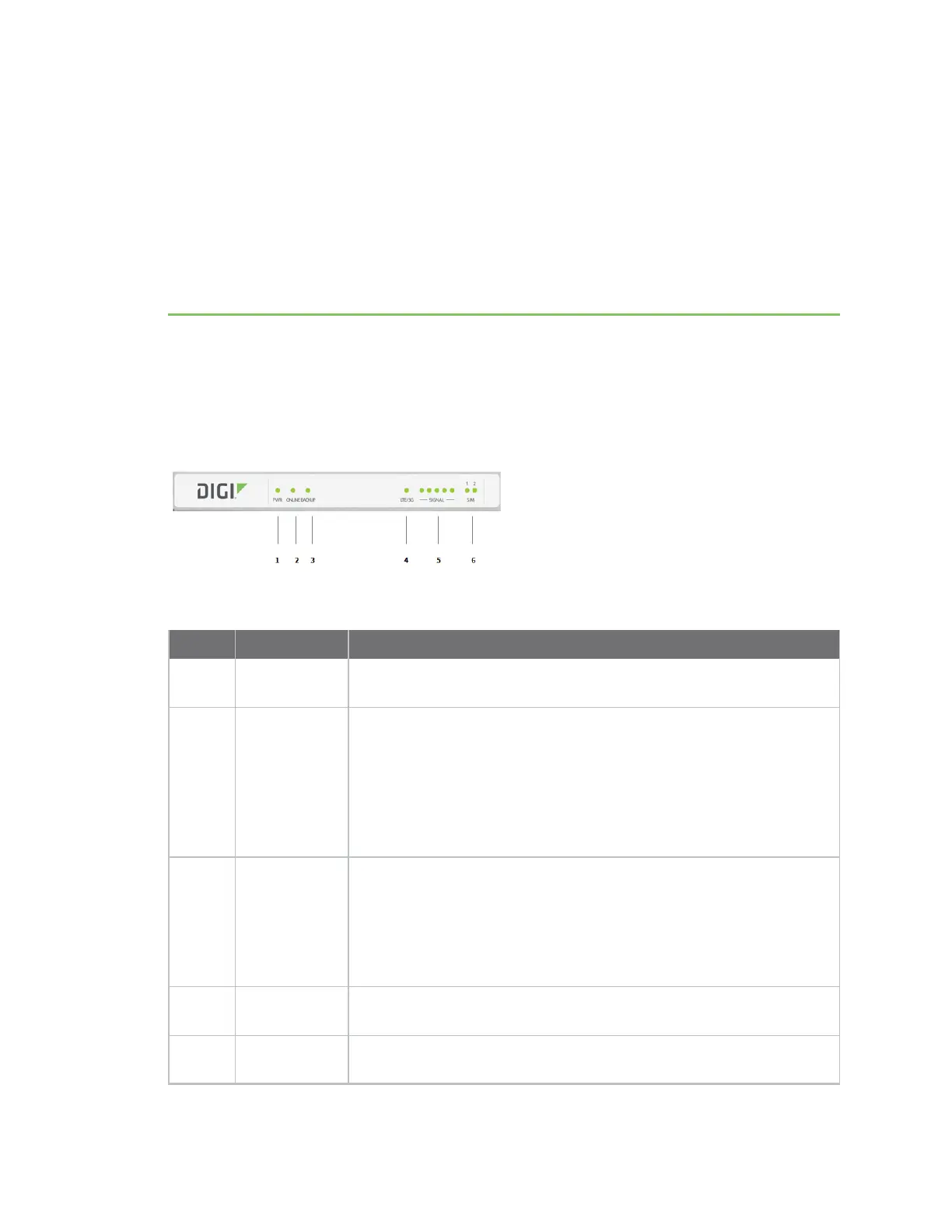
Front panel and LEDs
Item Name Description
1 PWR Indicates whether unit is powered up. This LED is hardwired to the
power input.
2 ONLINE
Indicates status of the primary internet network connection, which by
default is the WANEthernet port.
n Off: There is no physical link to the WAN Ethernet port.
n Flashing: The unit is attempting to it's primary network
connection.
n Solid: A primary network connection has been established.
3 BACKUP
Indicates the status of the backup network connection, which by default
is the cellular modem.
n Off: The COREcellular modem is unplugged or initializing.
n Flashing: The unit is attempting to establish a backup connection.
n Solid: A backup network connection has been established.
4 LTE/3G
Indicates a 4G\LTE or 2G/3G connection. See LTE status indicators for
information about the status indicated by the LED.
5 SIGNAL
Indicates the cellular network signal strength.
See Signal strength.
Digi Connect IT® 4 User Guide
886











 To Next Page