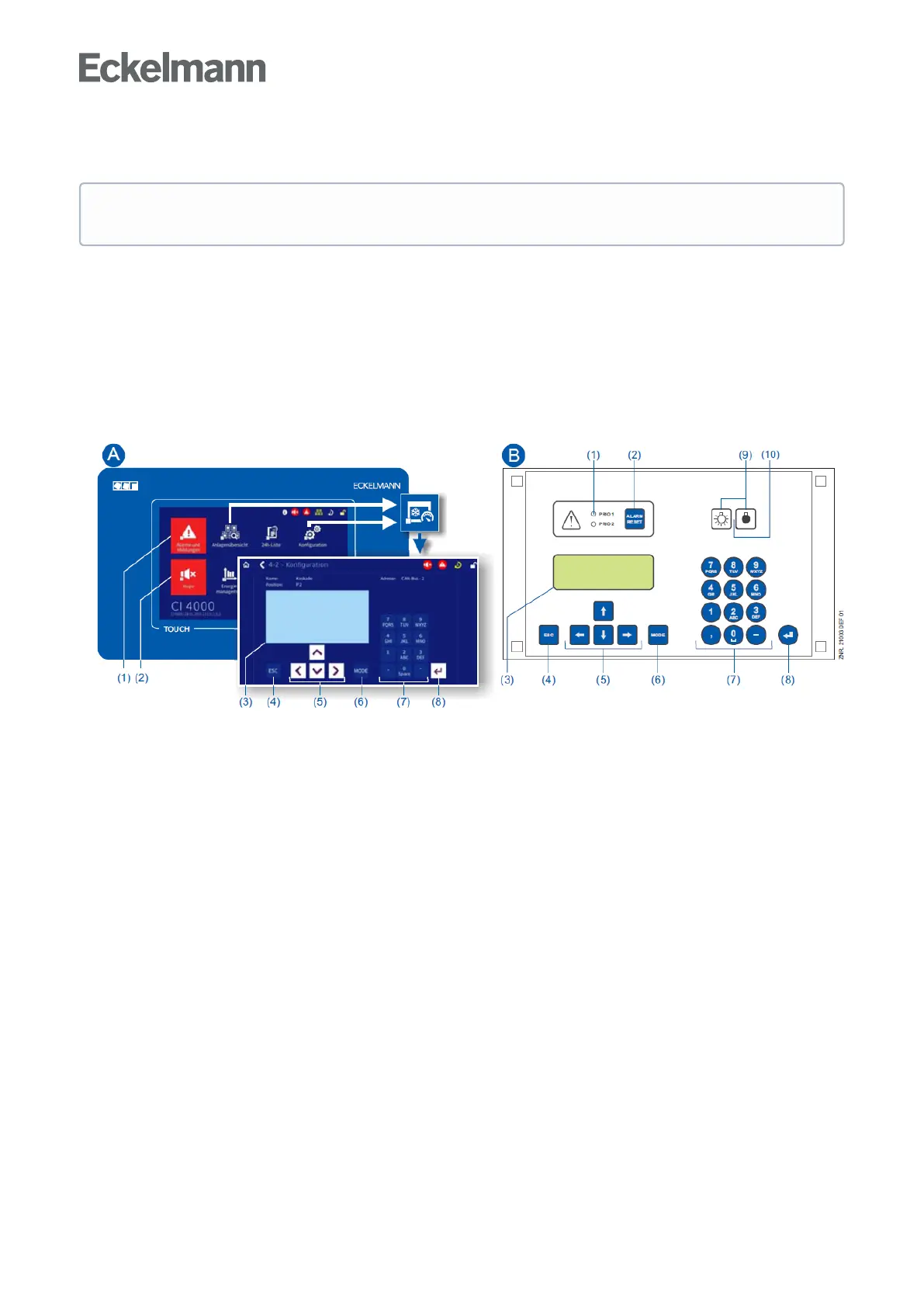
8.3 Remote control via a terminal
For the remote control of a controller, it makes no difference whether this is done with a system centre (A),
astorecomputerorwithanoperatorterminal(B)astheuserinterfacesontheterminalsarealmostidentical
andthesamefunctionsareavailable.SeechapterCalling the controller menu via remote controlfordetails
about remote control.
The system centre only emulates the "hardware front" of its "store computer" predecessor or of the operator
terminalbysoftwareonitstouchscreenwhichisdemonstratedbythefollowingcomparisonbetweenthe
terminalsoftheCI4x00andCI3x00/AL300:
(1) CI 4x00: "Alarms and messages" button in the main menu for display of whether alarms are pending. Alarms
are acknowledged in the "alarm list". CI 3x00 / AL 300: Red LED signal lamps to indicate whether alarms are
pending.
(2) CI 4x00: "Horn" button in the main menu for muting of the buzzer and for reset of the AUX relay. CI 3x00 /
AL300:Buttonformutingofthebuzzer,forresetoftheAUXrelay*andforacknowledgementofalarms.
(3)Display(4linesx20characters)fordisplayofthemenuofthecontroller.
(4)ESCbutton
(5)Cursorbuttons
(6)MODEbuttonfor,e.g.toggleuppercase/lowercasefortextinput.
(7)Alphanumerickeypad
(8)ENTERbutton(↵)
Only CI 3x00 / AL 300:
(9)On/Offbuttonfor,e.g.lighting
(10)GreenLEDsignallampforstatusindicatorwhetherthebuttonisactivated(thengreen)ordeactivated.
Further details for the operation of a system centre, store computer or operator terminal can be found
in their operating manuals.



 To Next Page