8.3.4 Activating service mode
For repair and maintenance work, service personnel can deactivate the remote alarm function of the system
centre and of the store computer for a limited period using the service mode.
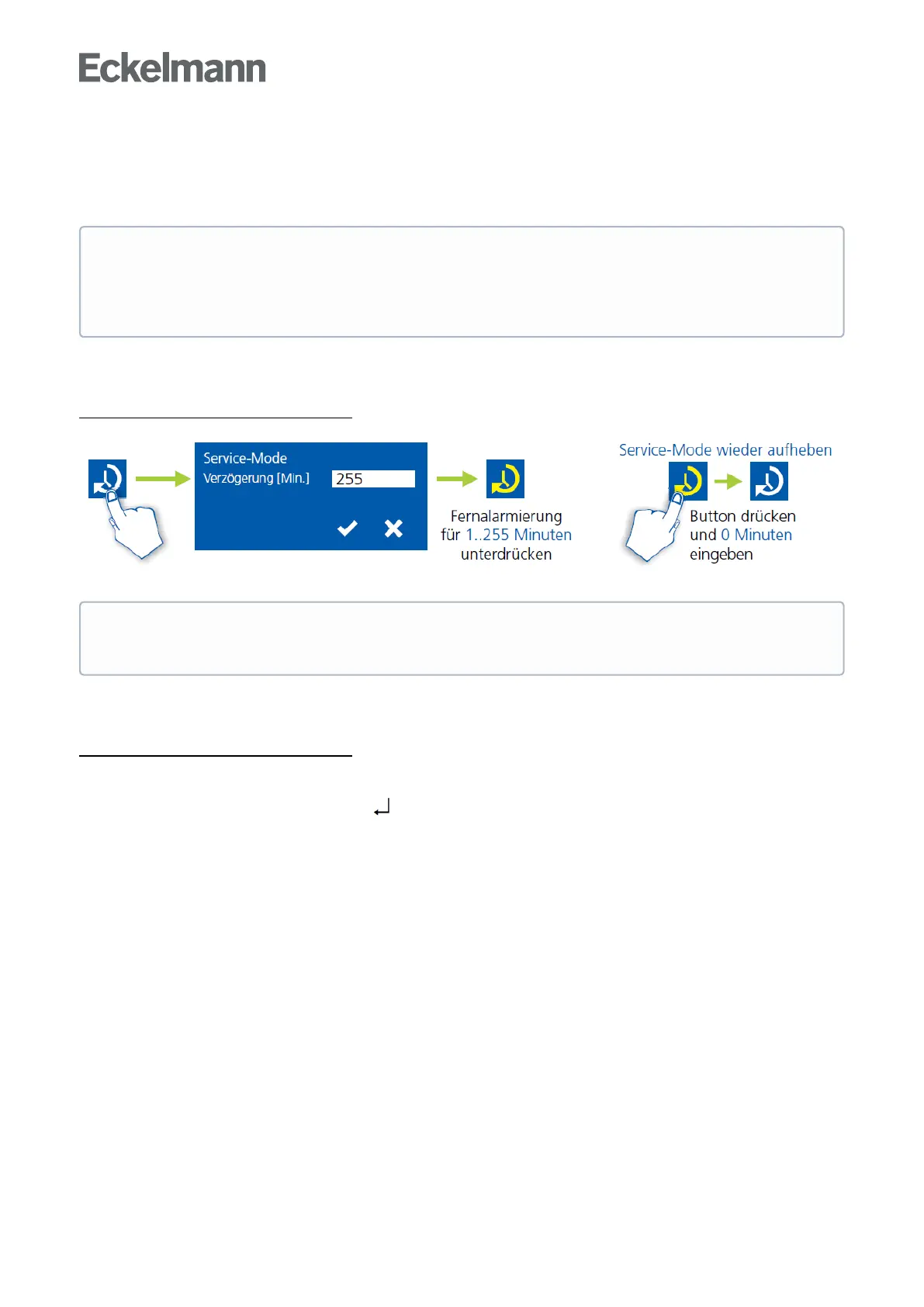
8.3.4.1 System centre CI 4x00 Service-Mode
Activating/deactivating service mode
8.3.4.2 Store computer CI 3x00 - Service-Mode
Activating/deactivating service mode
Step 1:Selectmenuitem9"Parametrisation"inthemainmenu.
Step 2:Selectmenuitem3"Lock-down"inthismenu.
Step 3:TapthebuttonsMODE + ENTER( ) simultaneously to open the screen for the suppression of
theremotealarmsignallingandinputtheserviceduration(1..255minutes).Theservicemodeisnowactivated
for the duration entered above.
Step 4:Theservicemodecanbereset/revokedagainbytheinputof0minutes.
The activation of the service mode must only be carried out by service personnel. If there are still
pending alarms (with the priority 1..2) after the time of the Service Mode has elapsed, the audible
warning devices and the alarm relays are activated and the alarms are forwarded using the automatic
transmission of alarms.
The service mode can only be activated if the system centre has previously been unlocked; see
chapter System centre CI 4x00.



 To Next Page