6.2.2 Setting of the controller type and master/slave mode
Setting of the controller type
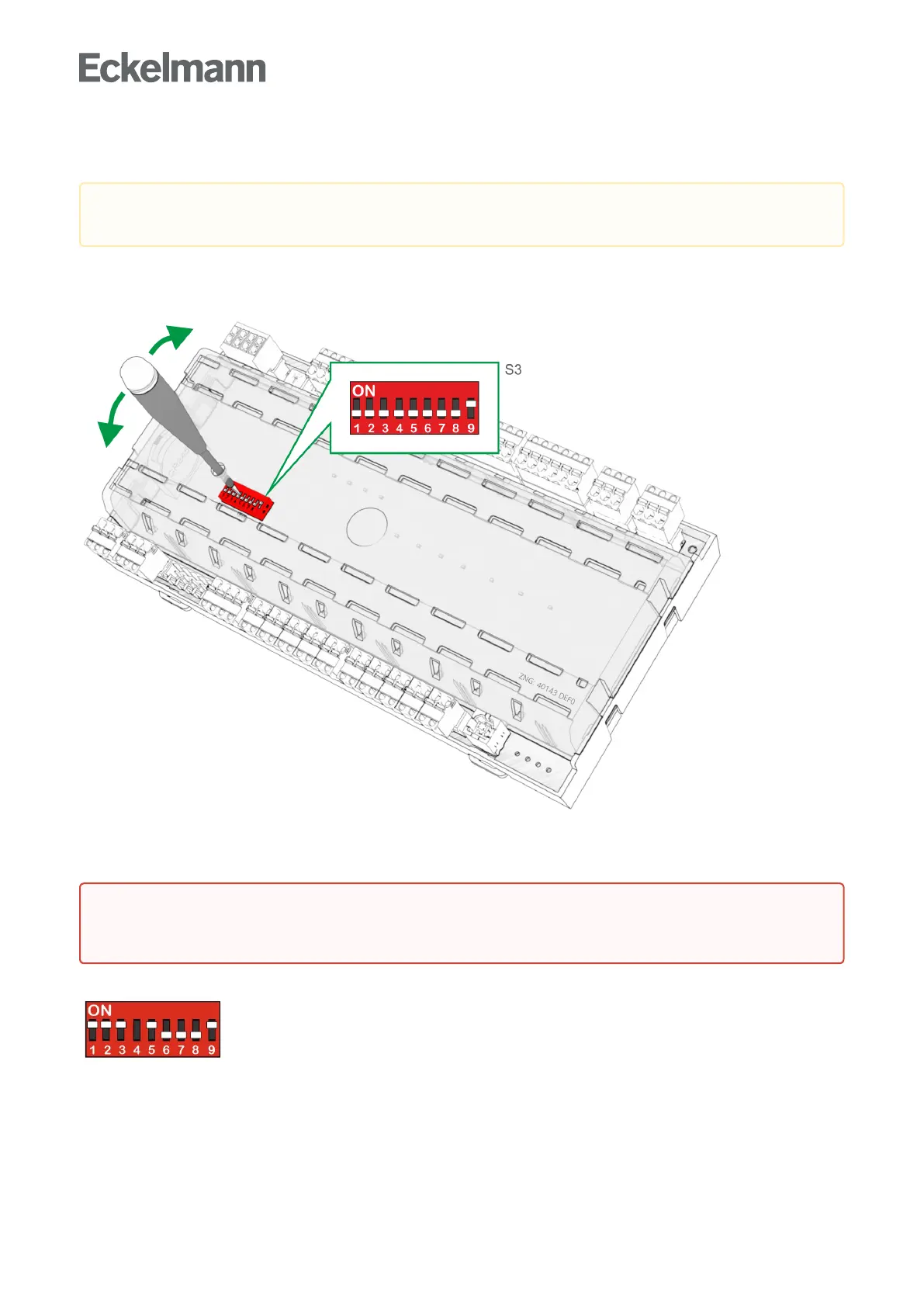
The required controller type can be set via the DIP switch S3 by adjusting the coding switches 1..9 with a thin
screwdriver(D=2mm)throughaholeinthecasecover:
Depending on the now set controller type, the respective functionalities are then displayed or hidden in the
menu of the controller. 8 controller types are available for the definition of the basic controller behaviour, see
chapter Controller types.
DIP switch S3
Example: Setting of the coding switches for the controller type UA 131 LS.
Caution: data loss!Allparametersareresettotheirfactorysettingsifthecontrollertypeischangedor
due to a first start (see chapter First start / reset controller to factory settings)!
Warning about dangerous electrical voltage!
Danger of electric shock!TheDIPswitchS3mayonlybeadjustedwhendisconnected from the
power supply. The changes are not applied until the next time the controller is switched on.



 To Next Page