176
176
Volume Control
Basic Operations
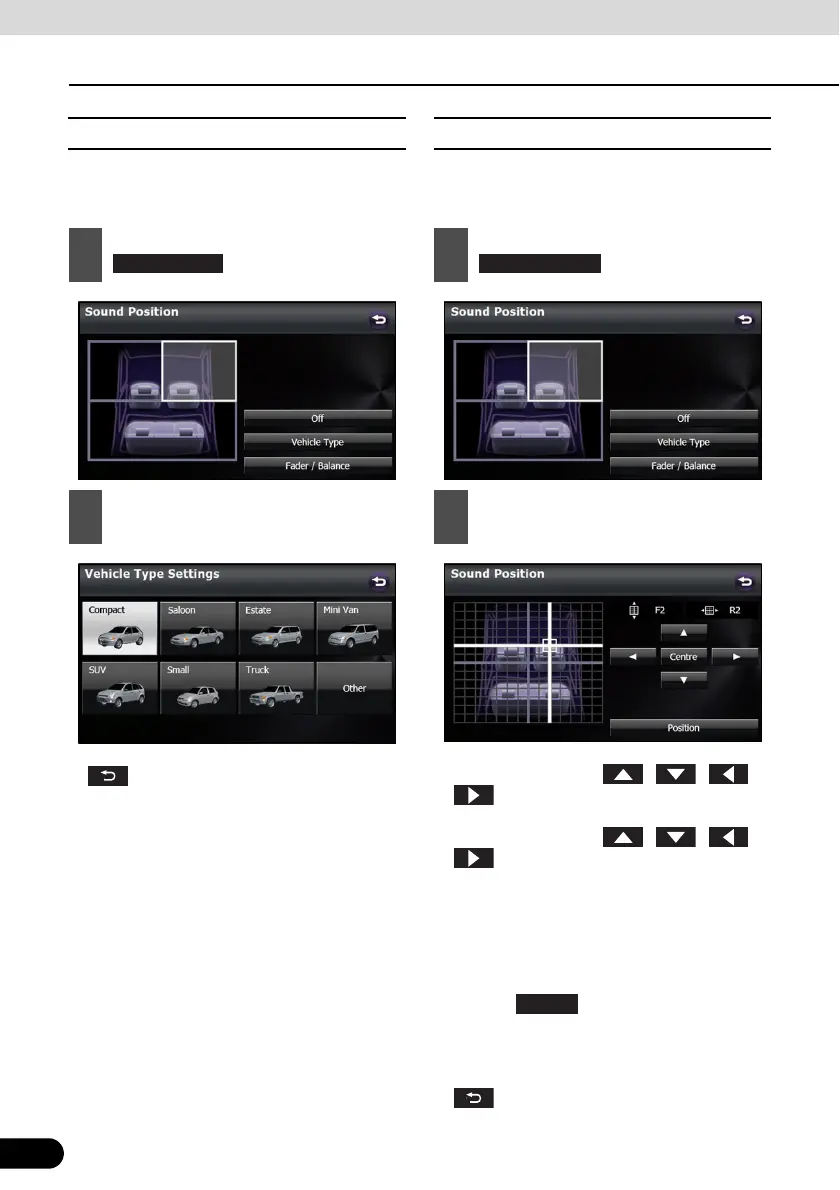
■ Adjusting the Vehicle Type
The optimal acoustical space for the vehicle
can be created by setting the Vehicle Type.
● After completing the adjustment, touch
to save the adjusted settings and
return to the Sound Settings screen.
■ Adjusting the audio balance
You can adjust the sound balance from front
to rear and left to right.
● To fine adjust, touch any of the balance
adjusting switches , , or
to change the value by 1 step. When
you touch and hold one of the balance
adjusting switches , , or
, the value changes continuously but
stops at the centre value. To continue to
change the balance, touch one of the
balance adjusting switches again.
● You can also adjust to the desired balance
by touching the screen.
● Touch to cancel the Fader/
Balance setting and return to the centre
value.
● After completing the adjustment, touch
to save the adjusted settings and
return to the Sound Settings screen.
1
On the Sound Position screen, touch
.
2
Touch the Vehicle Type that you want
to set.
1
On the Sound Position screen, touch
.
2
Touch the balance point that you want
to use.
Fader/Balance



 To Next Page