Operating of the Machine
4-80 © Essemtec AG Paraquda Startup & Safety
0000003/11 / November 4, 2014
• To make sure the label really sticks on the PCB after placing, it's necessary to have an
Additional Z move [mm] when placing of 0.5mm or more! Therefore of course also a good
PCB support is recommended.
• Reduce XY movement speed for huge labels to avoid label folding during movement.
Create a Carrier Type
First of all, the above created package (label) has to be saved.
Teach
Carrier Types
The dialog pops up to save the created package (label).
Yes to save the new created package (label).
In the Save as dialog, type in a name for the package (label) and press Save
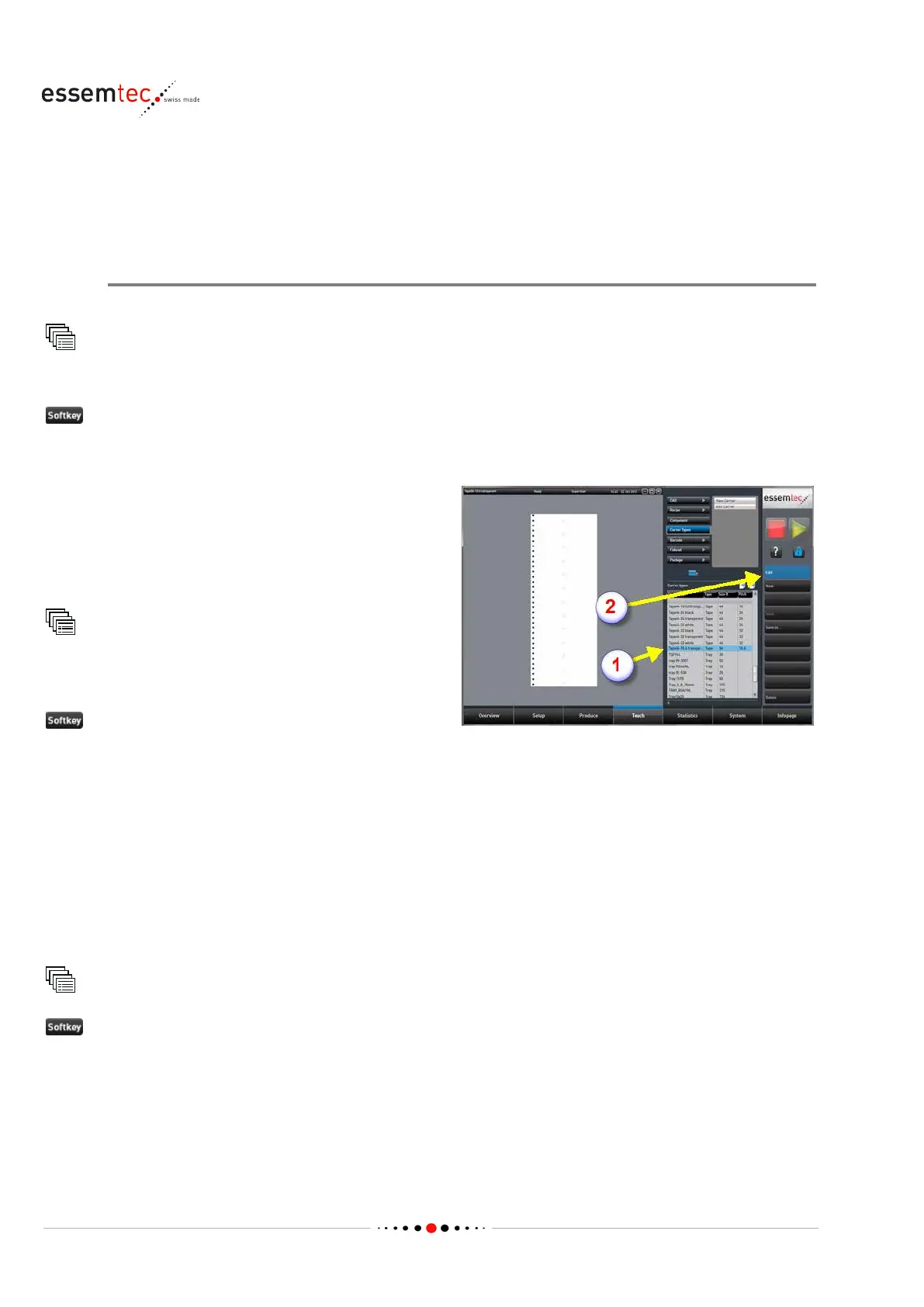
Create a carrier with the correct color, size and
pitch.
As factory setting, a suitable carrier type has
been added to the carrier type library. It is
named '
Tape56-10.6 transparent'.
Carrier Types
Out of the Carrier types table, select 'Tape56
-
(2) to open the screen Teach - Carrier
- Edit Carrier.
Define the following data (see online context
help for details):
• Color, the correct color for the used label
carrier.
• Size X [mm], the width of the used label
carrier
• Y pitch [mm], the pitch (feed motion) of the
physical label tape
Carrier Types
to save the new carrier type under a



 To Next Page