5. Programming
5−110
Festo P.BE−SPC200−WIN−PISA−CD−EN en 0901d
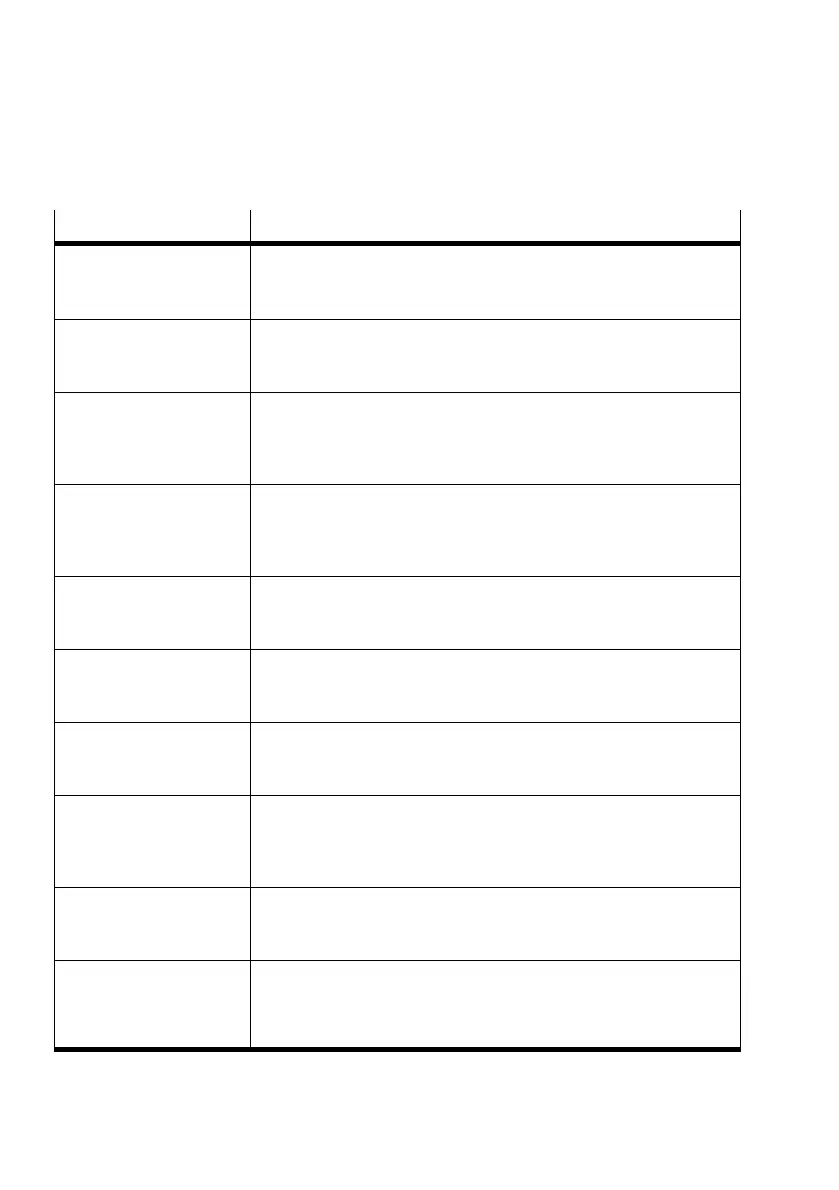
Message Description/Remedy
Non−permitted mode for
analogue reference value
You have specified an invalid mode for the analogue nominal value in
command M13".
Valid modes: X0 .. X4 [ Y , Z, U ]
Non−permitted mode for
reference travel
With command G74 you have entered a non−permitted reference travel
mode after the axis identifier.
Permitted reference travel modes: 0 ... 4
Non−permitted output With one of the commands #S..", R..", #T..", #TN.." (Set single−bit
operand, Reset, Test for 1 or 0−signal) you have specified a non−permit
ted output address.
Permitted addresses see section 5.2.
Non−permitted per cent
specification
You have specified an invalid percentage in command G08", G09" or
M39" (acceleration for approach or brake ramp, reserved for later
expansion).
Valid range: 0 .. 99 (0 = 100 %)
Non−permitted position
register value
You have specified an invalid position register number in a position
command.
Valid position registers: X@0 .. X@99 [ Y@.., Z@.., U@.. ]
Non−permitted quality
class
You have specified an invalid quality class in command G61"
(set quality class).
Valid quality classes: 0 ... 6
Number of records too
large
The permitted maximum number of 1000 records is exceeded in this
program. Optimize your program or break it down into two programs
and call one of them as a subprogram.
Non−permitted register
value
You have specified an invalid register number in one of the commands
L..", #LR..", #T..", #A.." (call up subprogram, load, test, add
register).
Valid registers: R0 ... R99
Non−permitted scaling
value
You have specified an invalid scaling factor in command M10"
(activate analogue reference value input).
Valid range: 0.1 ... 9999.9
Non−permitted speed value You have specified an invalid speed in one of the commands G01",
G02" (approach position with defined speed or approach smoothly).
Valid range: FX0 ... FX99 [ FY, FZ, FU ]
(0 = 100 % of defined maximum speed)









 To Next Page