Section 3: Model 9500B Controls: Modes of Operation 3-5
Final Width = 215mm
Descriptions assume 9500B/1100
WAVE
FORM
CHANNEL
SELECT
1
2
5
1.Ø
x 1Ø
∆ =Ø
OFF
SIGNAL CH1 5ØΩ
TRIGGER CH5 5ØΩ
1Ø
5.ØØ mV/div x4 = 2Ø.ØØØ mV
pk-pk
Deviation = ØØ.ØØ %
O/P Amplitude = 2Ø.ØØØ mV
pk-pk
Frequency = 1.ØØØØ kHz
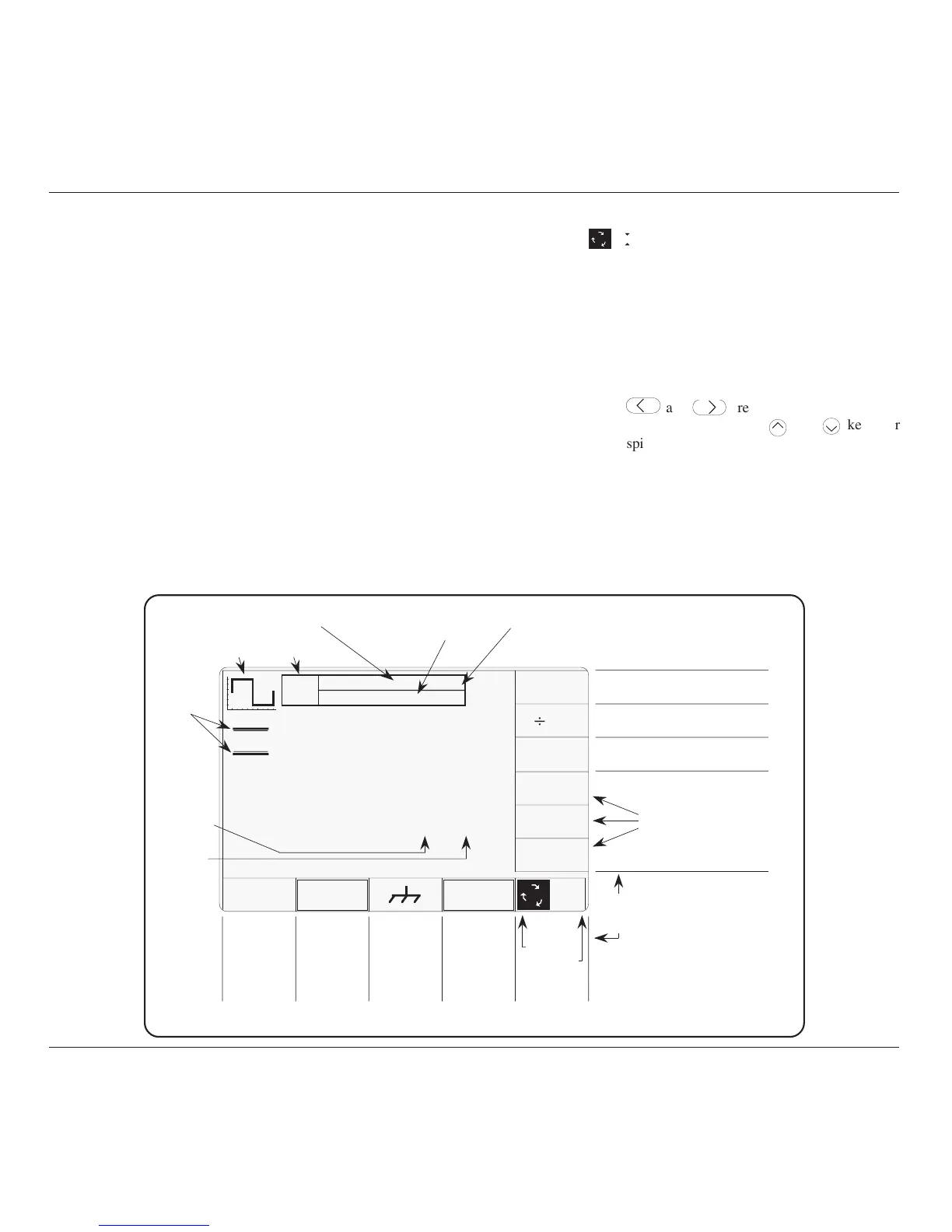
Function
Icon
Output
State
Selected SIGNAL
Channel
Selected TRIGGER
Channel or
'No Trigger' State
Multiplies Selected
Value by 10
Divides Selected
Value by 10
Toggles Deviation between
zero and previously set value
These three soft key
labels not used with
the DC/Square
Default Screen
All bottom soft key labels
may be employed for
alternative or additional
selections
'Barred'
Selection
Cursor
Accesses
Waveform
Menu
(Toggle)
Applies
Ground
Condition
(O/P On)
Accesses
Channel
Selection
Menu
Toggles
to Select
'Scope' or
'Direct Entry'
Mode
Numeric
Output
Values
Screen
Key
Effects
Output
Value
Units
TODAY'S DATE TIME
Expected Load
Impedances
Uses of all the right side
soft key labels are
dependent on the field
selected on the main part
of the screen
Soft key label
not used with
DC/Square
Default
Screen
Fig. 3.2.1 Manual Mode — Startup Default Settings
b. Numeric-Entry Edit.
Key Pad: Typing any character on the numeric keypad
will set up a 'box' beneath a smaller version of
the selected numeric value, and place the typed
character in the box. The right side key labels
change to give a choice of units.
Units: After the new value has been typed on the
keypad, the required units can be chosen from
the right side soft keys. Pressing one of these
keys will cause the display to revert to the 'Digit
Edit' format, with the same numeric value
remaining selected by the two triangles.
'Enter': The keypad 'Enter' (ø) key can be used instead
of one of the units keys to revert to 'Digit Edit'
format. In this case the 9500B firmware will
always impose the basic units (not multiples or
sub-multiples).
Further Use: Either Digit Edit or Numeric-Entry Edit can be
used for all selectable variables on the screen.
3. Scope Mode
1
2
5
1.Ø
This mode differs from Direct Mode only in that adjustment of
many screen variables is constrained to a series of 'Stepped Values',
which run in a sequence of 1 : 2 : 5 factor steps (The 'Pref' facility,
described overleaf, can be used to change the factor sequence to
match certain oscilloscopes with 1 : 2 : 2.5 : 4 : 5 steps). Selecting
one of these variables places a 'barred' cursor above and below the
whole numeric value (shown in Fig 3.2.1), and only one method of
value adjustment is available:
Cursor keys:



 To Next Page