Home
Foss
Measuring Instruments
Infratec 1241
Service Manual
Page 176 (Replacement of Cell Cover Outer)
Foss Infratec 1241 - Replacement of Cell Cover Outer
212 pages
Manual
Save Page as PDF
To Next Page
To Next Page
To Previous Page
To Previous Page
Loading...
Infratec™ 1241 Grain Analyzer
5:48
Service Manual 1001 5015 / Rev. 4
5.3.13
Replacement of Cell Cover Outer
1.
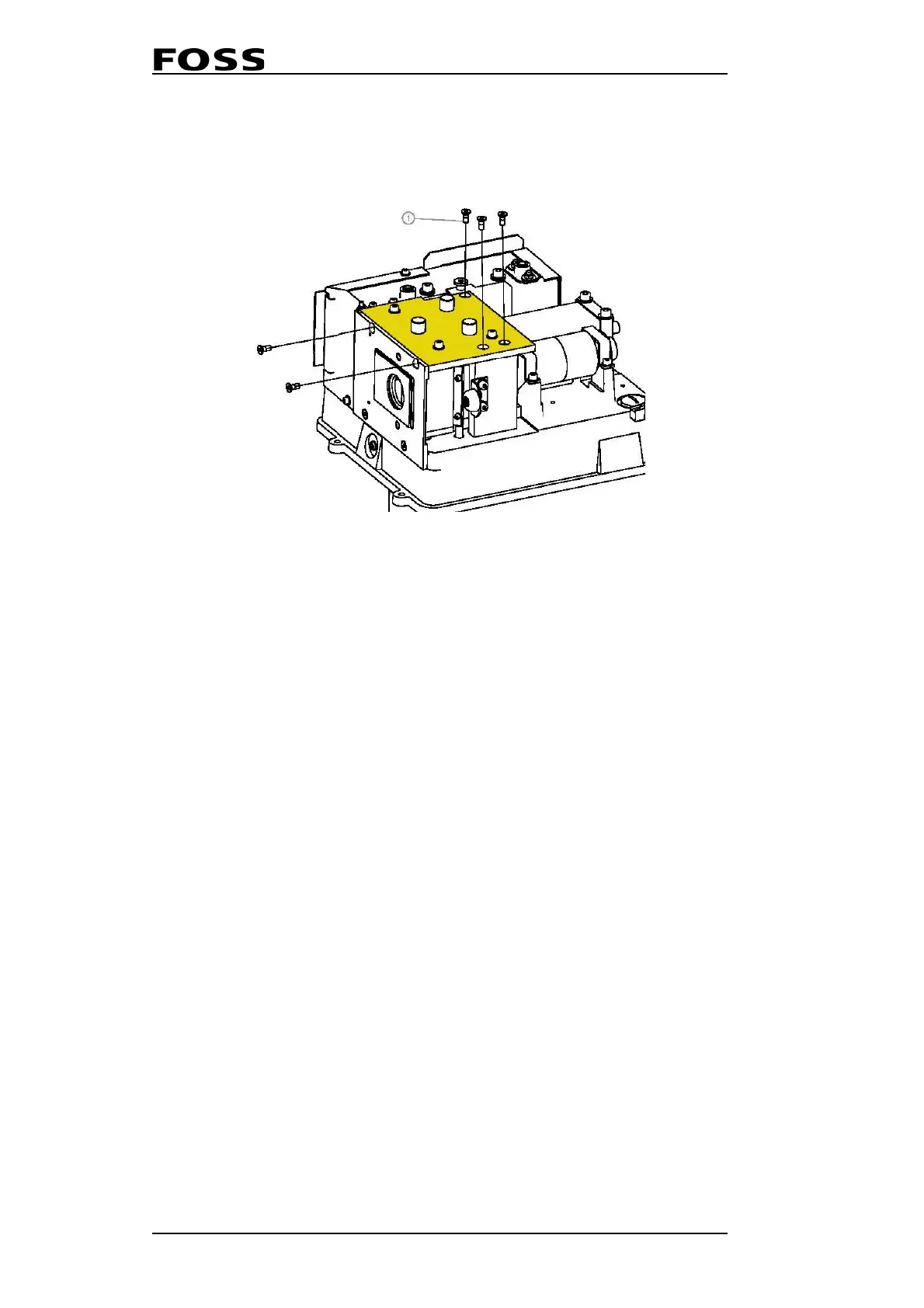
Remove the five screws a
ccording to the figure below.
Fig. 5:48 Remove five screws
2.
Mount the new Cell Side with the three screws.
175
177
Table of Contents
Main Page
Default Chapter
3
Table of Contents
3
Service Manual 1001 5015 /
8
1 Important Instructions
9
General
9
Service Documents
9
Self-Service Support
9
Contacting Customer Support
9
ESD Information
9
Precautions
10
2 Technical Description
11
History
11
Component Descriptions
13
PC-Module
14
Processor Board
15
DSP Board
16
Compactflash Disk
18
Monochromator
18
Lamp Module
20
Detector
21
Power Supply
22
LCD Display
24
Display Interconnection Board
25
TWM (Optional)
26
STM (Optional)
28
Remote I/O (Optional)
29
Software Description
32
3 Installation
35
General
35
Installation of Test Weight Module on
35
Infratec 1241 Generation 2
35
Preparation of the Infratec for Assembly
35
Preparation of the Test Weight Module for Assembly 3:4
38
Final Assembly of Infratec and Test Weight Module into a Complete Assembly
40
Installation of Test Weight Module on
44
Infratec 1241 Generation 3
44
Installation of Sample Transport Module
55
Mosaic Connection
56
4 Diagnostics and Troubleshooting
69
General
69
Poor Results
70
User Problems
70
Poor Calibrations
70
Outliers
70
Poor Reference Data
71
Instrument Problems
72
I 2 C Trouble Shooting
72
Service Menu
78
Quality Control
80
Self-Test
80
Clean Measuring Unit
87
Audit Log
87
Software Error Log
87
Hardware Error Log
88
Export Logs and Configuration
88
Wavelength Stability
88
Lamp Check
88
Automatic Tests
89
Detector
89
Monochromator
90
I/0 (Input/Output)
91
Manual Tests
93
Detector
93
Monochromator
93
Measuring Unit
94
Display
94
Scan
94
Test Weight
95
Sample Transport Module
95
Manual Analysis
96
Settings
96
Fill Sample Cell
96
Scan
96
Offset
96
Empty Sample Cell
96
Flush Sample Cell
96
Instrument Info
97
Hardware
97
Software
97
Bios
97
Monochromator Constants
97
Operating Temperature
97
Volume Information
97
Voltage Information
97
Clone Instrument
97
Default Settings
98
Scan Mode (Standard)
98
Read Disk
98
Error Codes in Software Log (SL) and Hardware
99
Error 4, Grating Motor Error
101
Error 22, MU/TWM Data Range Error
101
Error 32, Speckle Signal Blocked
101
Error 128, Path Length Error
102
Error 512, Speckle Function Error
102
Error 16384, Strain Gauge Failure (Load Cell)
102
Error 32768, Hardware Error
102
Error 33292, Reference Scan too Low
103
Error 33293, too few Valid Sub Samples Collected
103
Error 33294, Monochromator Shutter Not Able to Move
103
Error Word
104
Commands
105
Status Word 1
109
Status Word 2
110
Error Word 1
111
Error Word 2
112
Error Word 3
113
Error Word 4 Bit Encoding (0X0108)
113
DSP Version
113
Export Logs and Configuration
114
5 Service and Maintenance
129
Special Tools
129
Service Procedures
129
Replacement of Display Kit
129
Replacement of Keyboard Overlay
135
Replacement of Detector Unit Complete
136
Replacement of Monochromator Complete
137
Replacement of Halogen Lamp for Monochromator
139
Use of the Aperture Kit (P/N 60023539)
141
Replacement of Power Supply Board
144
Replacement of Interface Complete
146
Replacement of PC Module Complete W/O Flash Disc
151
Replacement of DSP Board
157
Replacement of Compact Flash Disc
163
Measuring Unit
164
Replacement of Upper Solenoid
166
Replacement of Lower Solenoid
167
Replacement of Lower Linkage Shutter Assembly
168
Replacement of Upper Linkage Shutter Assembly
169
Replacement of Connection PCB Complete
170
Replacement of Measuring Unit PCB
171
Replacement of Variable Motor
172
Replacement of Conveyor Motor
173
Replacement of Cell Wall Front with Speckle Emitter PCB
174
Replacement of Cell Block Complete and Path Length Encoder
175
Replacement of Cell Cover Outer
176
Checking Movement of the Variable Cell
177
Drawer Sensor Cable, Rerouting
178
Test Weight Module
180
Replacement of Wiper Arm Complete
181
Replacement of TWM PCB
184
Replacement of Wiper/Shutter Motor
186
Replacement of Locking Guide
189
Checking/Adjusting TWM Level Sensors
191
Sample Transport Module
193
Replacement of STM Cuvette Cam Thread
194
Checking STM Cuvette Cam Thread
197
Corrective Maintenance Procedures
198
Preventive Maintenance Procedures
200
TWM Balance Calibration
202
TWM Balance Control
205
Technical Specifications
207
Other manuals for Foss Infratec 1241
Quick Guide
2 pages
Related product manuals
Foss NIRS DA1650
72 pages


 To Next Page