100
Airplane
Function
Method
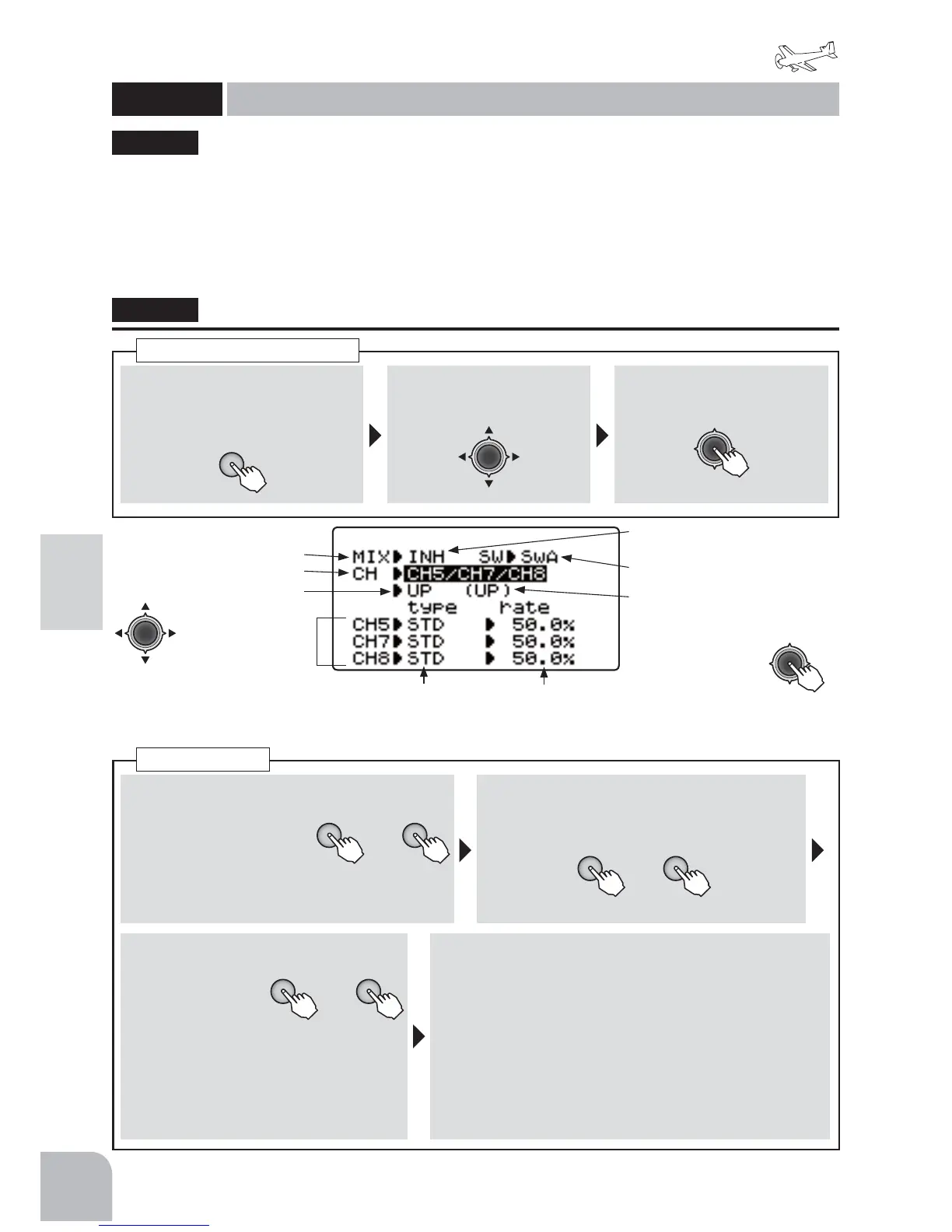
①Callthemenuscreenfromthe
homescreenbypressingthe +
keyfor1second.
+
② Select
fromthemenuwiththe
Jogkey.
③Openthesettingscreenby
pressingtheJogkey.
(1second)
Callingthesettingscreen
■ Activatingthefunction
+ −
or
①Selectthe"MIX"item
andthenselectthe
"ON"bypressingthe+
keyor‒key.
● Whenyoudonotuseafunction,settothe
"INH"side.
■ Sensitivityswitchselection
②Selectthe"SW"itemandthenselectthe
switchbypressingthe+keyor‒key.
Range:SwA 〜 SwH、Default:SwA
■ Sensitivitysettingchannelselection
+ −
or
③ Selectthe
"CH"itemand
thenselect
thesensitivity
settingchannelbypressingthe+key
or‒key.
Range:CH5、CH5/CH7、
CH5/CH8、CH5/CH7/CH8
Default:CH5
■ Gyrotypeandsensitivitysetting
④PresstheJogkeyandselectthesensitivitysetting
screenyouwanttosetandthenset“type”(gyrotype)
and“rate”(gyrosensitivity)ofeachchannelbypressing
the+keyor‒key.
("type")Range:STD,GY Default:STD
("rate")Range:0 〜 100%(STD),NOR100 〜 0 〜
AVC100%(GY) Default:50%(STD),0%(GY)
● Whenyouwanttoreturnthesetvaluetotheinitialvalue,
pressthe+keyand‒keysimultaneously.
GYROSENS
+ −
or
This function is dedicated mixing for switching
the gyro sensitivity and gyro mode (AVCS/
NORMAL) of Futaba airplane use gyros. Up to 3
axes can be set.
ŏ7KHVHQVLWLYLW\VZLWFKFDQEHVHOHFWHGDQGWKH
VHQVLWLYLW\RIHDFKGLUHFWLRQRIWKHVZLWFKFDQEH
VHW6ZLWFKHV$WR+,IWKHDLUSODQHVWDOOVGXULQJ
IOLJKWWKHJ\URZLOOORVHFRQWURORIWKHSODQH·V
DWWLWXGH)URPWKHVWDQGSRLQWRIVDIHW\ZH
UHFRPPHQGWKDWWKH2))SRVLWLRQDOVREHVHW
XVLQJDSRVLWLRQVZLWFK
ŏ&+&+&+&+&+RU&+&+&+
FRPELQDWLRQVFDQEHVHOHFWHGDVWKHVHQVLWLYLW\
VHWWLQJFKDQQHO
"GYROSENS"
GYROSENS
Gyrosensor
(ACROBATIC)
Activatingthefunction
GainChannelselection
Switchdirection
Gyrotype,
Gainrate
● Whennotusingthisfunction,
selectINH.
Sensitivityswitchselection
(Currentswitchoperating
direction)
● Switchestothe
sensitivitysetting
screenofeachswitch
directionwhenthe
Jogkeyispressed.
● Selectthesettingitem
withtheJogkey.
(Gyrotype) (GyroGain)
● WhenusingaFutabaGYAgyro,selectgyrotypeGY.Thisswitchesthegyrosensitivitysetting
itemtomodeandsensitivitydirectreadingdisplay.
*<526(16


 To Next Page