133
Helicopter
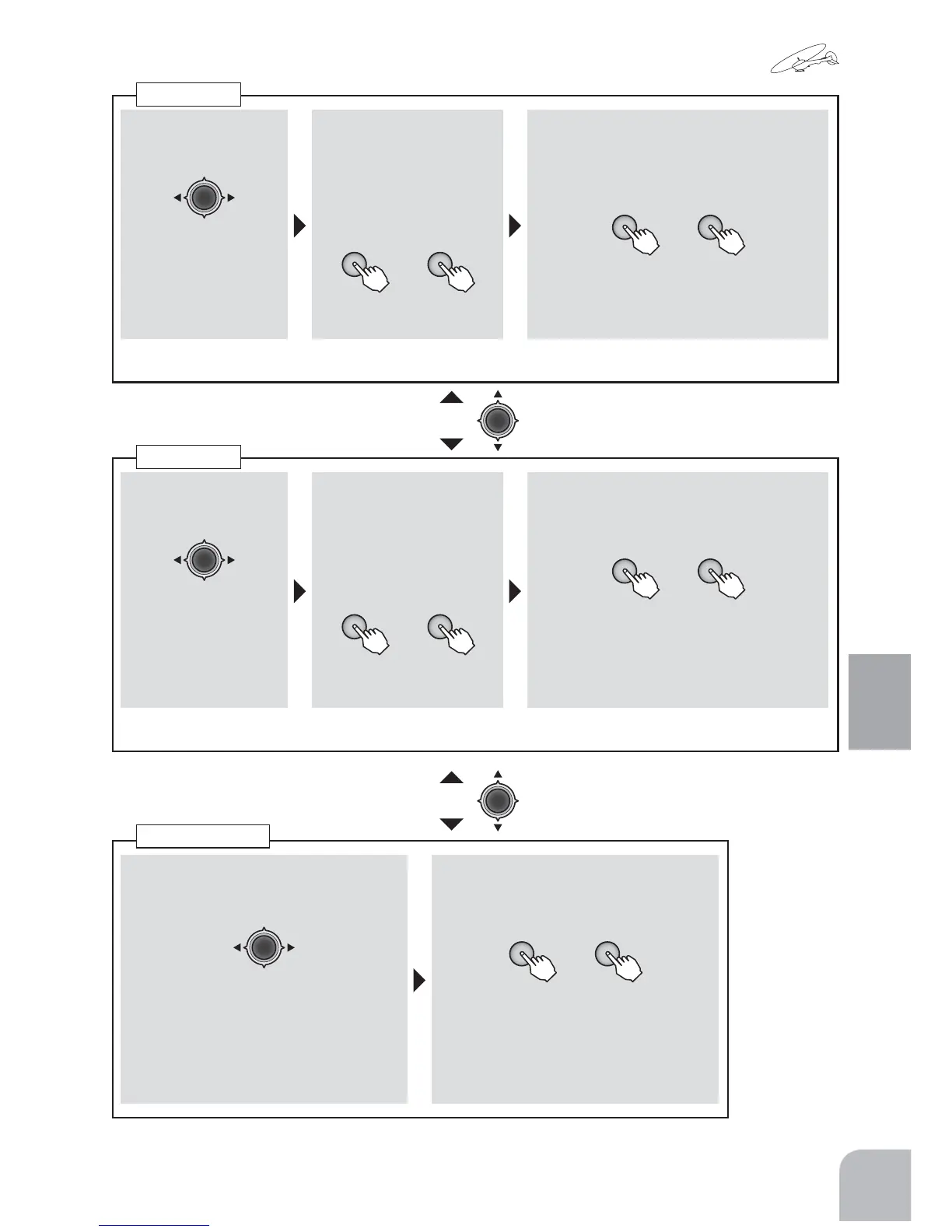
■ Channelselection
① Selectthe"SW"itemandthenselect
thechannelwiththeJogkey.
Range:1,2,4
■ Switchselection
②AswitchorCondischosenby+keyor
‒key.
+ −
or
Range:SwA 〜 SwH,Cond
●When"Cond"ischosen,asetupis
possibleforeverycondition.
■ Channelselection
①Achannelischosen
byJogkey.
Range:1,2,4
■ Switchdirection
② Selectthe"No"itemand
thenselecttheswitch
directionorconditionby
pressingthe+keyor‒
key.
+ −
or
■ D/RSetupofrate
③
Selecteachfunctionitemof"D/R"and
settheratebypressingthe+keyor‒
key.
+ −
or
Range:0 〜 140%Default:100%
● Whenyouwanttoreturnthesetvalue
totheinitialvalue,pressthe+keyand‒
keysimultaneously.
Adjusttherateofeachdirectionofthedualrateswitchandstickbyrepeatingstep
■ Channelselection
① Achannelischosen
byJogkey.
Range:1,2,4
■ Switchdirection
② Selectthe"No"itemand
thenselecttheswitch
directionorconditionby
pressingthe+keyor‒
key.
+ −
or
■ EXPSetupofrate
③ Selectthe"EXP"itemandthenadjust
theratebypressingthe+keyor‒key.
+ −
or
Range:-100 〜 +100%、Default:0%
● Whenyouwanttoreturnthesetvalue
totheinitialvalue,pressthe+keyand‒
keysimultaneously.
Adjusttherateofeachdirectionofthedualrateswitchandstickbyrepeatingstep
Dualrate
EXPO
● Movingtoanothersettingitemofthesame
channelispossiblebyJogkey.
● Movingtoanothersettingitemofthesame
channelispossiblebyJogkey.
SwitchChange


 To Next Page