94
Commonfunction
Method
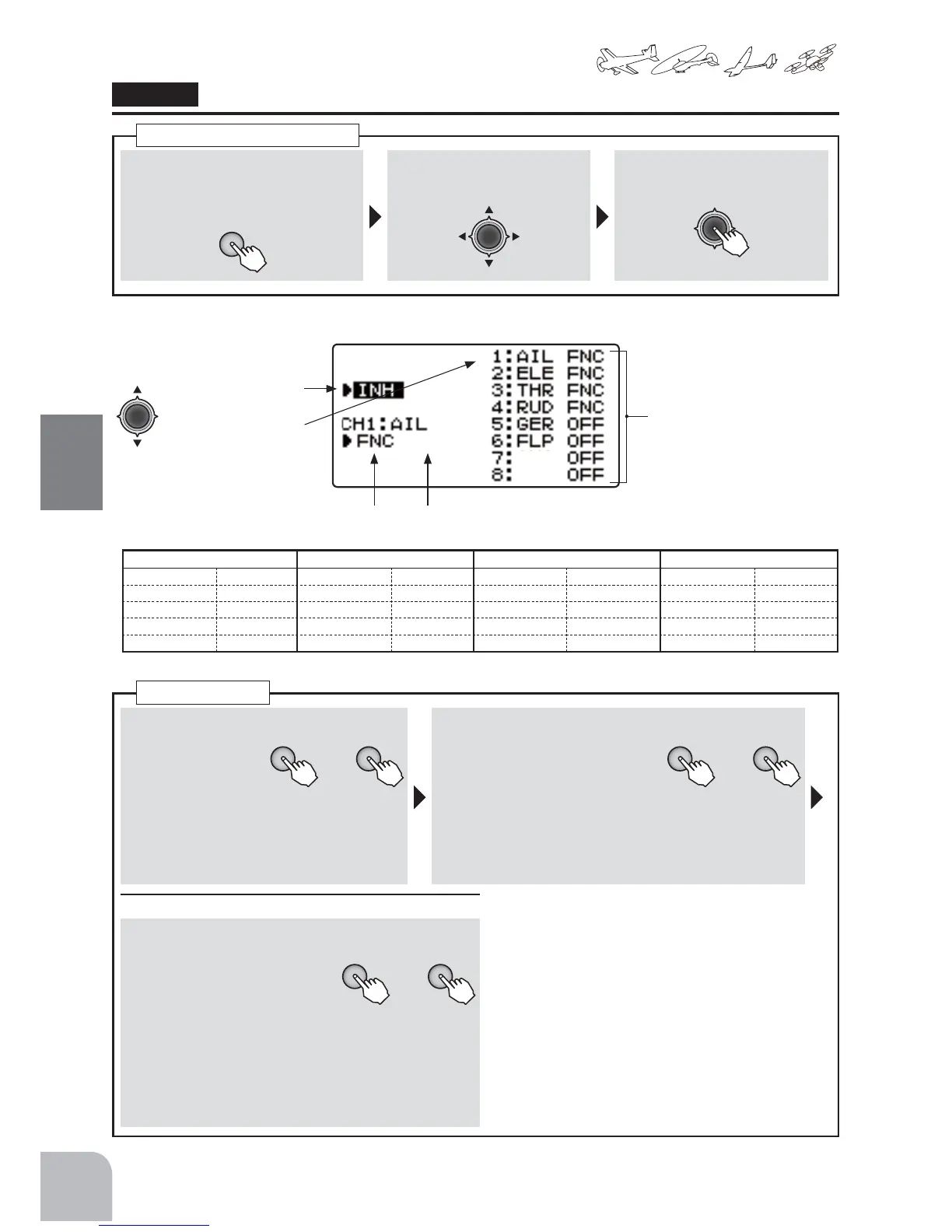
①Callthemenuscreenfromthe
homescreenbypressingthe+key
for1second.
+
② Select
fromthemenuwiththeJog
key.
③Openthesettingscreenby
pressingtheJogkey.
(1second)
Callingthesettingscreen
"TRAINER"
(Trainerfunction)
● Selecttheitemwiththe
Jogkey.
Functionactivation
ChannelSelect
● Channelsettingmodedisplay
SelectCHmodeDisplay Ratebystudent(atMIXmode)
■ Functionactivation
+ −
or
① Selectthe"OFF"by
pressingthe+key
or‒key.
● Whenyoudonotwanttousethe
functionselectINH.
■ Modesetting
+ −
or
② Themodeofthechannelofhope
ischosenbypressingthe+key
or‒key.
Selectionrange:OFF,
NOR,FNC,MIX、
Default:OFF
(WhenMIXmodeSelect)
■ Studentratesetting
+ −
or
③ Jogkeyispressedinaside
andachannelischosen,rate
settingbypressingthe+key
or‒key.
Range:0 〜 100%
Default:30%
Trainerfunction
75$,1(5
*CH9andCH10cannotuseatrainerfunction.
< ChannelDisplay >
ACROBATIC HELICOPTER GLIDER(AF2) MULTICOPTER
1:AIL(Aileron) 6:FLP(Flap) 1:AIL(Aileron) 6:PIT(PITCH) 1:AIL(Aileron) 6:FL2(Flap2) 1:AIL(Aileron) 6:AUX
2:ELE(Elevator) 7:AUX 2:ELE(Elevator) 7:AUX 2:ELE(Elevator) 7:AI2(Aileron2) 2:ELE(Elevator) 7:AUX
3:THR(Throttle)8:AUX 3:THR(Throttle) 8:AUX 3:MOT(Motor) 8:AUX 3:THR(Throttle)8:AUX
4:RUD(Rudder) 4:RUD(Rudder) 4:RUD(Rudder) 4:RUD(Rudder)
5:GER(Gear) 5:GYR(GYRO) 5:FLP(Flap) 5:MOD(Mode)
$8;
$8;


 To Next Page