103
Airplane
Function
Method
①Callthemenuscreenfromthe
homescreenbypressingthe +
keyfor1second.
+
② Select
fromthemenuwiththe
Jogkey.
③Openthesettingscreenby
pressingtheJogkey.
(1second)
Callingthesettingscreen
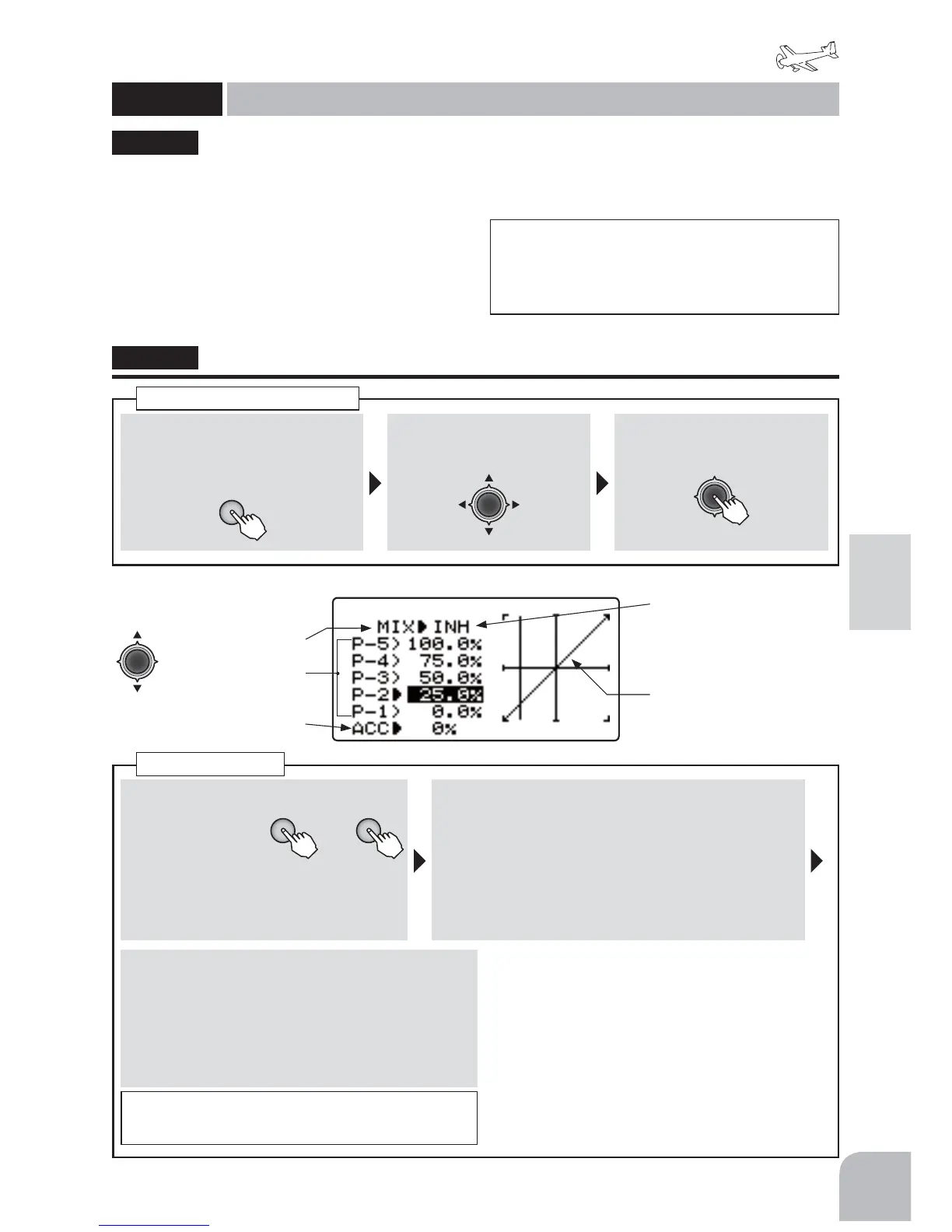
●Anaccelerationfunctionhelpstheenginecompensate
forsudden,largeamountsofthrottleinputbymaking
themixturesuddenlyricher,theneasingitbackto
theproperadjustmentforthatthrottlesetting.This
functionrequiressomeadjustmenttobestfityour
engineandyourflyingstyle.Adjustengineʼ sresponse
untilnohesitationoccursonrapidthrottleinput.
● Superfluousoperationofaneedleservobecomes
largeasitapproachesto100%.Moreover,timeto
usuallyreturntoapositionbecomeslate.
This function is used when the engine is
equipped with a mixture control system (needle
control and other mixture adjustments to the
engine).
The throttle control servo connects to receiver
CH8.
ŏ7KHPL[WXUHFDQEHVHWE\SRLQWFXUYHLQUHODWLRQ
WRWKHWKURWWOHVWLFN
ŏ$QDFFHOHUDWLRQIXQFWLRQZKLFKDFFHOHUDWHVWKH
HQJLQHWRWKHRSWLPDOPL[WXUHZKHQWKHWKURWWOHLV
RSHQHGFDQEHVHW
"THR → NEEDL"
THR → NEEDL
Throttle → Needlemixing
(ACROBATIC)
■ Activatingthefunction
+ −
or
①Selectthe"MIX"
itemandthen
selectthe"ON"
bypressingthe
+keyor‒key.
● Whenyoudonotuseafunction,set
tothe"INH"side.
■ 5pointcurvesetting
② Selectthesettingitem(P-1 〜 P-5)andthensetthe
travelofeachpointbypressingthe+keyor‒key.
Range:0 〜 100%
Default:P-1:0%,P-2:25%,P-3:50%,
P-4:75%,P-5:100%
■ Accelerationrate
③Selectthe"ACC"itemandadjusttheacceleration
amountbypressingthe+keyor‒key.
Range:0 〜 100%,Default:0%
● Whenyouwanttoreturnthesetvalueto
theinitialvalue,pressthe+keyand‒key
simultaneously.
Throttlecurve
● Selectthesettingitem
withtheJogkey.
Activatingthefunction
5Pointcurveset
(Cursormoveswitha
THRstick)
Accelerationrate
● Whennotusingthisfunction,
selectINH.
● Theset-upcurveisshown
NOTE:ThiscannotbeusedifAilevatorfunction
isactiveastheycannotbeusedsimultaneously.
“AILVATORmix“ON”“isdisplayedonthescreen.Setthe
THR → NEEDLfunctiontoACTaftersettingtheactive
functiontoINH.
7+5 ڀ 1(('/
NOTE:Whenusingtheaccelerationfunction,sincethe
needlestrokeislarge,adjustyoursettingssothere
isnobindingofyourlinkage.


 To Next Page