87
Commonfunction
7KLVIXQFWLRQVHWVDOOWKHVORWVWR,1+6HQVRUVFDQQRWEHXVHGHYHQLIFRQQHFWHGWRWKHUHFHLYHU$OOWKH
alarm settings of each sensor are also cleared.
*Theslotnumbermemorizedateachsensorisnotinitialized.
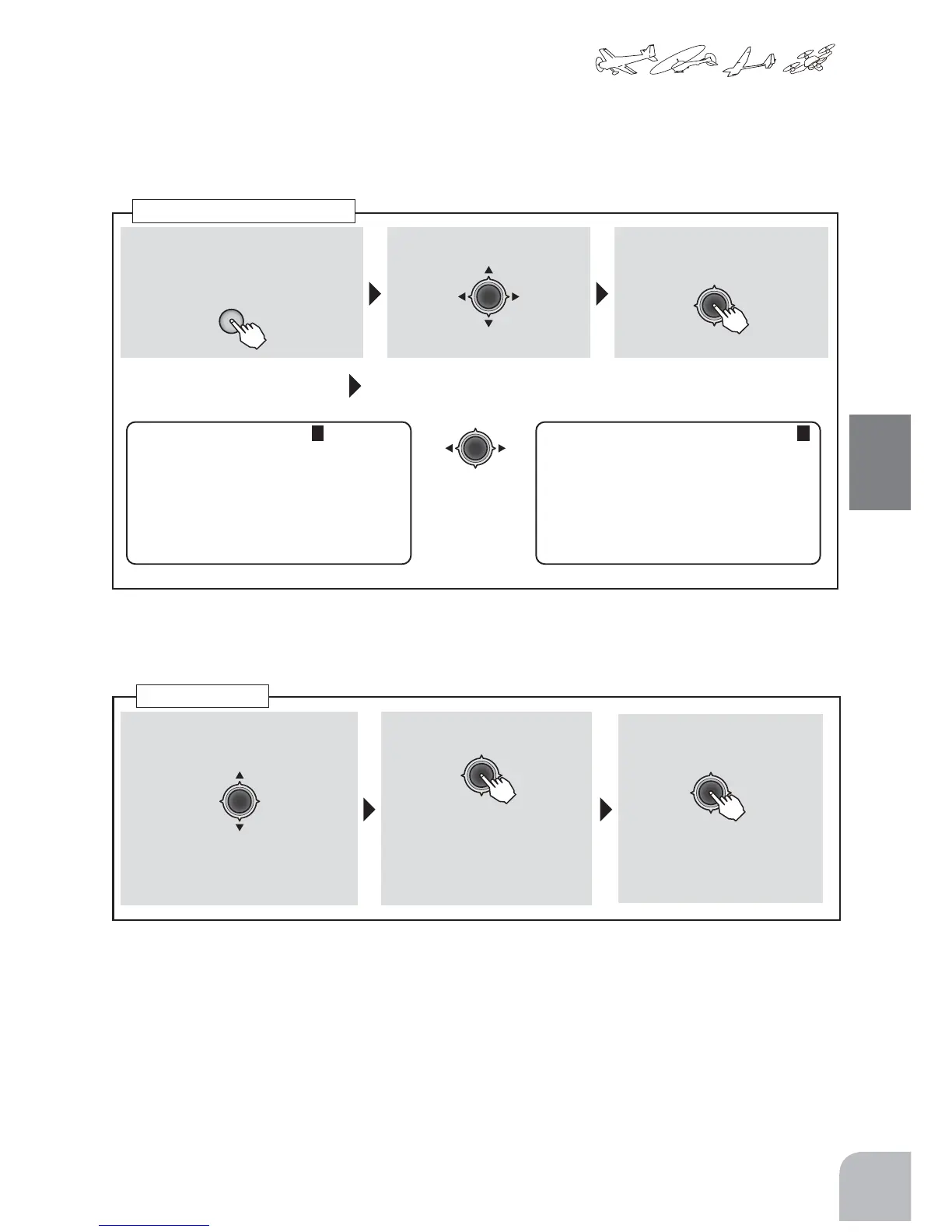
● ALLCLEAR
6(16256/27
㌣6%67
㌣6%6$
6%6$
6%6$
㌣6%69
㌣6%6502
①Callthemenuscreenfromthe
homescreenbypressingthe+key
for1second.
+
② Select ③Openthesettingscreenby
pressingtheJogkey.
(1second)
6(16256/27
,1+%,7
㌣5(*,67(5
㌣6(166/27
㌣,1,7,$/,=(
㌣$//&/($5
fromthemenuwiththe
Jogkey.
④
Jogkeypressessideandmakes
it6pages
Left1-time
press
or
Right10-
timepress
"SENSOR"
Callingthesettingscreen
① "ALLCLEAR"inSENSORSLOTpage
6ischosenbyJogkey.
② PresstheJogkeyfor1second.
③ PresstheJogkey.
● Theclearingisdone
when"COMPLETE"is
shown.
Allclear
● Confirmationmessage
"sure?"blinks.


 To Next Page