- 82 - eBike II, eBike II L, eBike II EL 2018112-069 Rev. F
MountIng tHe HandleBar
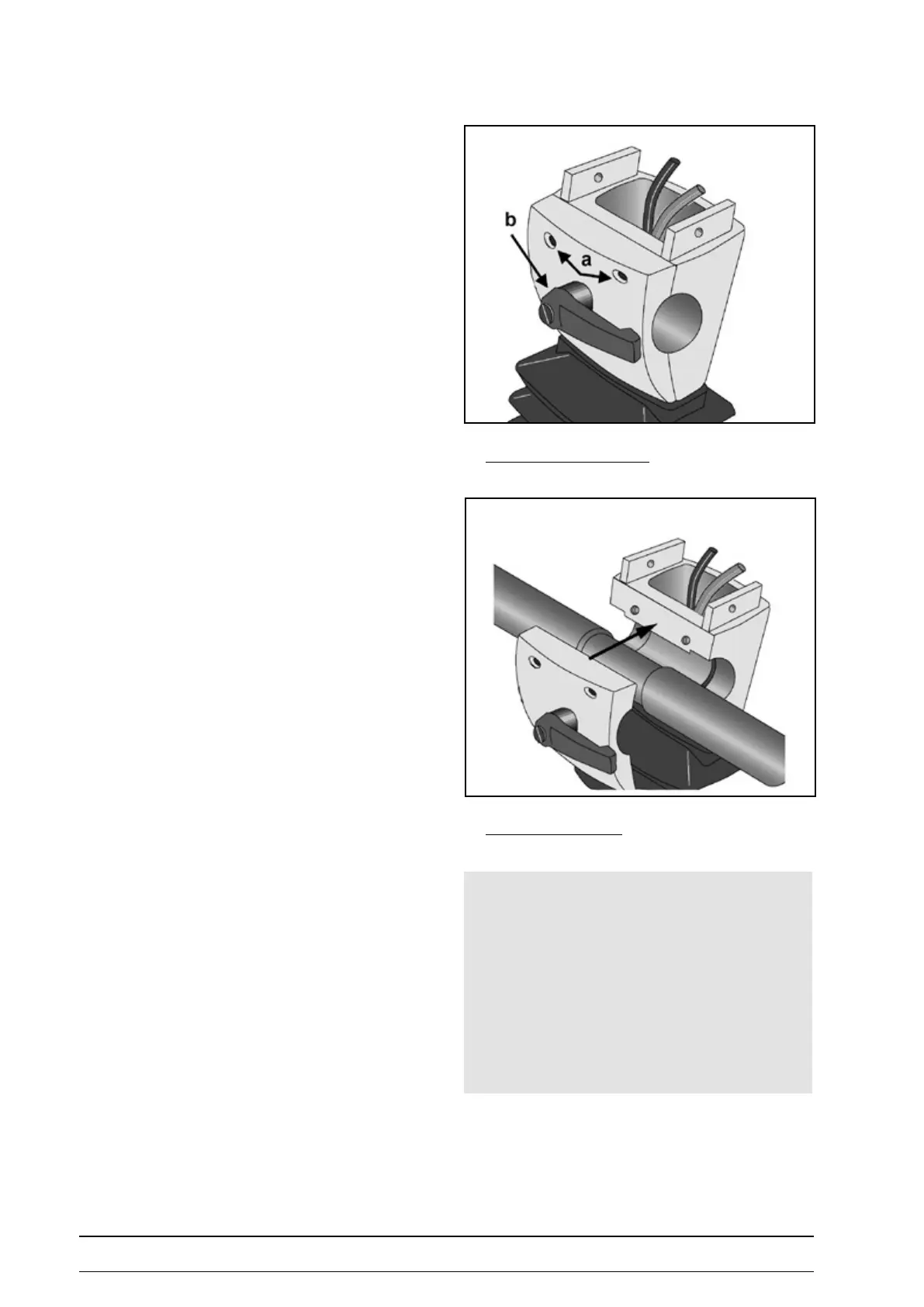
• Remove the two screws (a) from the clamping plate.
• Holding the clamping plate, turn the clamping lever
(b) counterclockwise and remove.
• Take o the clamping plate.
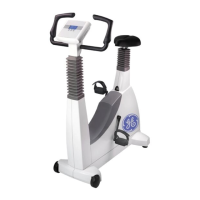
• Install the handlebar (handles downward) and secure
with the clamping plate.
• Turn the screws (a) in and tighten moderately.
• Screw in clamping lever (b) by turning it clockwise and
tighten moderately.
taKing off the claMping plate
Mounting the handlebar
Note
• When mounting the handlebar, it should rst point down
until the control terminal has been installed.
• Then bring the handlebar to the correct position and
secure by tightening the clamping lever and the screws.
• At the eBike comfort you can additionally adjust the
height of the handlebar to any level by means of a clam-
ping lever.



 To Next Page