GE
- 74 - eBike II, eBike II L, eBike II EL 2018112-069 Rev. F
software update
To load a new version of the internal software into the
eBike II ergometers, a PC or Laptop with USB or a serial
port (RS-232) is needed.
To use the ergoemter USB port, a special driver has to be
installed on the PC( virtual COM driver).
Copy the complete software package onto the PC and
unzip it.
Connect the PC or Laptop with a serial cable or USB cable
with the egometer (Port 1 oder USB).
The software update is started in the service menu.
To activate the service menu the ergometer has to be
switched o and on again.
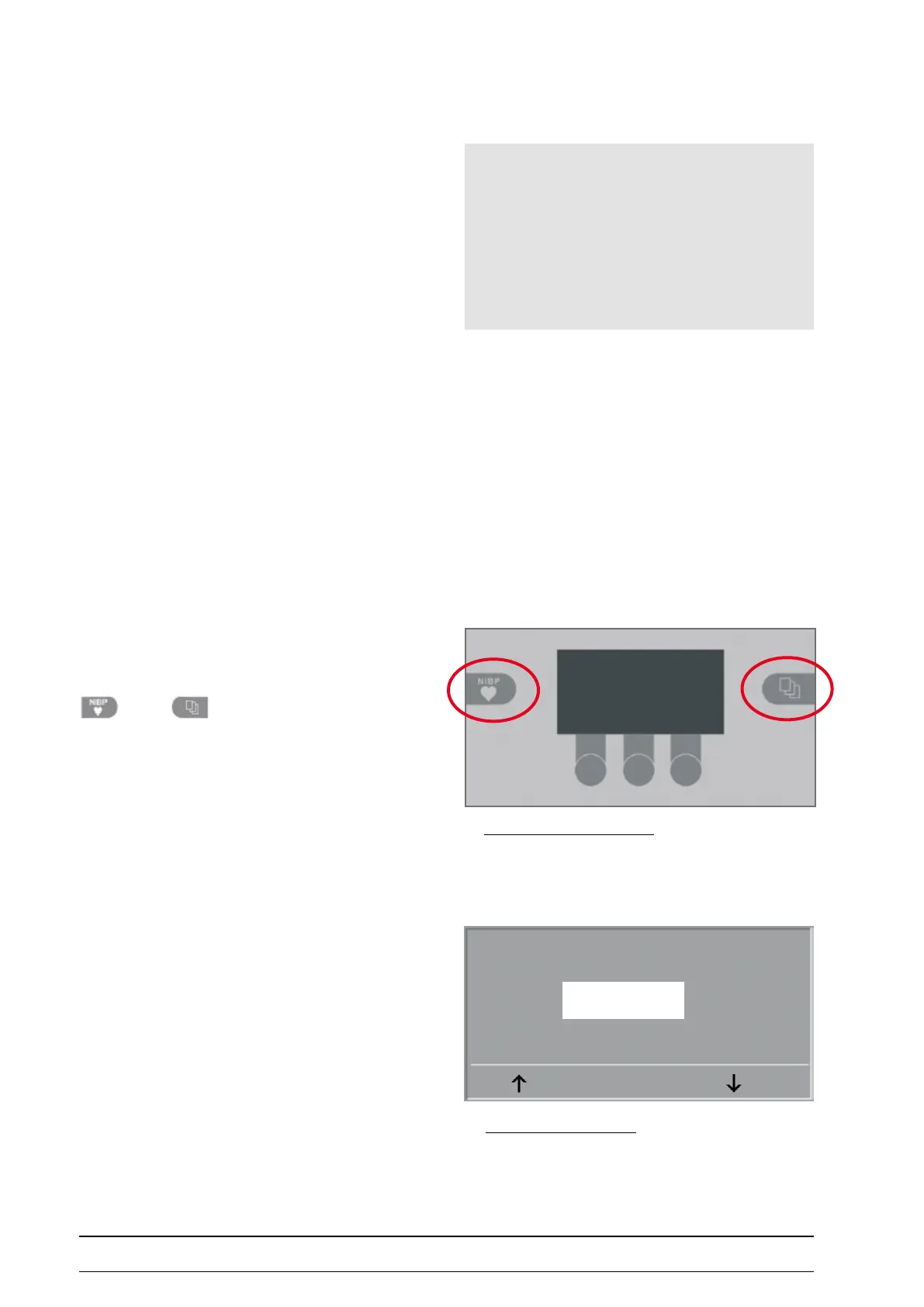
As soon as the self test appears on the ergometer display,
press the two softkeys
synchronously and hold.
To prevent settings from being changed by chance, the
service menu is „protected“ by a password.
Select „999“ with the arrow keys and conrm with SET.
Selftest running
Service Menu control terMinal
Hint
• Always use the latest software version for the appropriate
ergometer.
• Use only the PC update program included in the software
package.
Service Code
999
SET
paSSword for Service Menu



 To Next Page