page | 103
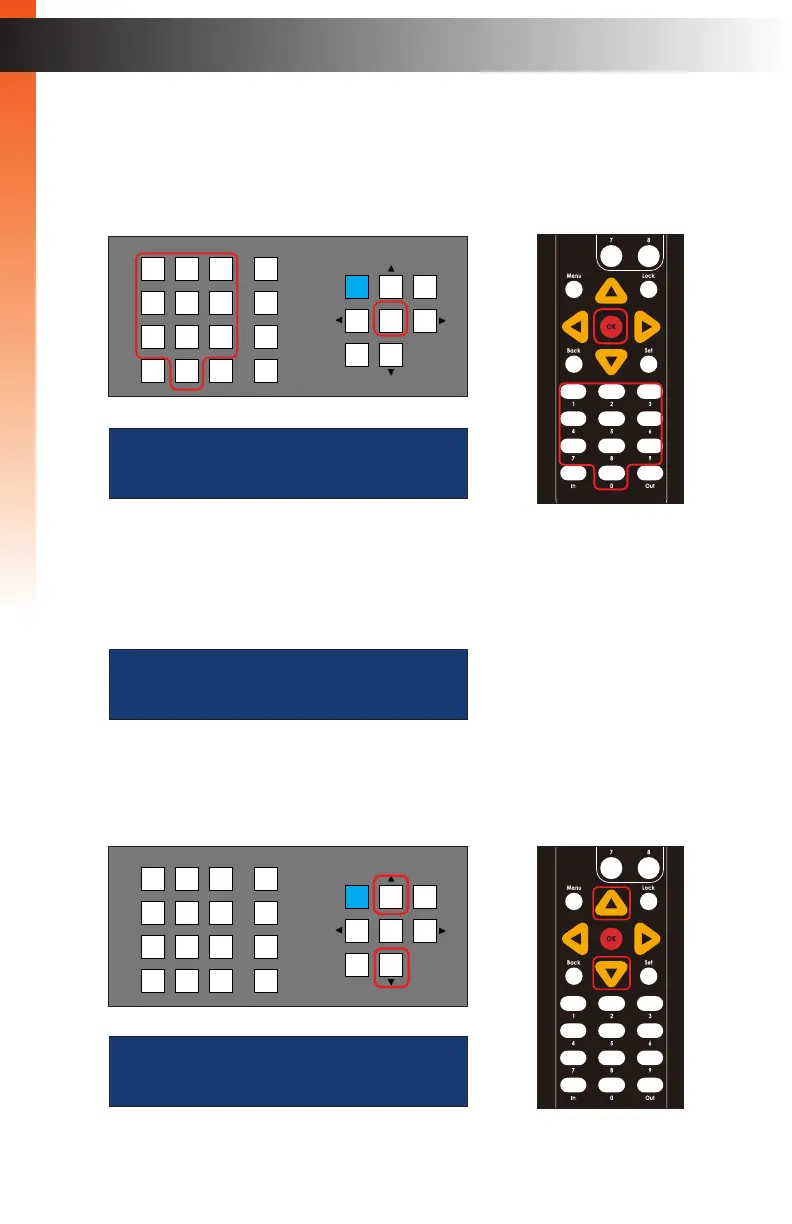
12. Use the numeric keypad to enter the desired IP address.
If a one or more digits in the IP address is less then three digits in length, then preceding
zeros must be used to pad the value. For example, if one of the numbers is 10, then
you would enter 010 on the keypad. If the number is 5, then you would enter 005.
13. The cursor will automatically advance to the next digit in the IP address. If an error
is made, use the ◄ or ► to move backward or forward between each digit.
14. Press the OK button to save the change.
15. Press the ▲ or ▼ buttons to select the Subnet Mask setting. The subnet mask
address will be displayed.
Basic OperationBasic Operation
Menu System
ip address:
10.5.64.74
subnet mask:
255.255.255.0
OR
LAN
POE
5V DC
1 2
Matrix Controller
Status
IR
Power
Menu
1 2 3
4 5 6
7 8 9
In 0 Out Set
Clear
Mask
Preset
Back
OK
Lock
LAN
POE
5V DC
1 2
Matrix Controller
Status
IR
Power
Menu
1 2 3
4 5 6
7 8 9
In 0 Out Set
Clear
Mask
Preset
Back
OK
Lock
IP address:
010.005._01.074
OR



 To Next Page