35. mySewnet™ library menu
36. File manager
37. Design information
38. Design categories
39. Thread color edit
40. Total number of stitches in design
combination
41. Design stitch out order
42. Pan
43. Scale
44. Rotate
Grid/Background Color
Touch the grid/background color button to activate a grid on
the embroidery area to guide placement of designs. Touch
again to remove the grid.
Touch & hold to set background color and/or grid options.
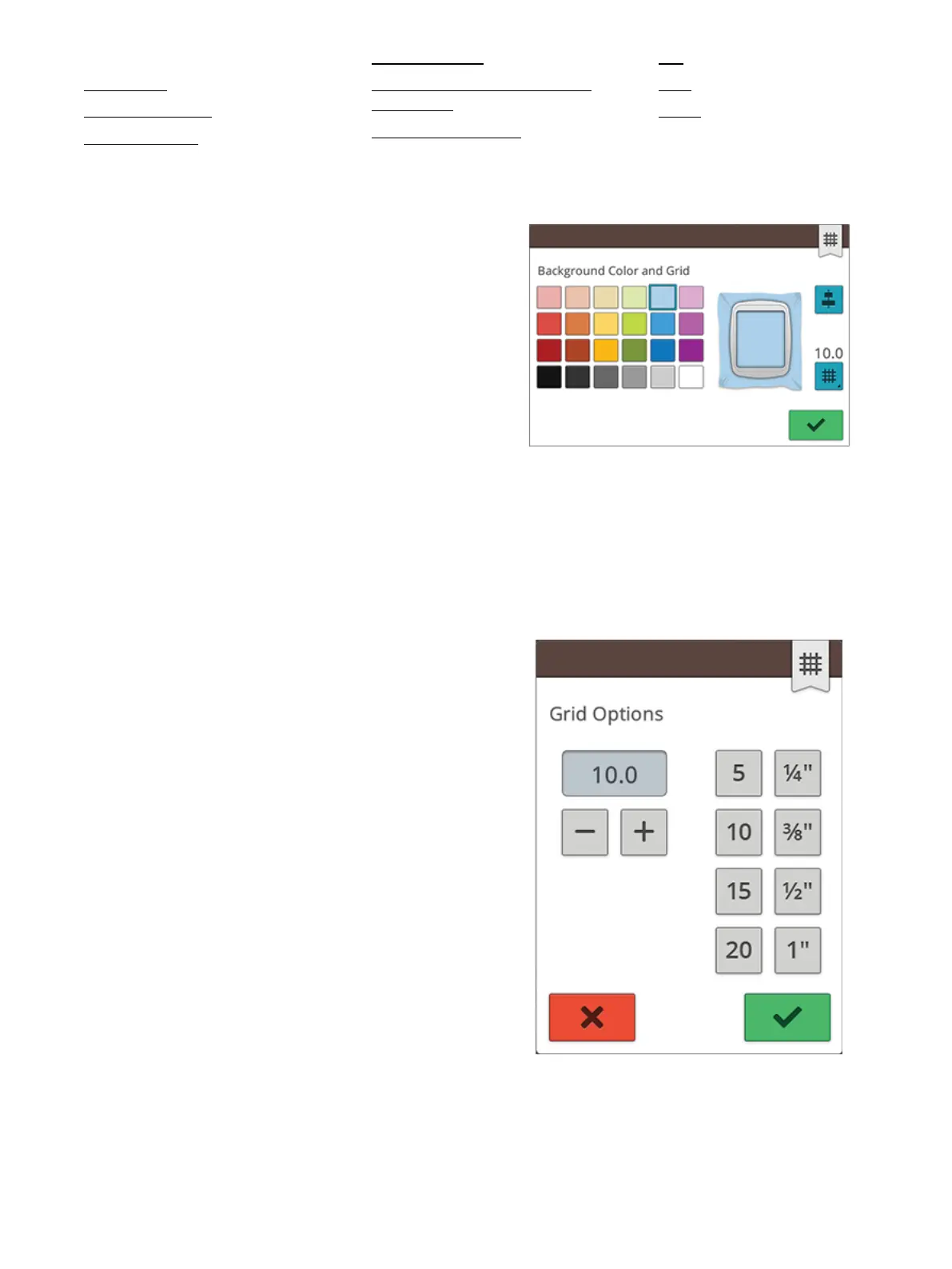
Background color
Select a background color for the embroidery area that
matches the color of the fabric you will use. Choose between
different background colors. The selected background color
will be shown in the hoop.
Alignment
If activated, guides will appear when moving your design
around the screen. This will help you to easier line-up two
designs to one another.
Grid options
Touch and hold the grid options button to set the distance
between the grid lines in millimeters/inches using the - and +
buttons. You can also choose from 8 predefined grid options.
Alternatively touch in the grid number area to open a keypad
where you can enter a number.
108 8 Embroidery




 To Next Page