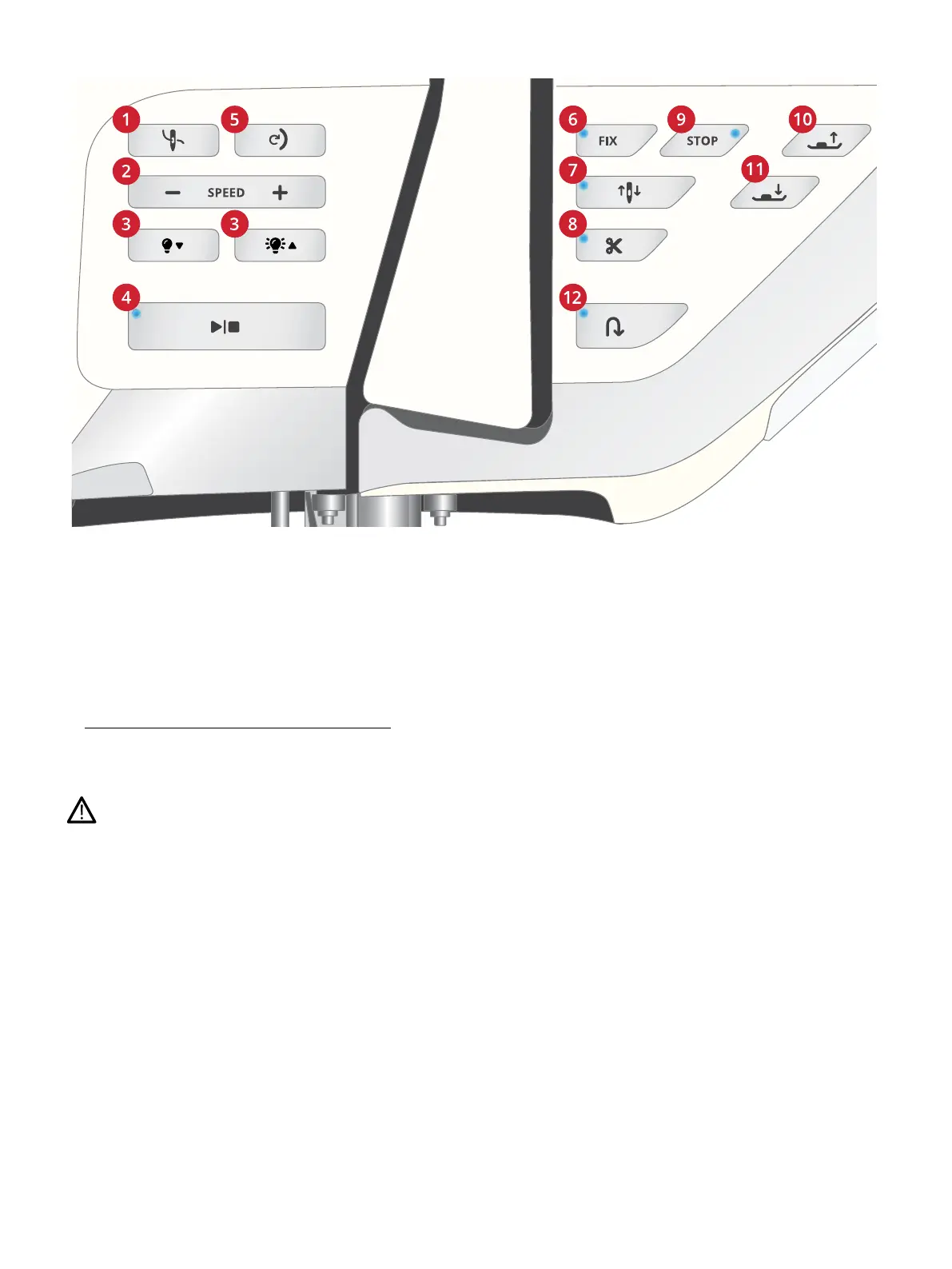
Function Buttons
1. Automatic needle threader
2. Speed – and +
3. Decrease LED work light brightness/
Increase LED work light brightness
4. Start/Stop
5. Stitch re-start
6. FIX function
7. Needle stop up/down
8. Cut function
9. STOP function
10. Presser foot up and extra lift
11. Presser foot down and pivot
12. Reverse
Automatic Needle Threader
See Using the Automatic Needle Threader, page 40 to learn
how to place the thread for automatic needle threading. When
the thread is in place, touch this button to thread the needle
automatically.
To prevent damage to the automatic needle threader, needle,
presser foot or other attached accessories, read the instructions
carefully on how to use the automatic needle threader before
using it.
Speed – and +
All stitches and embroideries in your machine have a pre-set,
maximum allowed sewing speed to provide a good stitch
result.
Touch speed – to decrease the maximum allowed sewing
speed. Touch speed + to increase the maximum allowed
speed again. The machine will never sew faster than the
maximum allowed sewing speed for the selected stitch/
embroidery. Touch speed – or + when the machine is not
running and a pop-up on the screen will indicate the speed
setting. You can set the speed by touching the slider in the
pop-up or by touching the speed – or + buttons. If you
change the speed setting while sewing no pop-up will appear.
Adjusting LED lights brightness
Adjust the brightness of the LED lights to adapt to the light
conditions in your sewing room. Simply press the right button
to make the LED lights brighter or the left to make them less
bright.
Start/Stop
Touch the start/stop button to start and stop the machine
sewing or embroidering without using the foot control. Touch
start/stop to begin and touch again to stop.
Stitch Re-Start
When you stop sewing in the middle of a stitch, touch stitch
re-start to begin sewing at the beginning of the stitch. The
stitch or stitch program will remember any special settings
you made.
FIX Function
FIX is used to tie off a stitch. Touch the button to turn the
function on/off. The indicator next to the FIX function
button is lit when the FIX function is active. When beginning
to sew with FIX function active, your machine sews a few tie-
off stitches and continues with the selected stitch. Touch FIX
18 1 Introduction













 To Next Page