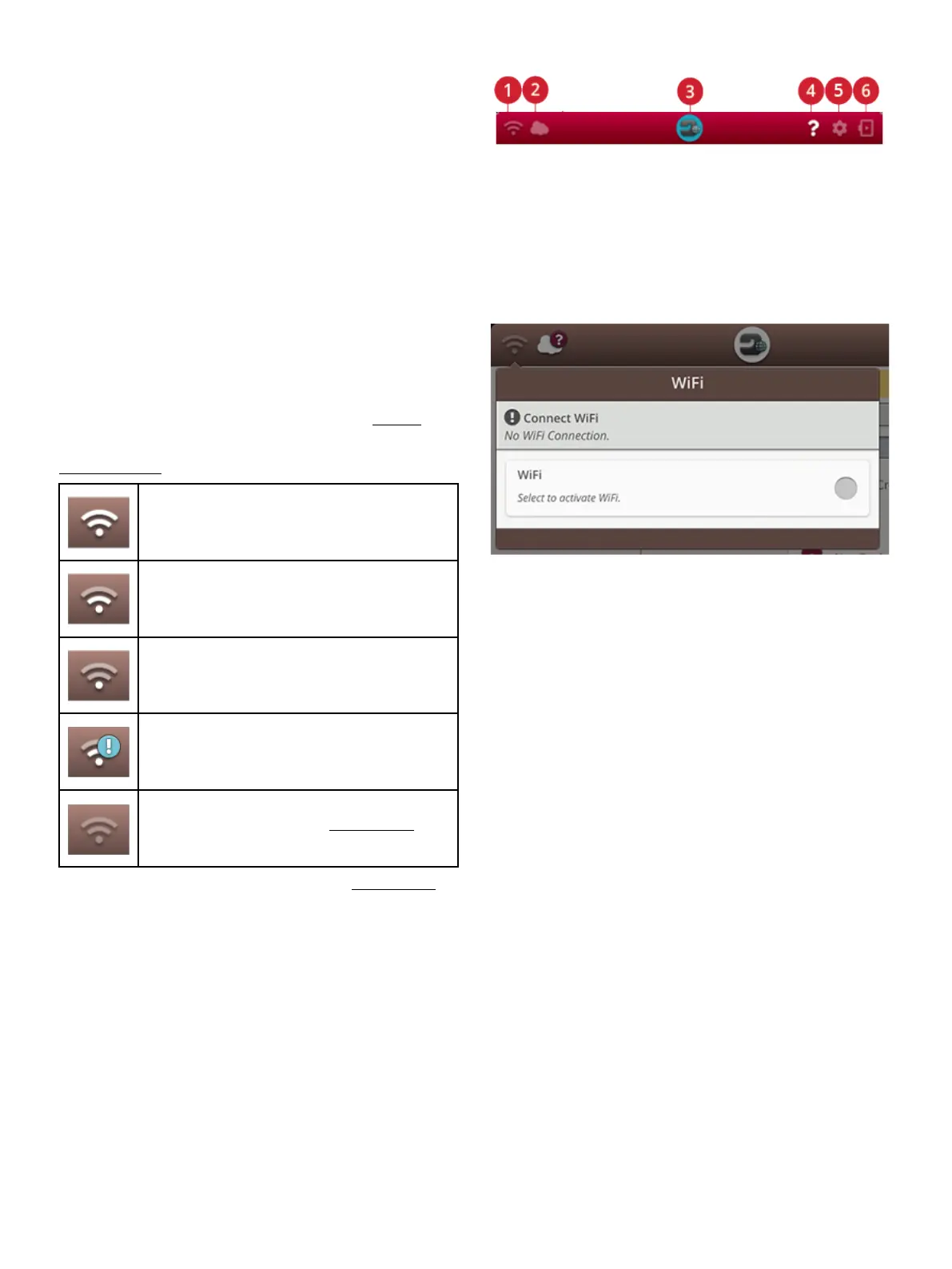
Topbar
1. WiFi
2. mySewnet™
3. Home screen
4. Quick help
5. Settings
6. Sewing/embroidery mode
toggle
On the topbar you will find the following functions: WiFi,
mySewnet™, wireless firmware update, home screen, quick
help, settings and sewing/embroidery mode toggle.
Note: All functions may not always be available at the same time.
WiFi
Touch the WiFi button in the topbar and activate WiFi.
Select a network from the list of available networks. If your
network is password protected, you will be prompted to
enter the password in the pop-up.
You can also connect to a network with WiFi in settings.
If you do not get any signal or have a low signal strength see
troubleshooting.
WiFi is connected with high signal strength.
WiFi is connected with medium signal
strength.
WiFi is connected with low signal strength.
WiFi is connected but the network does not
work properly.
WiFi is disconnected. Connect to a network
through the WiFi button or WiFi settings.
Read more about WiFi in the machine in the WiFi chapter.
4 The Multi-Touch Screen 57













 To Next Page