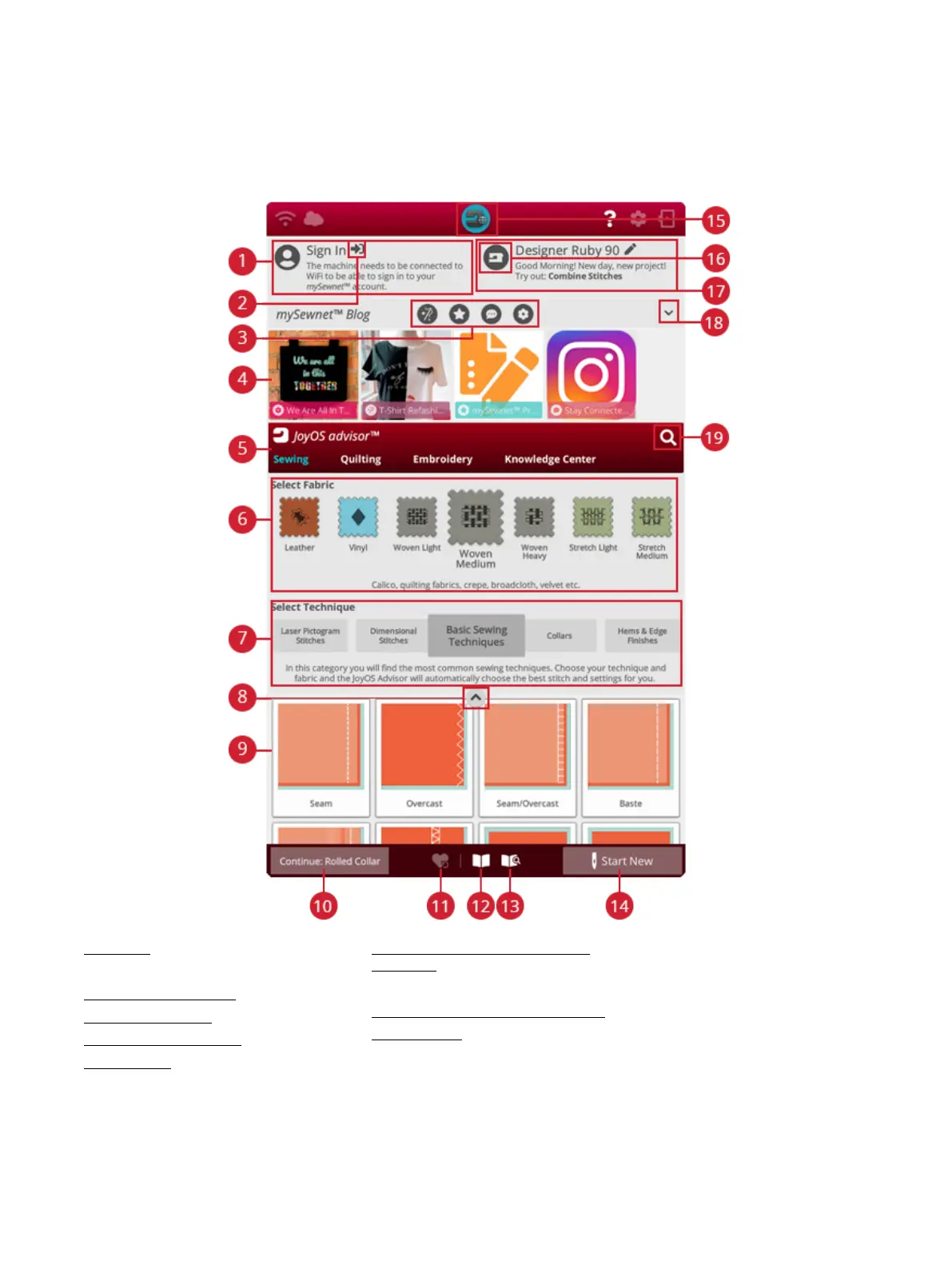
Home Screen— Overview
The home screen is filled with guidance, inspiration and help.
Here you'll find the JoyOS ADVISOR™ feature which
includes a sewing, quilting and embroidery advisor that will
guide you through different techniques and automatically
choose correct settings.
Get tips and inspiration through the mySewnet™ blog, read
your user's guide for instant help or find several guides and
sewing instructions within the knowledge center.
Note: Images may look different than your screen and/or machine
depending on what machine model and color settings you have. All
functionality has been verified to be accurate for this model.
1. User profile
2. Sign in/out mySewnet™ account
3. mySewnet™ filter blog posts
4. mySewnet™ blog posts*
5. JoyOS ADVISOR™ feature
6. Fabric selection
7. Technique selection
8. Minimize/expand JoyOS ADVISOR™
project files
9. JoyOS ADVISOR™ project files
10. Continue JoyOS ADVISOR™ project file
11. Load smart save
12. JoyOS ADVISOR™ project viewer
13. User’s guide
14. Start new
15. Home screen button
16. Edit machine nickname
17. Welcome center
18. Minimize/expand mySewnet™ blog
19. Search
70 6 Home Screen













 To Next Page