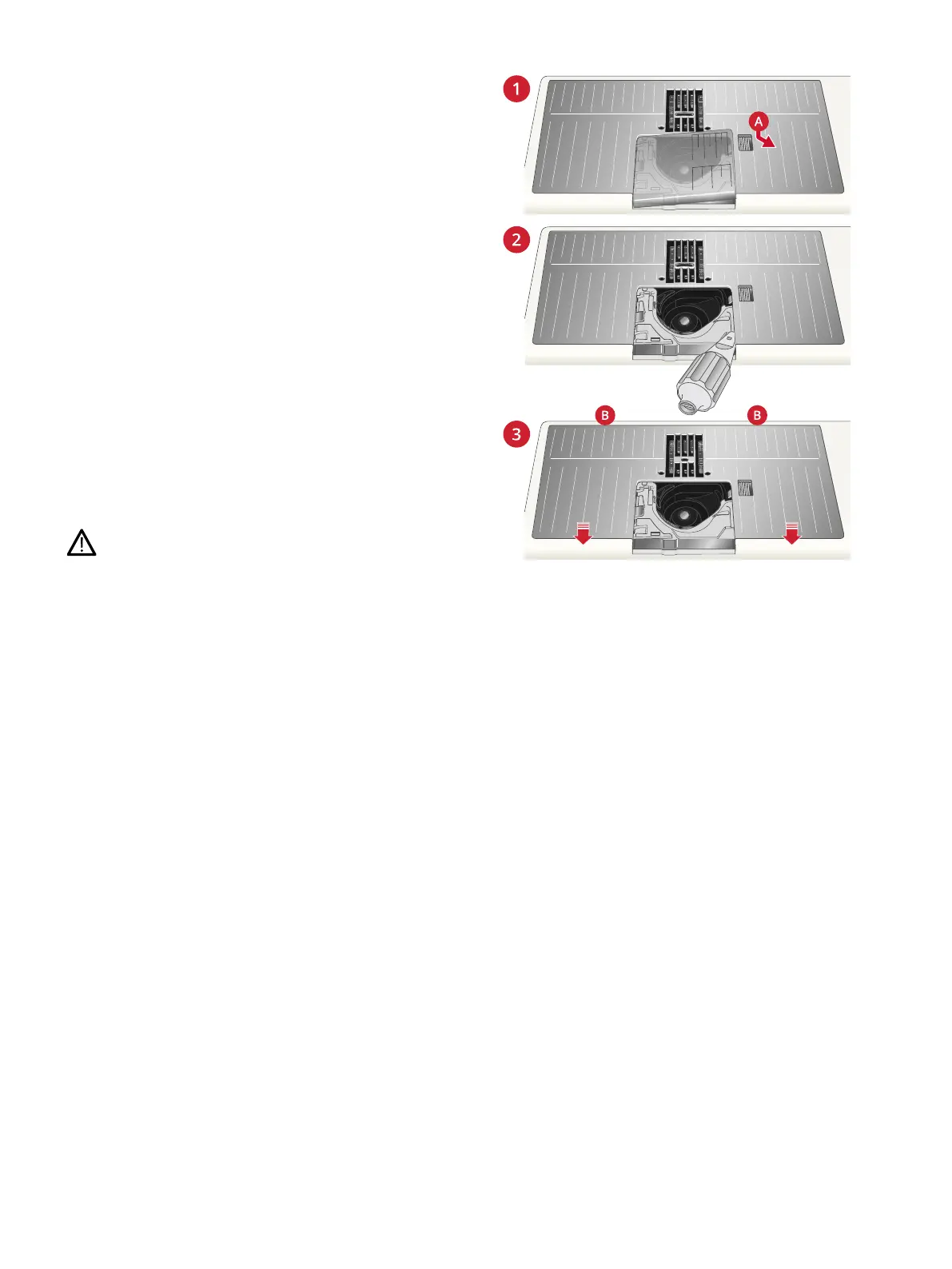
Changing to Straight Stitch Plate
The Straight Stitch Plate is recommended for embroidery. It
may also be used for certain techniques in sewing mode, such
as quilt piecing. The smaller hole in the Straight Stitch Plate
supports the fabric closer to the needle and helps prevent the
fabric from being pulled down into the bobbin area,
especially at the beginning and/or end of a seam.
1. Remove the presser foot. Open the bobbin cover by
pushing the release button (A) to the right. Remove the
cover.
2. Make sure that the feed teeth are lowered. Place the
universal tool under the needle plate as shown and gently
turn the universal tool to pop off the needle plate.
Note: Lower the feed teeth by touching the presser foot up and extra
lift button.
Note: When changing the needle plate, clean any lint and threads
from the bobbin area.
3. With feed teeth lowered, position the Straight Stitch Plate
so that it fits into the notches at the back (B). Press the
Straight Stitch Plate down until it clicks into place.
Replace the bobbin cover.
To prevent needle breakage or damage to the plate, remove
any accessory that is not compatible with the Straight Stitch
Plate, such as twin needle.
2 Preparations 49













 To Next Page