Save Program
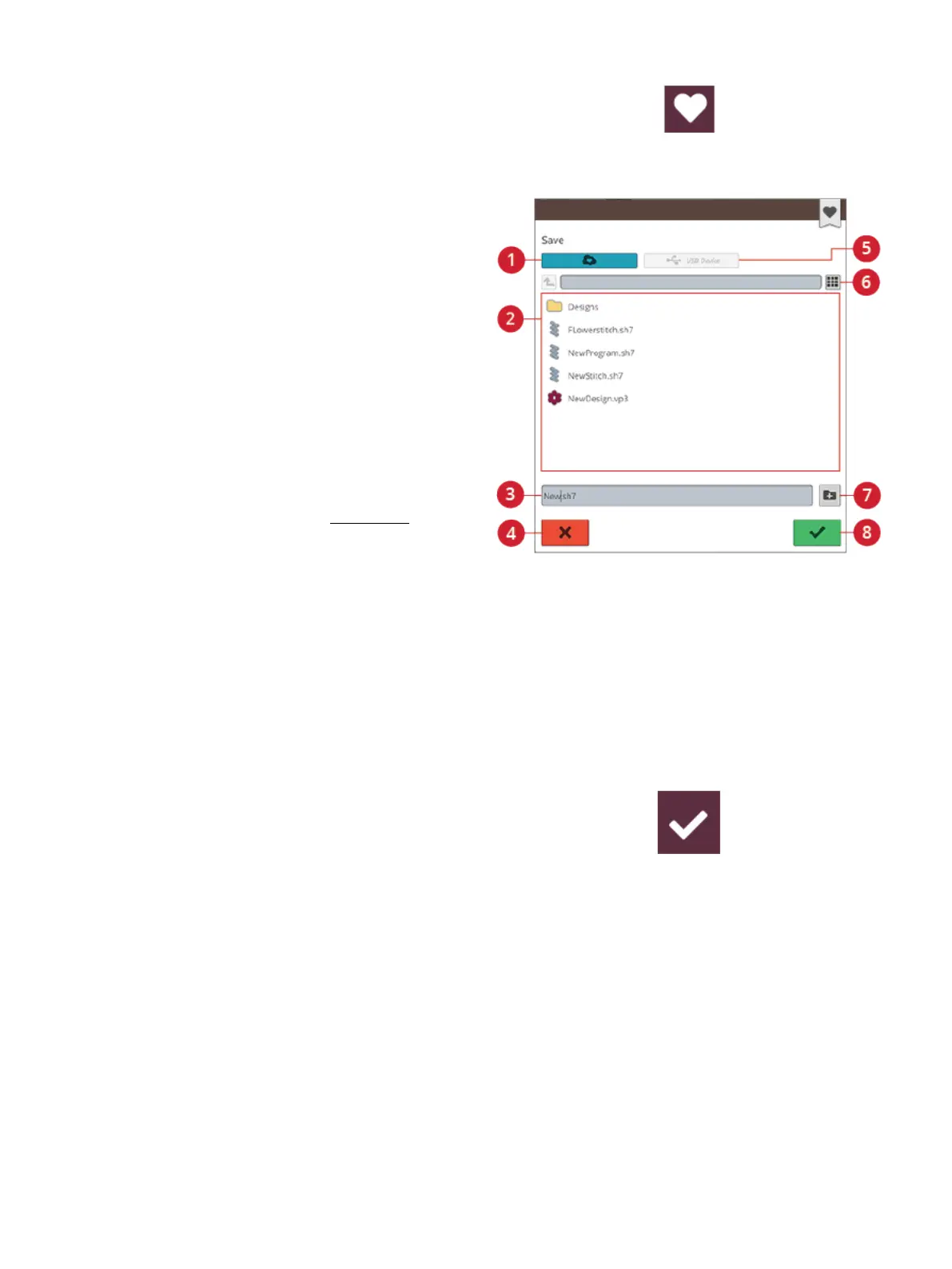
Save button in embroidery edit
1. Save to the mySewnet™ cloud
folder
2. Selection area
3. File name
4. Cancel
5. Save to a USB device
6. Toggle between list and
thumbnail view
7. Create new folder
8. Confirm
To save your file, touch the save button and a pop-up will
appear on the screen. In the save pop-up you can choose to
save the file to the mySewnet™ cloud folder or to a USB
device. Previously saved designs, stitches, programs and/or
fonts are shown. Name your file with the keyboard and touch
the OK button.
If you want to save to a folder, simply touch & hold on the
folder to open it, then name your file with the keyboard and
touch OK in the pop-up to save. To create a new folder,
simply touch the create new folder button, name the folder
with the keyboard and touch OK. Then touch & hold on the
folder to open it and save into the new folder.
Touch the list and thumbnail view button to toggle between
showing the files in a list or as thumbnail icons. In list view
each file is shown with the file name and file type. In
thumbnail view each file is shown with file name and a
thumbnail image of the file.
To cancel the save process, close the pop-up window by
touching cancel. The save pop-up will close and you will
return to program mode.
Learn how to organize your saved files in file manager.
Sew or Embroider Your Stitch
Program
To sew your stitch program, load it to sewing mode by
touching the OK button in the program window.
If you have opened program in embroidery edit, touching
OK in the program window will load your program to
embroidery edit.
Note: A program created in embroidery mode will be loaded and saved
as a design and can not be sewn as a stitch in sewing mode.
Program Pop-Up Messages
Not a Programmable Stitch
Some stitches are not possible to insert in a stitch program,
for example buttonholes and special stitch menus such as
theme stitches.
150 10 Program













 To Next Page