Project Menu
In the project menu recommended stitches and/or designs
will be shown for the current loaded sewing/embroidery
technique.
Project Viewer
When loading a JoyOS ADVISOR™ project from the
JoyOS ADVISOR™ feature it will be shown in the project
viewer which is always accessible on the screen. When the
project viewer is minimized, touch the button to expand.
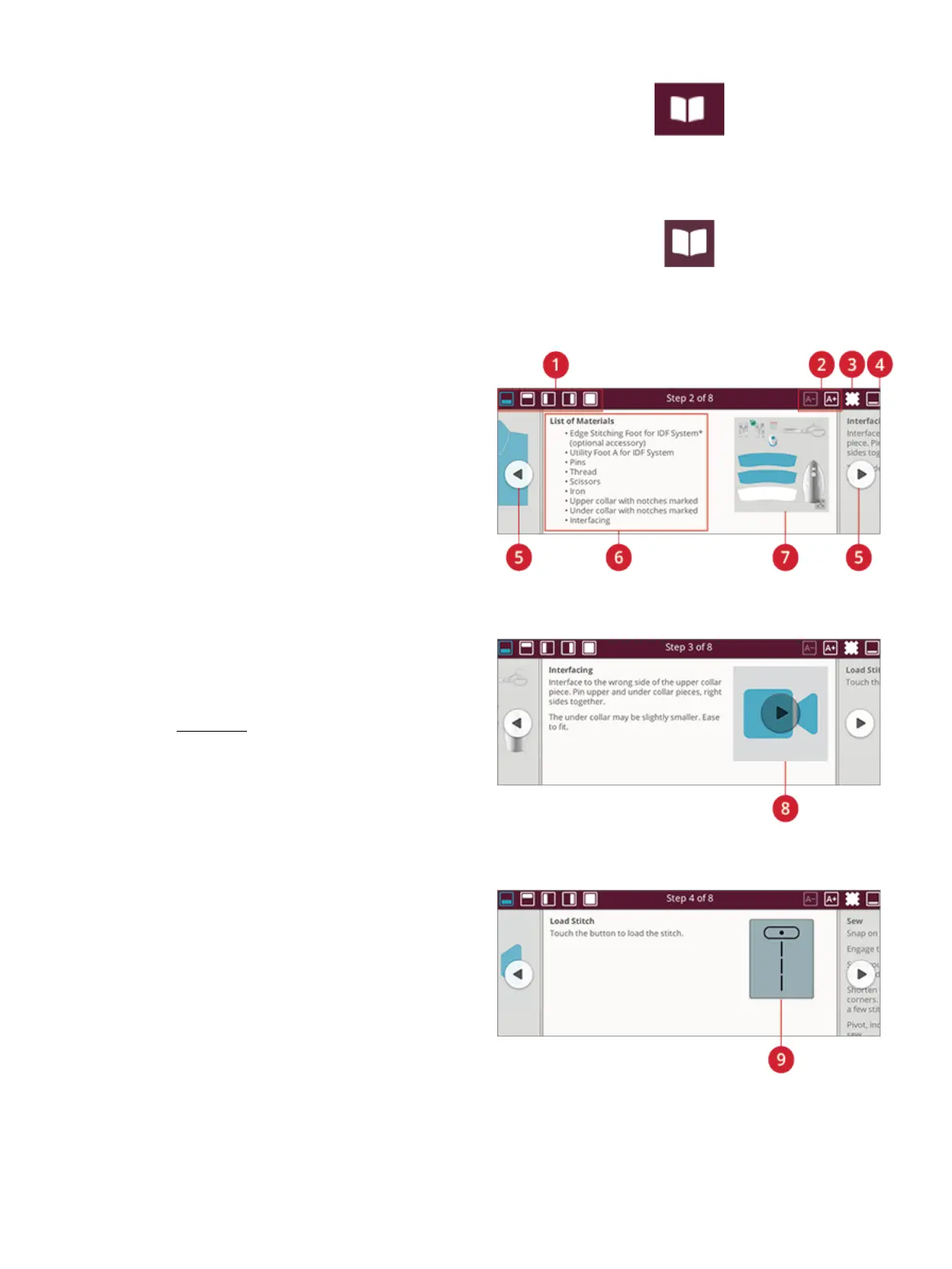
JoyOS ADVISOR™ Project Viewer – Overview
1. Move the viewer on the screen to be able to reach
buttons that might be hidden when following the
instructions.
2. Decrease or increase the text in the viewer by touching
the A- or A+ buttons.
3. Select the fabric that you will use. The stitches loaded
through the project are set to fit your selected fabric.
4. To minimize, touch at the top right corner. To expand it
again, touch the JoyOS ADVISOR™ project viewer
button.
5. Touch the right arrow to step forward in the instruction
and touch the left arrow to step backwards.
6. Information shown for each step in the instruction.
7. Every picture can be expanded by touching it in the
viewer.
8. Touch the play icon to load an animation. More detailed
description in animations.
9. Load the recommended stitch for the loaded technique
by touching the stitch in the viewer.
6 Home Screen 73













 To Next Page