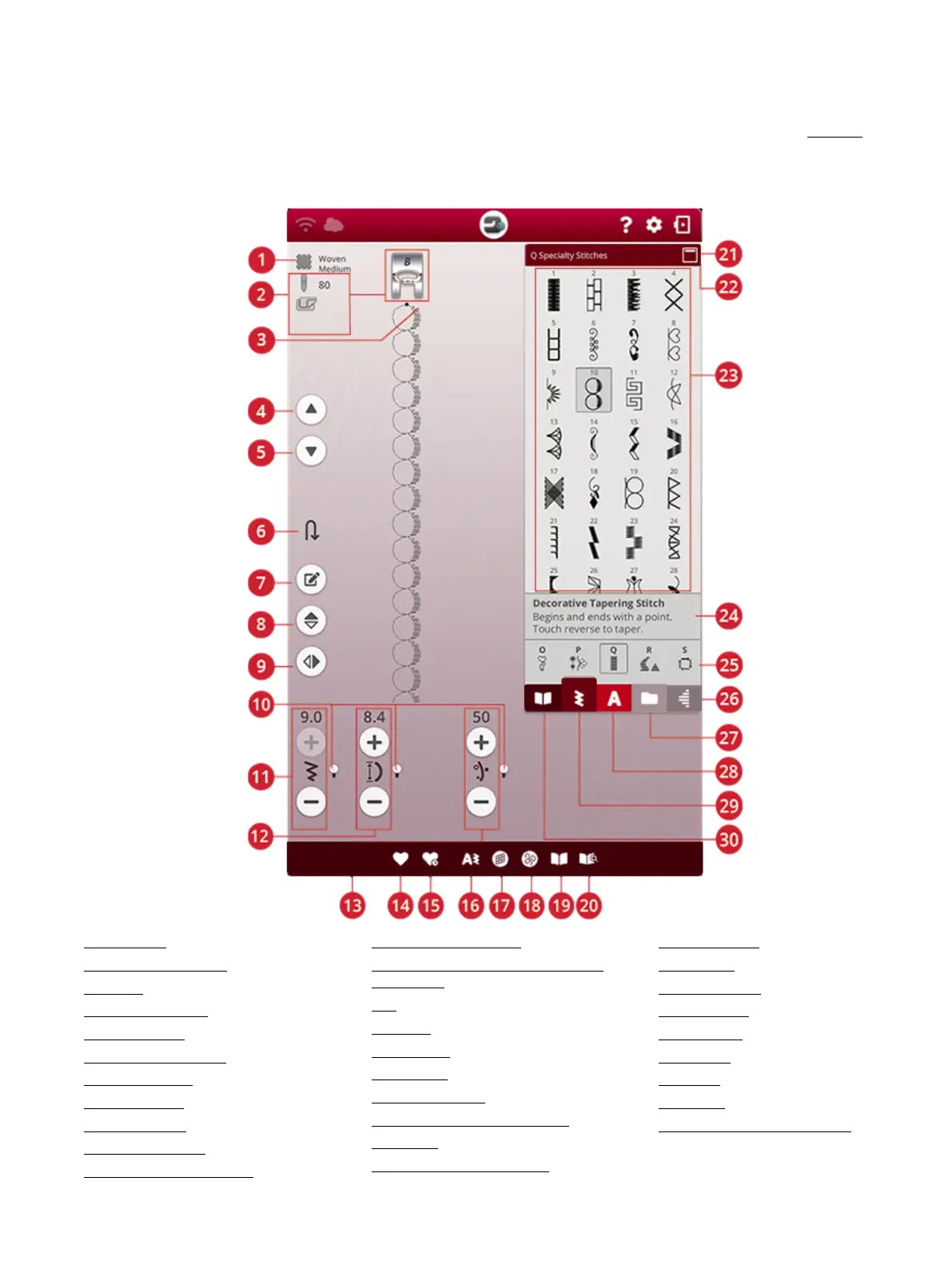
Sewing Mode – Overview
In sewing mode you can select stitches, adjust and sew them. Your selected stitch will be shown in actual size in the stitch field.
The sewing recommendations will be shown at the top.
You can also go to program mode to create your own stitch program. Read more about how to program stitches in program.
Note: All symbols and options will not be shown at the same time.
1. Fabric selected
2. Sewing recommendations
3. Stitch start
4. Step to previous stitch
5. Step to next stitch
6. Step to next part of stitch
7. Edit stitch program
8. Mirror end to end
9. Mirror side to side
10. Alternative switch bar
11. Stitch width/stitch positioning
12. Stitch length/stitch density
13. Thread portioning/thread tension/sensor
foot pressure
14. Save
15. Smart save
16. New program
17. Balance stitch
18. Free motion options
19. JoyOS ADVISOR™ project viewer
20. User’s guide
21. Minimize/expand selection area
22. Stitch menu name
23. Selection area
24. Stitch information
25. Stitch categories
26. Tapering menu
27. File manager
28. Font menu
29. Stitch menu
30. JoyOS ADVISOR™ project menu
7 Sewing 85













 To Next Page