201
Configuring Fader and Button functions
Each fader and button function may be customized on a “per master” basis in order to provide
maximum flexibility when it comes to operating a show.
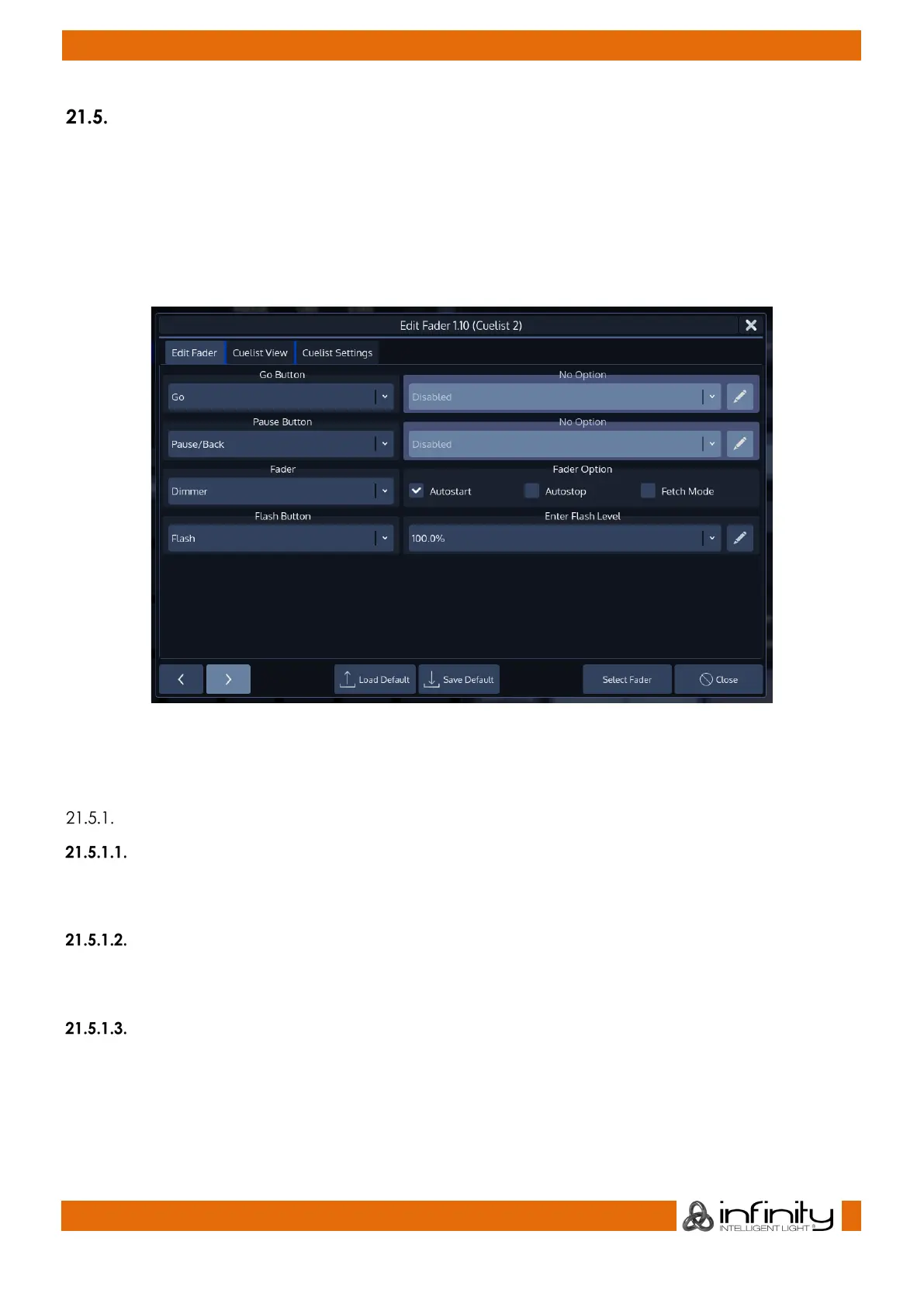
To edit a masters Go, Pause / Back and fader function, press [Edit] followed by the [Go], or
[Pause/Back] key of the master you would like to customize. A window allowing you to adjust each
function will be shown.
Alternatively, you may click on the Fader or Executors label.
Fig. 168: Edit Fader Dialog
Many Fader and Button options allow for further customization by using dropdown boxes that allow to
specify individual options like the flash value or multiplications of timings (for speed masters).
Common Settings
Autostart
The Autostart option will only shown for Cuelists. Enabling it will cause the Cuelist to be started when the
Fader is pulled up from 0%.
Autostop
The Autostop option is only shown for Cuelists. Enabling it will cause the Cuelist to be stopped as soon as
the Fader reaches the 0% value.
Fetch-Mode
Fetch Mode is especially useful if more than one Fader Page is used. When Fetch-Mode is enabled for a
fader, the console will save the current faders value when changing the fader page. When you change
back to the page where this Object resides on the fader, you will have to reach this value before any
fader movement is recognized.
Example without Fetch Mode:



 To Next Page