MAINTENANCE MANUAL
INTEL
®
FALCON™ 8+ UAS
DESCRIPTION
72 © 2017 Intel Corporation. All rights reserved.
REV 00
APR 2017
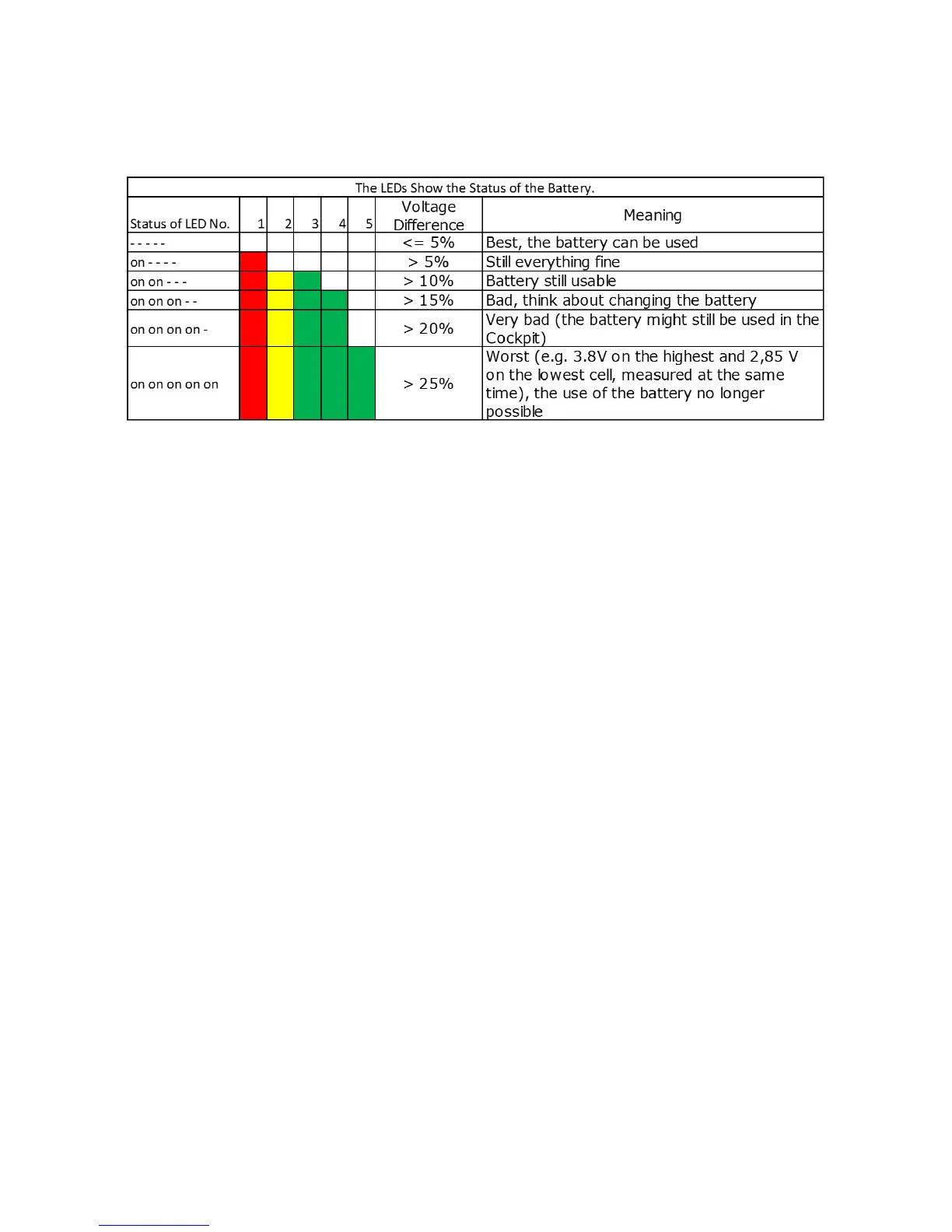
This status can be shown by activating menu 5.
To get a comparable result, this battery status check is done best directly after use/ flight.
BMS Error Mode
If during the charging process LED2 / LED4 are enlightened alternatingly with LED3, the
charging process is interrupted for one of the following reasons:
The Intel
®
Powerpack™ Battery cells are too hot (> 113ºF (45°C)) or too cold (<32ºF (0°C))
Charge Control Circuitry too hot (> 158ºF (70°C))
The charging process will resume automatically once the cells have cooled down or heated up,
respectively.
If LED1 / LED5 are enlightened alternatingly with LED2 / LED4:
BMS was operated out of specification
o It can still be used for discharging one time as usual
o It will not charge when connected to the power supply unit
Error mode batteries must be returned to supplier
For all other behavior of the LEDs contact an Intel
®
Falcon™ 8+ UAS supplier.


 To Next Page