iPECS UCP
Hardware Description and Installation Manual Issue 1.3
105
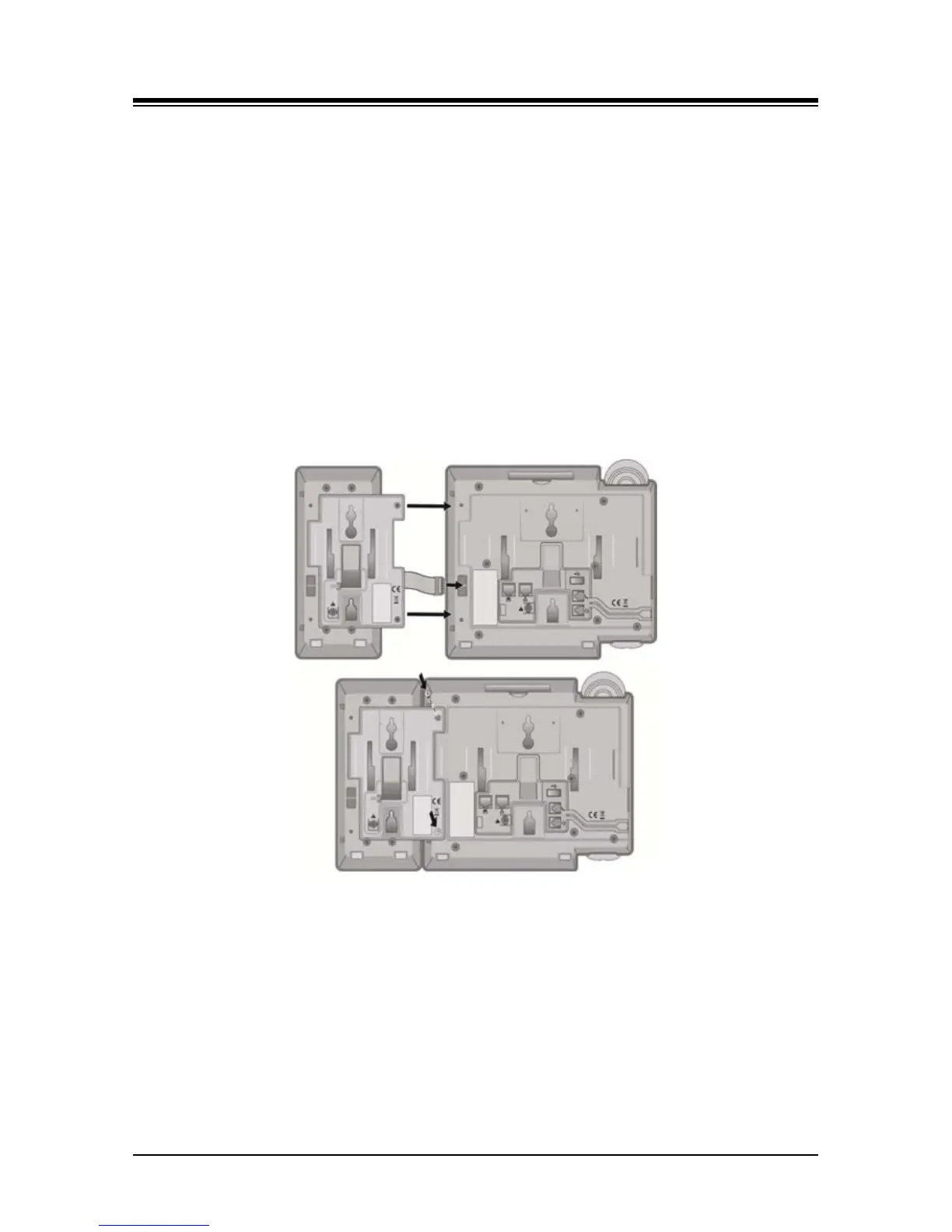
Referring to Figure 7.1.2-2 below use the following instructions to install and wire the LIP Console
to the associated LIP Phone.
1. Turn the LIP phone and Console upside down
2. Remove the rubber plug in the LIP phone protecting the Console serial cable connector.
3. Insert the flat ribbon cable from the Console into the connector in the LIP phone.
4. Insert and tighten two (2) screws through the DSS Console mounting flange into the LIP
phone. Caution, do not over-tighten the screws as this may damage the LIP phone
housing.
5. For additional Consoles, repeat the procedure connecting one console to the previous
console.
6. For each LIP-8048DSS and LIP-8040LSS, insert the DC plug of an AC Adaptor-K to the
DC input of the Console and plug the AC plug into an appropriate (110/240 VAC) outlet.
Figure 7.1.2-2 LIP-8000 DSS Installation



 To Next Page