iPECS UCP
Hardware Description and Installation Manual Issue 1.3
61
5.6 1U-Rack Mount Bracket Installation
The Module 1U-Rack Mount Bracket will house a single Module and an AC/DC adapter to power
the Module. To install, refer to figures and instructions below:
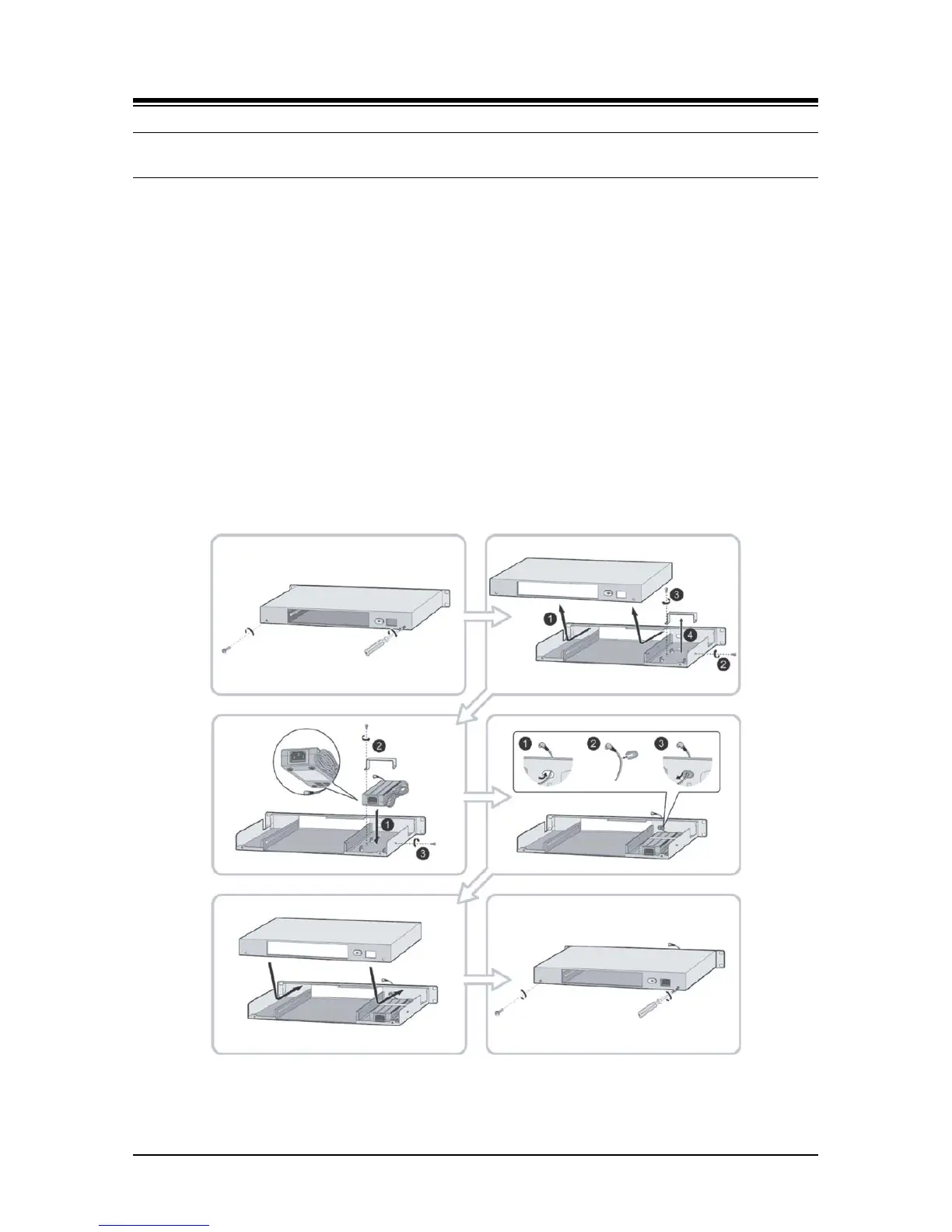
1. Install the AC/DC adapter in the 1U-RMB. Refer to Figure 5.6-1.
a) Remove the two (2) screws on the rear of 1U-RMB to release the upper housing.
b)
Lift up and remove the upper housing.
c)
Remove the two (2) screws holding the adapter bracket.
d)
Lift up and remove the adapter bracket.
e)
Install an adapter, the label side of the adapter should be placed on the inner surface
of 1U-RMB), place the adapter bracket over the adapter and fasten the two 2) screws.
f)
Insert the adapter DC plug through the hole in the front of 1U-RMB. Note for the
RSGM, the DC cable should exit through the hole in the rear of the 1U-RMB.
g)
Insert the rubber grommet over the DC adapter cable and insert the grommet in the
hole in the front of the housing.
h)
Replace the upper housing and fasten the two (2) screws.
Figure 5.6-1 1U RMB Adapter Installation



 To Next Page