- Digital Microscope VHX-5000 User’s Manual -
Basic Operation
3-2
Basic Operation
Basic Operation
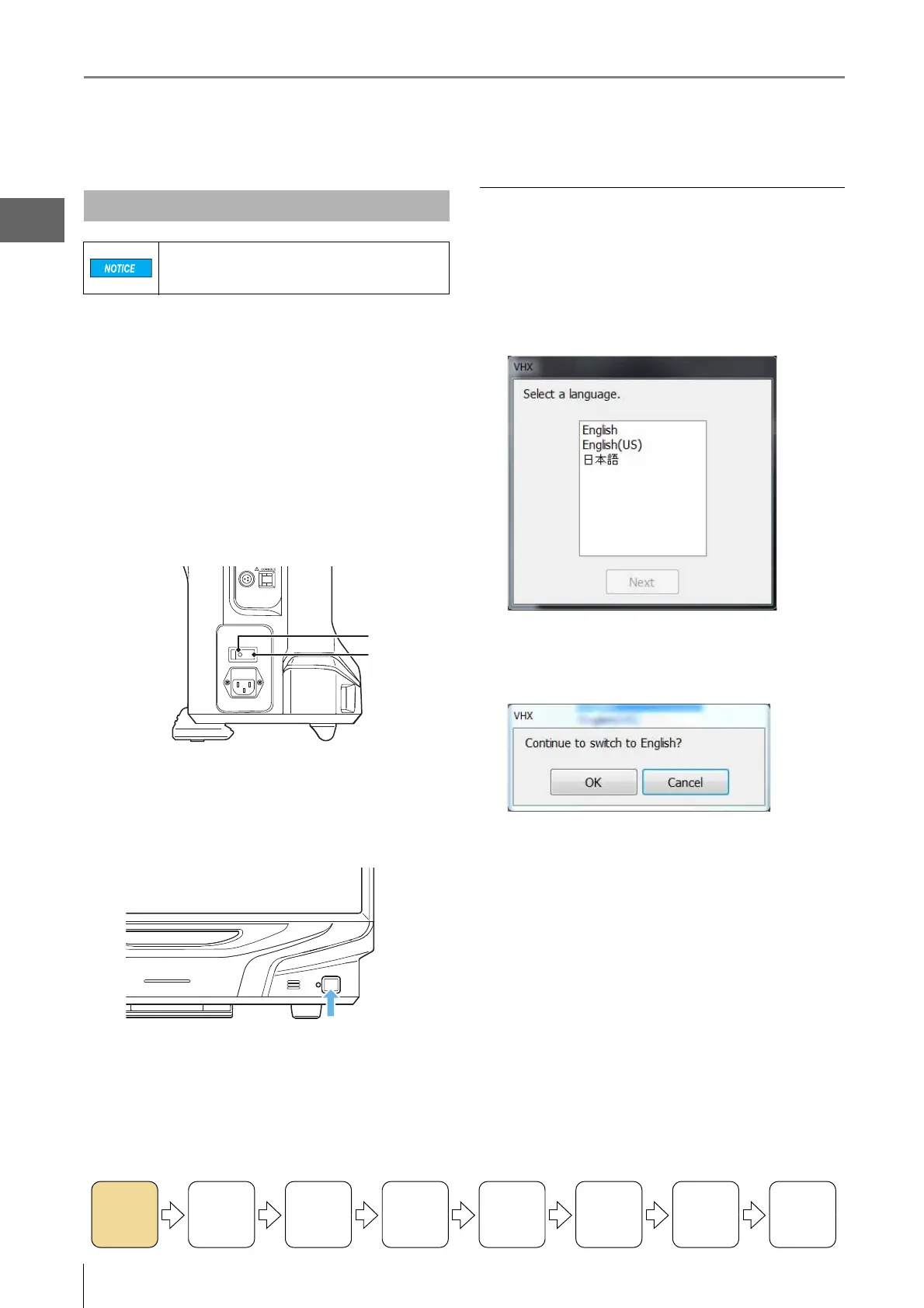
1 Turn on the power switch of the VHX-S550.
2 Turn the main power switch on (lower left side of
the microscope).
This switch is normally left on. To turn the power on or
off, use the POWER switch located on the lower right of
the front panel.
Tu rn the main power switch off when moving the
microscope to another location, or if the microscope is
not to be used for prolonged periods.
3 Press the POWER switch on the lower right of the
front panel.
The microscope will turn on and the screen will appear.
Language selection at initial startup
When starting up the microscope for the first time, a window
for selecting the display language will appear.
1 In the window for selecting the language, select
[English] and click [Next].
The confirmation window appears.
2 Click [OK].
Turning the Microscope Power On
If the Z-axis motorized stage is being used, the
stage will move to confirm its point of origin
when power is turned on.
On
Off
Turning the
Power On
Initializing
XY Motorized
Stage
Adjusting
the Color
Balance
Adjusting the
Brightness
and Focus
Move XY
Motorized
Stage
Observing
Tilted
Z-Axis
Capturing
(Saving)
Images
Turn the
Power Off



 To Next Page