- Digital Microscope VHX-5000 User’s Manual -
Recording and Saving Videos
5-11
Recording (Saving) Images
5 Click [Save].
The video data are saved and the [Video recording..]
dialog box closes.
To play the saved video, use the Album function (Page
6-2).
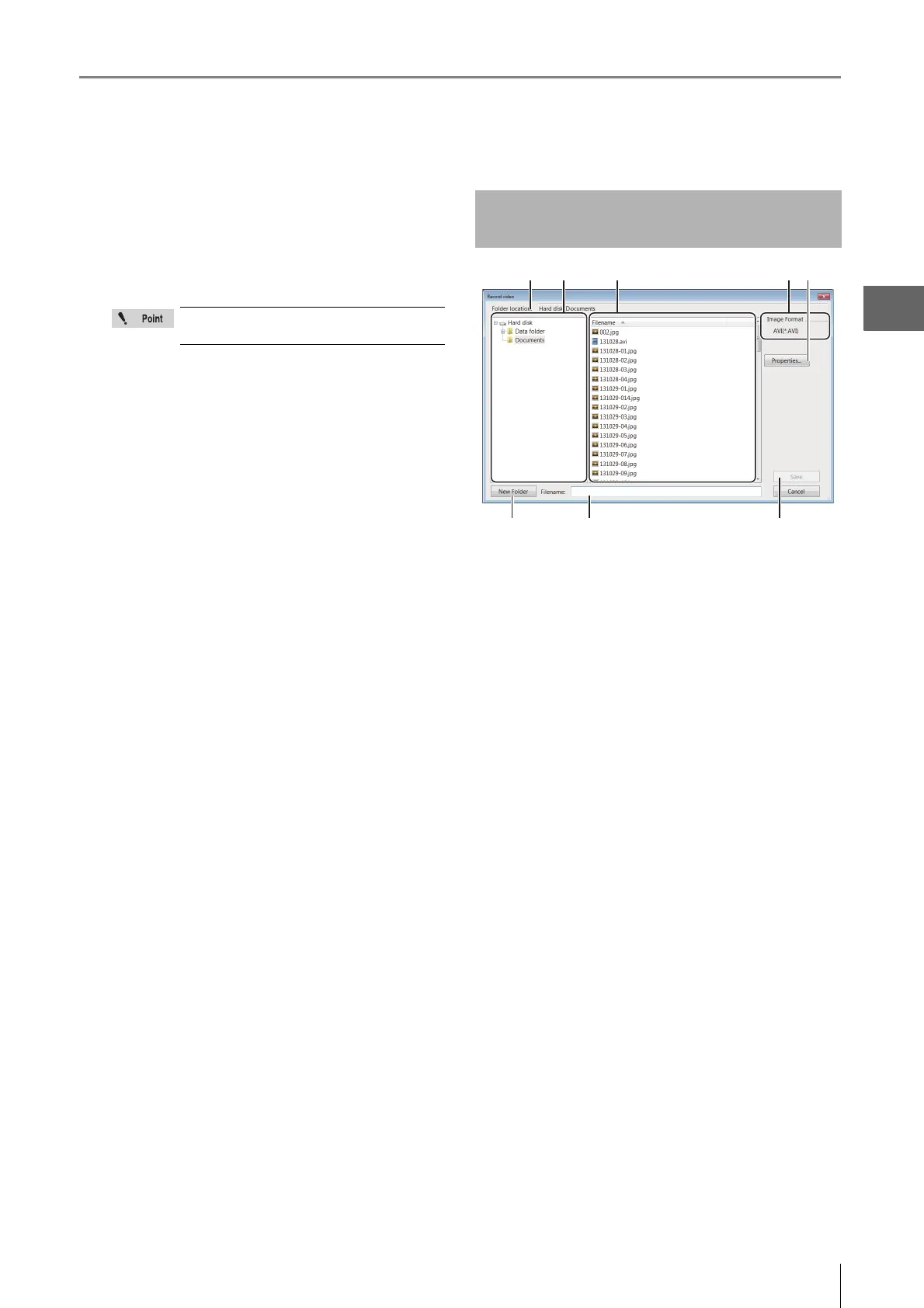
(1) Folder location
Displays the new folder containing the files currently
showing.
(2) Folder tree
Displays the drives and the new folder. Click the new folder
to save the image in.
(3) Filename
Displays the files in the currently selected folder.
(4) Image Format
Displays the format to save the image (AVI).
(5) Properties...
Used to add comments to video files.
(6) New Folder
Creates a new folder.
(7) Filename
Enter the file name to save the image.
(8) Save
Saves the file.
Clicking [No] discards the recorded video
data.
Names and Functions on the
[Record video] Dialog Box
(6) (7) (8)
(4)
(3)(1) (2) (5)



 To Next Page