- Digital Microscope VHX-5000 User’s Manual -
Adjusting Image Brightness
4-2
Advanced Camera Settings
Adjusting Image Brightness
This section explains how to adjust image brightness. Image brightness can be adjusted using [Lighting] on the console, or
the camera setting options from the VHX MENU. Normally, the brightness is adjusted using [Lighting] on the console. To
make detailed settings, use the camera setting options from the VHX MENU.
Adjust the brightness of the image by adjusting the shutter
speed (Auto shutter). If the object is dark, the controller will
automatically increase the gain.
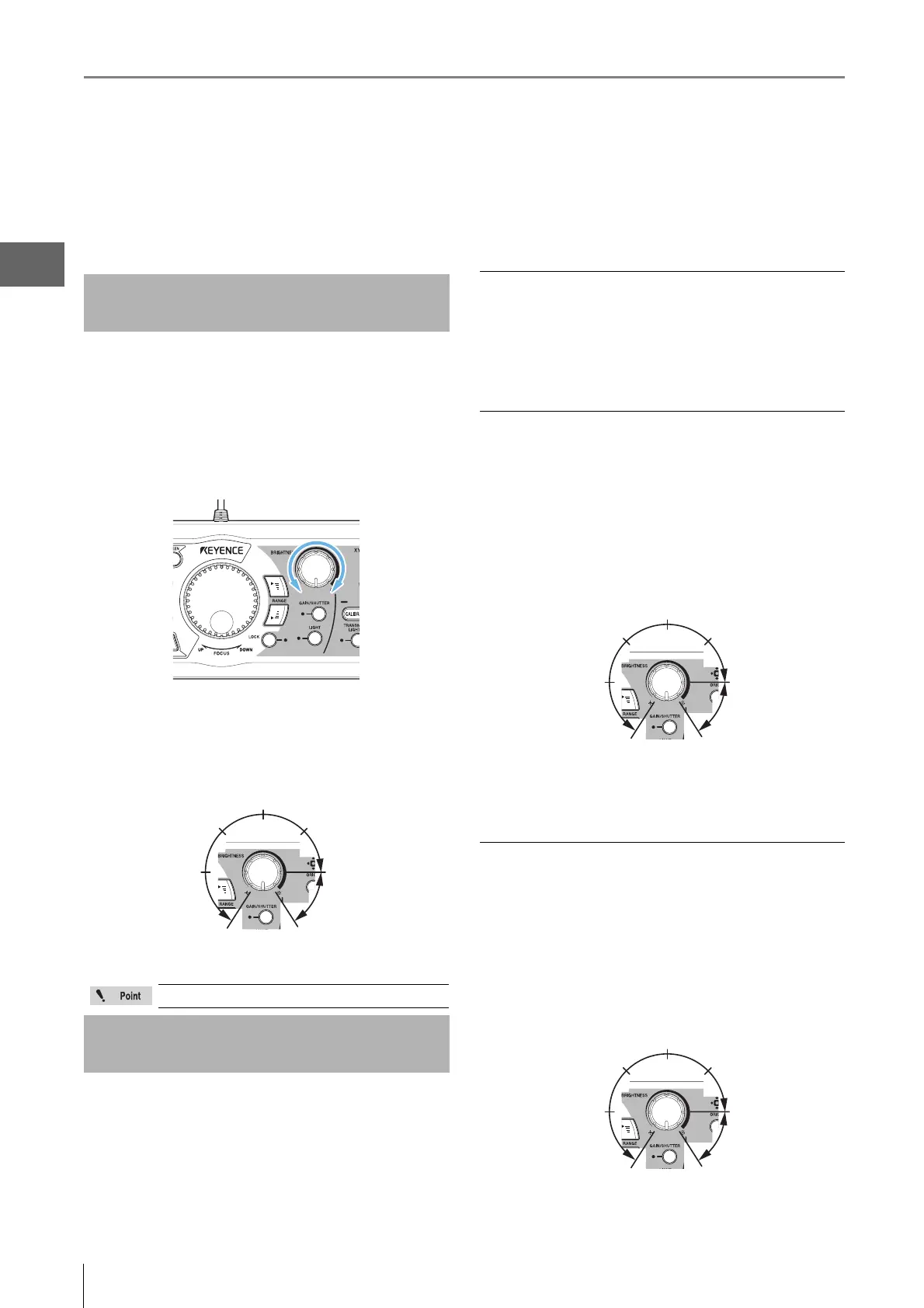
1 Adjust the brightness by turning the BRIGHTNESS
dial on the console.
Turning right brightens the image and turning left darkens
the image.
The gain increases automatically when the BRIGHTNESS
dial is turned to the right past the five-sixths position (about
3 o'clock).
1 Press the [GAIN/SHUTTER] button on the console.
The dial now functions as the supercharge shutter
control and the GAIN/SHUTTER indicator begins to
flash.
Press the [GAIN/SHUTTER] button again to return to
gain control.
Auto shutter
Normally, the microscope is used in Auto shutter mode. The
shutter speed will automatically adjust according to the
BRIGHTNESS dial.
Gain
Gain is a function that electrically amplifies the video signal
in the internal circuitry.
The position of the BRIGHTNESS dial controls the level of
amplification or gain.
The gain is increased automatically when the
BRIGHTNESS dial is turned to the right past the five-sixths
position (about 3 o'clock).
If the picture quality degrades because of increased noise,
change to supercharge shutter control.
Supercharge shutter
The supercharge shutter prolongs the exposure from
0.02 ms to 4 s.
The position of the BRIGHTNESS dial controls the
exposure time.
If the [GAIN/SHUTTER] button is pressed while the gain is
automatically increasing, the dial will change to
supercharge shutter control.
Adjusting with the Brightness Dial
on the Console
At startup this dial functions as the gain control.
Changing Between Gain and
Supercharge Shutter
Auto shutter
About 5/6 of a turn
(3 o'clock position)
Gain/
Supercharge shutter
GAIN/SHUTTER indicator light: Gain
Flashing: Supercharge shutter
Unlit: Auto shutter
Auto shutter
About 5/6 of a turn
(3 o'clock position)
Gain
Lit when Gain mode is active
Auto shutter
Supercharge
shutter
Flashing:
Supercharge shutter
About 5/6 of a turn
(3 o'clock position)



 To Next Page