- Digital Microscope VHX-5000 User’s Manual -
Part Names and Functions
1-6
Before Using the VHX-5000
Part Names and Functions
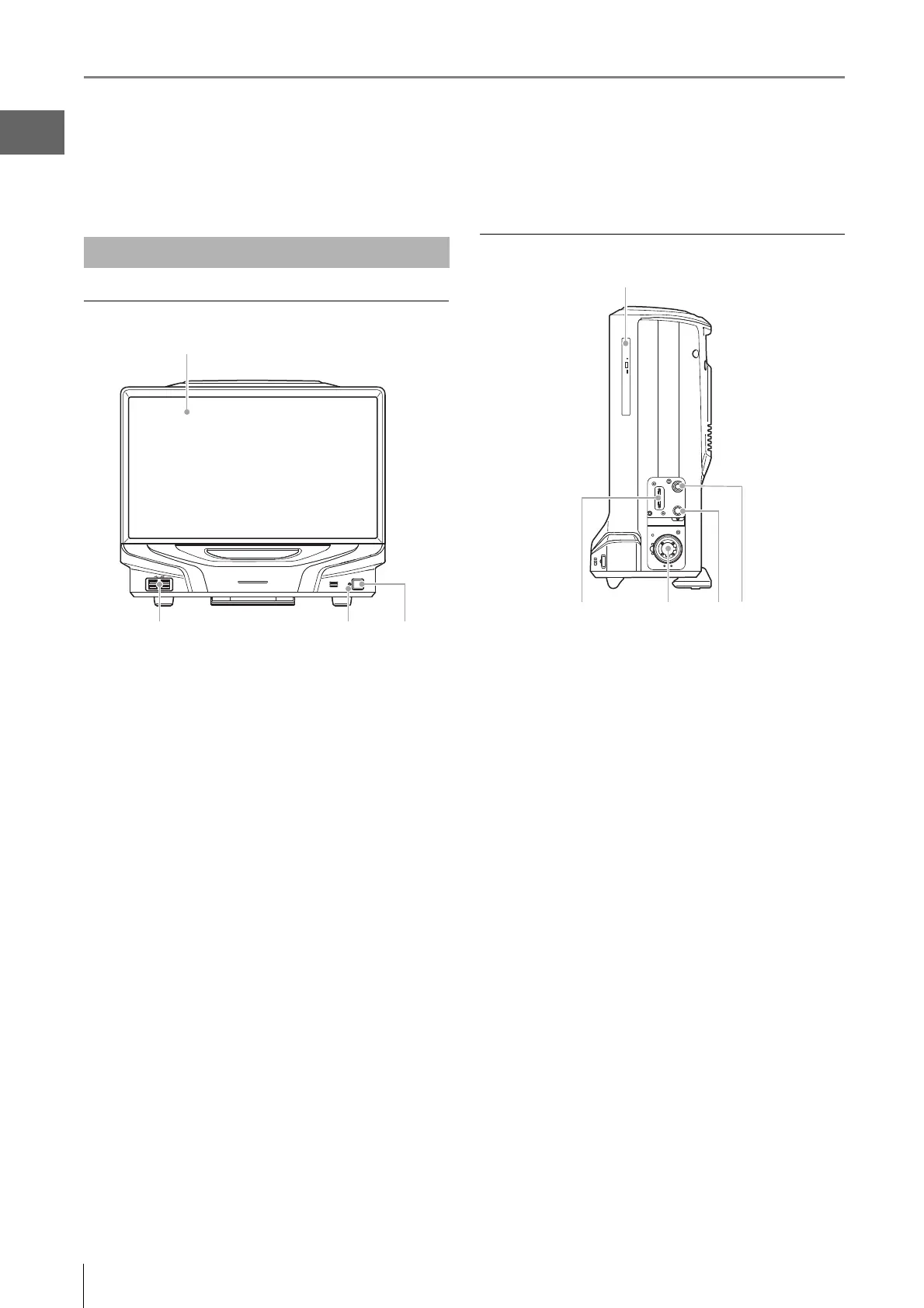
The names and functions of each part are explained below.
Front view
(1) LCD monitor
23" full HD (1920 x 1080 pixels) LCD monitor.
(2) USB ports
Connect a keyboard, mouse, and USB memory including
other USB devices.
(3) Power indicator
Illuminated when the power is on.
(4) Power switch
Turn the power on or off. (The main power switch on the left
side must be turned on.)
Right view
(1) DVD hyper-multi drive
Insert a CD-R, CD-RW, or DVD. Used to save and load
images and video files.
(2) CAMERA connection port
Connect the camera cable for the camera unit.
(3) LIGHT connection port
Connect the fiber optic cable.
(4) STAGE connection port
Connect the controller connection cable for the free angle
observation system base unit (VHX-S550/VHX-S500) and
free angle observation system (VHX-S90F/VHX-S50F).
(5) TRIPLE'R connection port
Connect the Z-axis motorized stage/automatic lens/zoom
recognition cable for the camera unit.
Main Unit (VHX-5000)
(1)
(3)
(4) (5)(2)



 To Next Page