- Digital Microscope VHX-5000 User’s Manual -
Basic Operation
3-7
Basic Operation
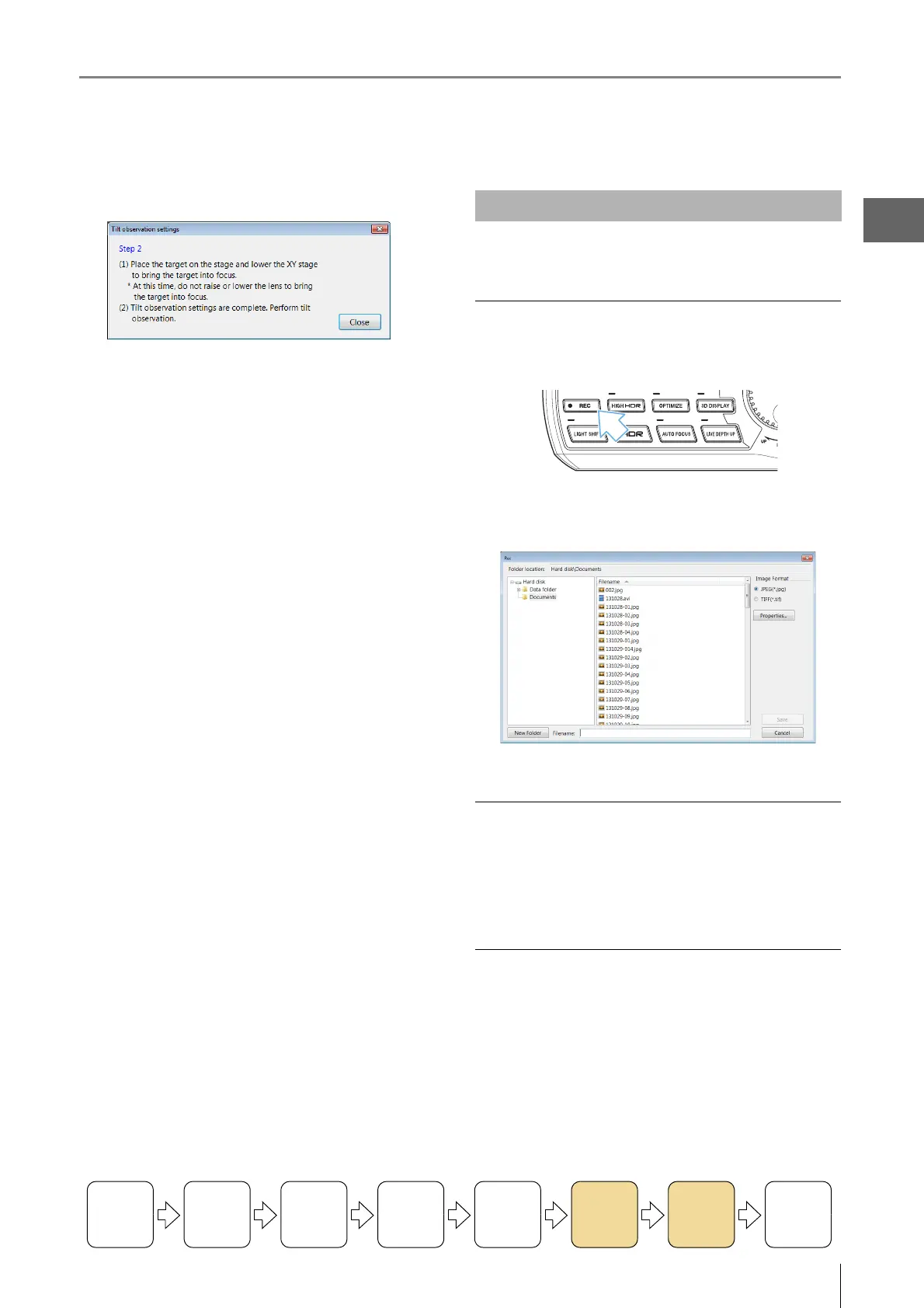
7 Click [Close].
8 Observe the tilted Z-axis.
Capture the displayed image and store it on the internal
hard drive.
Capturing (saving) images
1 Press the REC button.
2 Select the folder to save the image in and enter a
file name.
3 Click [Save].
Saving without entering a file name
The auto capture feature (Page 5-6) can be set to
automatically save images when pressing the REC button.
To switch to auto capture, select [Capture Settings] from the
main menu and click [Auto Capture Mode].
Saving videos
Select [Record Video] (Page 5-10) from the main menu.
Specify the conditions and click [Start Recording].
Turning the
Power On
Initializing
XY Motorized
Stage
Adjusting
the Color
Balance
Adjusting the
Brightness
and Focus
Move XY
Motorized
Stage
Observing
Tilted
Z-Axis
Capturing
(Saving)
Images
Turn the
Power Off
Capturing (Saving) Images



 To Next Page