- Digital Microscope VHX-5000 User’s Manual -
Adjusting the Lighting
4-5
Advanced Camera Settings
Adjusting the Lighting
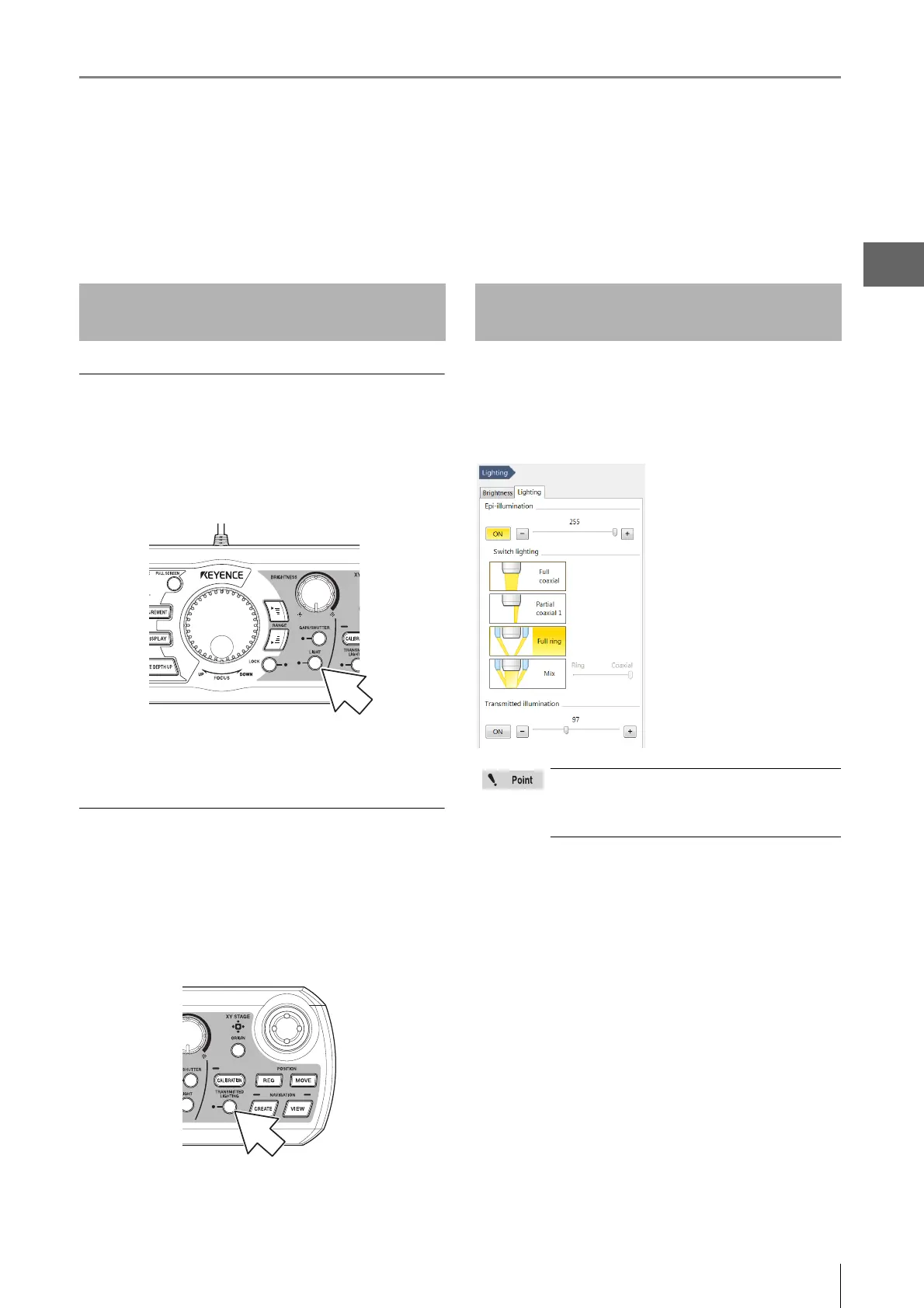
This section explains how to turn the lighting on and off and how to adjust the brightness. The brightness of the lighting can
be adjusted using the LIGHT button on the console or through the [Lighting] from the VHX MENU.
Normally, the light is turned ON at maximum intensity. Adjustments should be made as necessary if an external light is being
used for the observation.
ON/OFF of top down lighting
1 Press the LIGHT button on the console.
The LIGHT indicator on the console goes out and the
top down lighting turns off. Pressing the LIGHT button
again turns the top down light on.
When the motorized XYθ stage is in use, transmitted
lighting can also be used.
ON/OFF of transmitted lighting
1 Press the TRANSMITTED LIGHTING button on the
console.
The transmitted lighting indicator light illuminates and
the light comes on. When the TRANSMITTED
LIGHTING button is pressed again, the light goes off.
1 Click [Lighting] from the VHX MENU and select the
[Lighting] tab.
This brings up the [Lighting] dialog in the operation
area.
Lamp: ON
Sets the lighting to ON or
OFF. This function is identical
to the LIGHT button on the
console.
This adjusts the brightness in
256 steps by dragging the
slider on the screen. You can
select the type of light at
switch lighting.
Transmitted light: ON
This option appears only when the motorized XYθ stage
remains connected to the system. Sets the transmitted
lighting to ON or OFF. This function is identical to the
TRANSMITTED LIGHTING button on the console.
This adjusts the brightness in 256 steps by dragging the
slider on the screen. Normally used in the MAX (rightmost)
position.
2 To turn off the lighting, click [ON] of the applicable
lighting option to cancel the selective state
(yellow). Adjust the light intensity by dragging the
slider.
Using the LIGHT Button on the
Console
Adjusting the [Lighting] from the
VHX MENU
Available types of lighting change automatically
according to the connected lens.
For the details, refer to "Changing the Lighting
Method" (Page 7-8).



 To Next Page