- Digital Microscope VHX-5000 User’s Manual -
Enhancing Resolution and Increasing Gradation
7-4
Improving Images
1 Adjust the position of the object to be observed
and adjust the focus.
"Adjusting the Brightness and Focus" (Page 3-4)
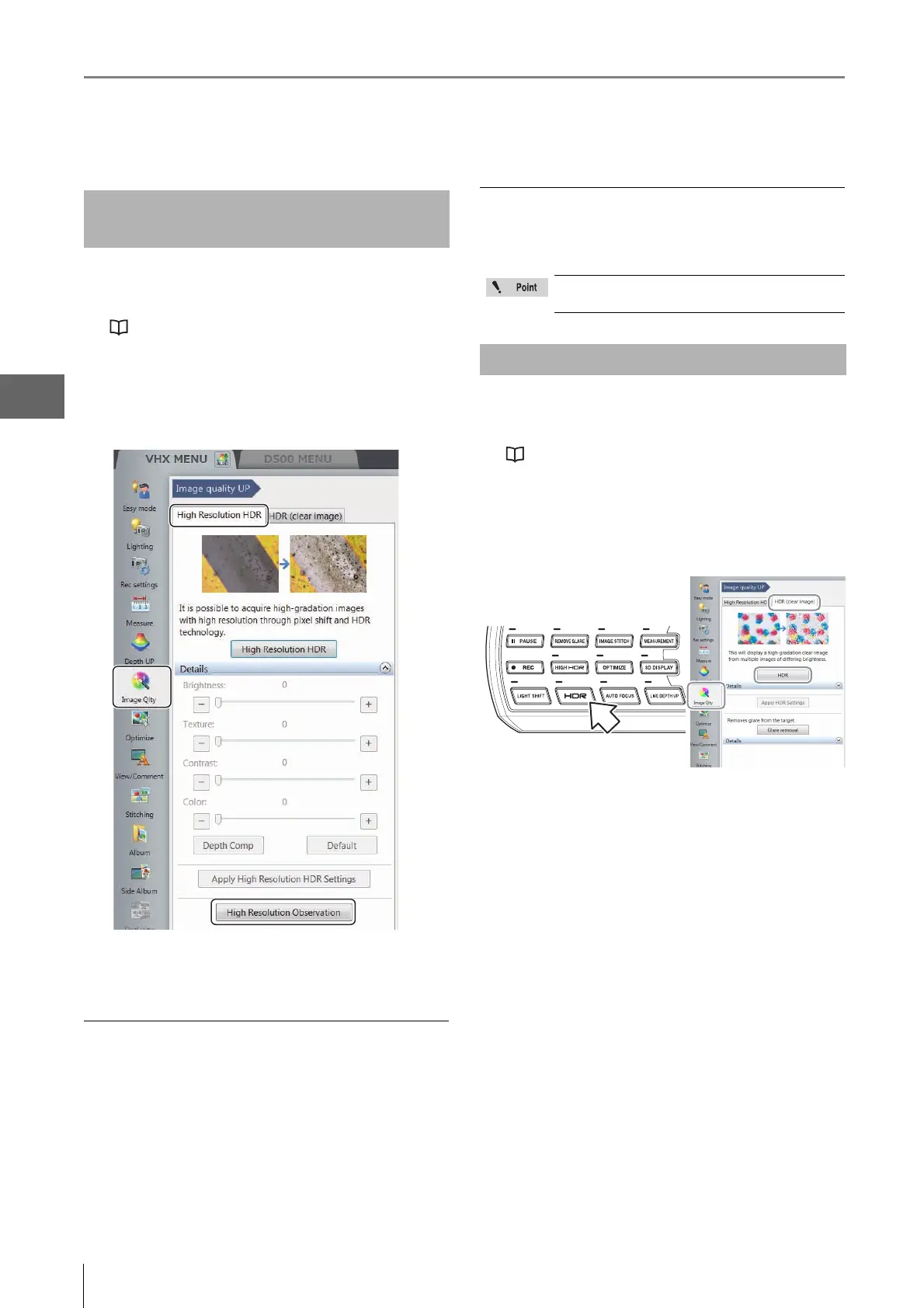
2 Click the [Image Qlty] from the VHX MENU, select
the [High Resolution HDR] tab and click [High
Resolution Observation].
The high resolution image appears in the observation
window.
Saving high resolution images
1 Press the [Rec] button on the console or click [Rec]
from the on-screen menu options.
The [Rec] dialog box appears.
2 Select the folder where to save the data, enter the
filename, and click [Save].
Releasing the high resolution observation
Click [High Resolution Observation] from the VHX MENU
again to release the activated state (yellow).
1 Adjust the position of the object to be observed
and adjust the focus.
"Adjusting the Brightness and Focus" (Page 3-4)
2 Press the [HDR] button on the console. You can
also go through the VHX MENU, click [Image Qlty],
select the [HDR (clear image)] tab, and click [HDR].
The HDR image appears in the observation window
and the [Details] menu appears.
High resolution Observation
Settings
While the high resolution observation is in
effect, some features will not be available
HDR Settings



 To Next Page