A75UM3EC (Ver. E.2)
3-76
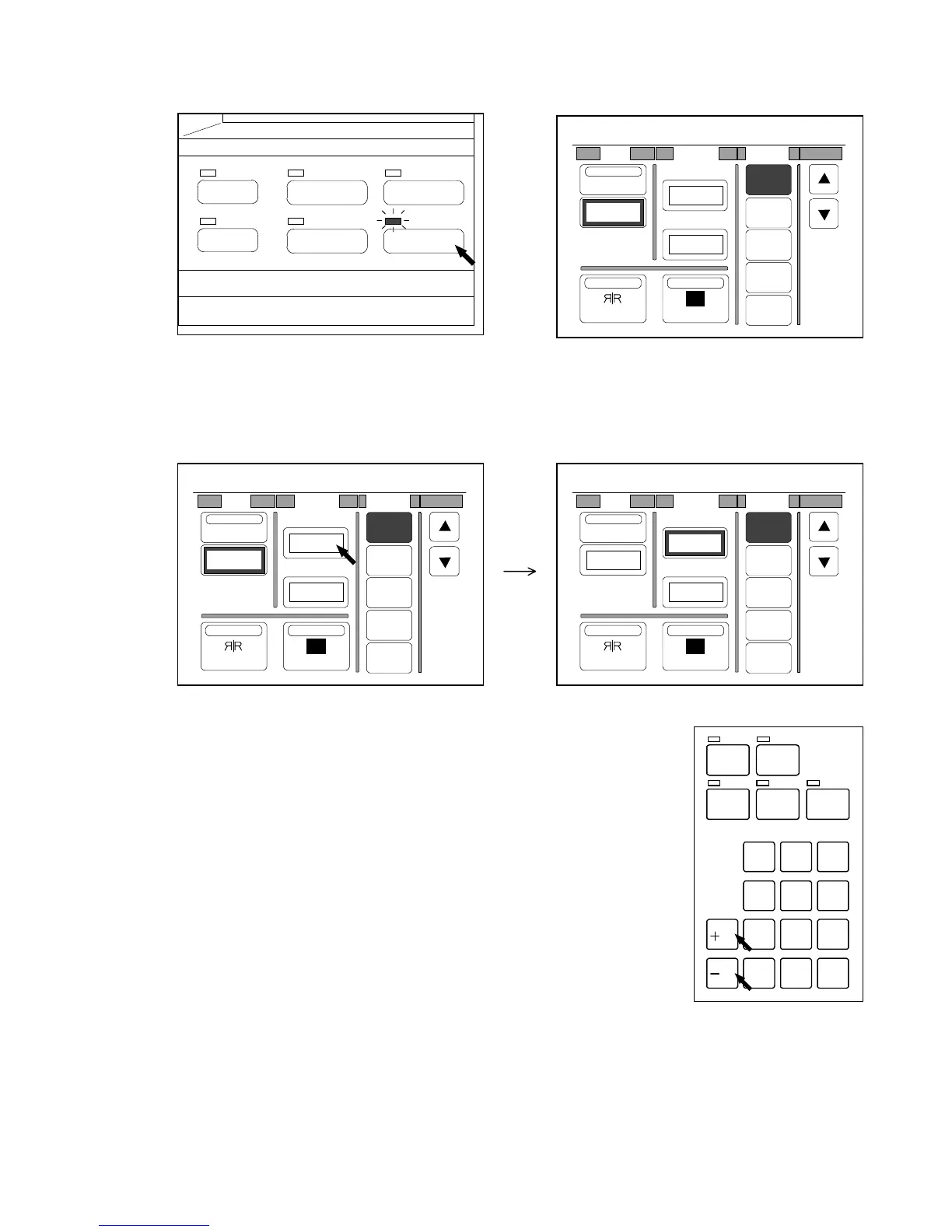
[How to decide the amount of Leading Edge and Trailing Edge]
1) Push the Function Key to indicate the Function Setting Screen on the LCD.
(Function Key) (Function Setting Screen)
2) If you would like to specify the amount for the Leading Edge, press the value below “L. Edge”
The frame around the setting value becomes thicker showing that it is possible to change the
setting value now.
3) Push the “+/R” Key if you wish to provide the leading margin to the copy.
Push the “-/L” Key if you wish to prevent original’s leading image from
being copied.
/
L
/
R
SET COPY
ROTATE
AUTO ZOOM AUTO PAPER
CON CURRENT
PRINT
0
1
4
7
.
2
5
8
C
3
6
9
PAPER
FUNCTION
BASIC SCREEN
MODE MEMORY
MENU
REFERENCE
0%
001
R
Shift Margin Folder
OFF
1
2
3
4
Centering
0.00"
NegativeMirror
T. Edge
L. Edge
0.00"
0.00"
0%
001
R
Shift Margin Folder
OFF
1
2
3
4
Centering
0.00"
NegativeMirror
T. Edge
L. Edge
0.00"
0.00"
0%
001
R
Shift Margin Folder
OFF
1
2
3
4
Centering
0.00"
NegativeMirror
T. Edge
L. Edge
0.00"
0.00"



 To Next Page