6-29
Sending > Registering Destinations in the Address Book
4
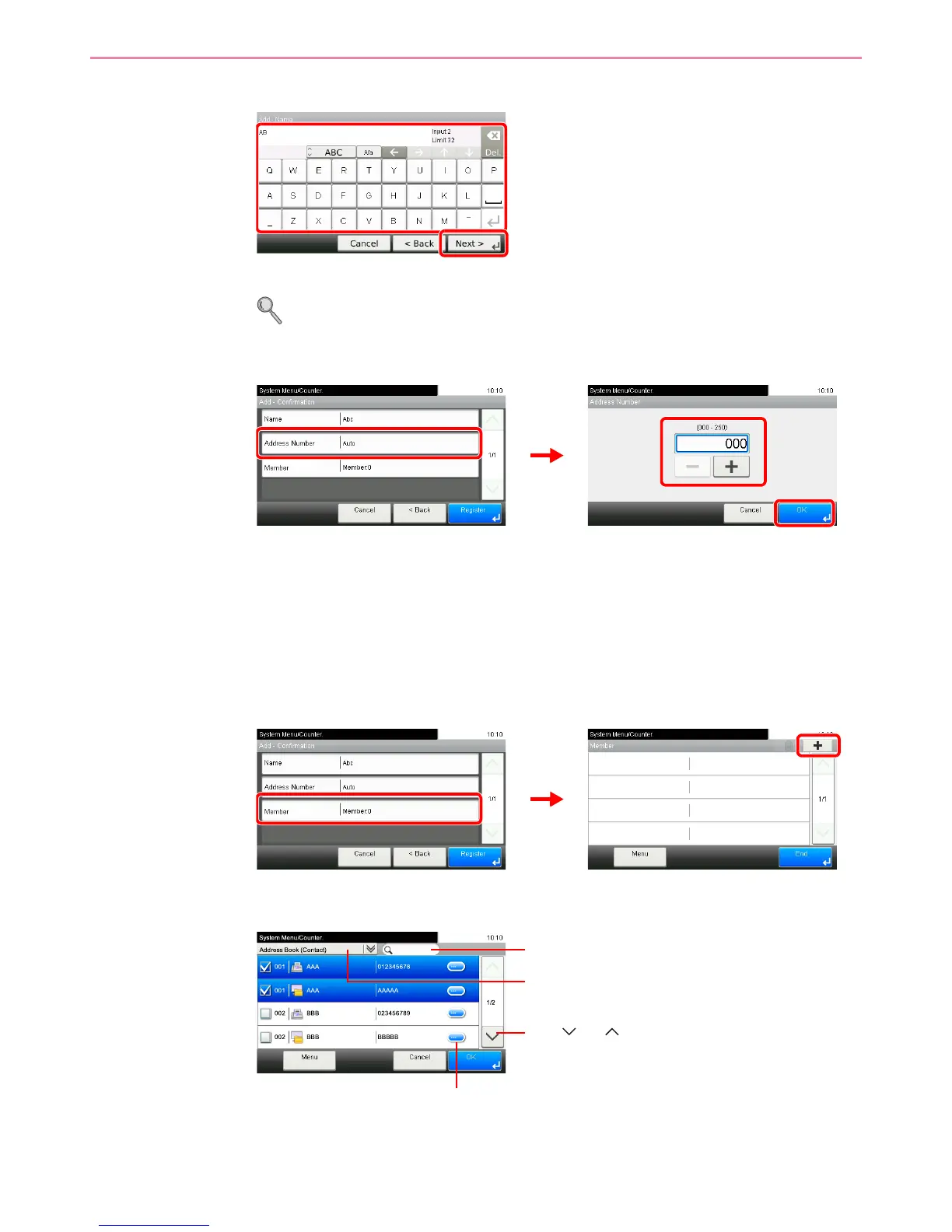
Enter the group name.
Up to 32 characters can be entered.
Refer to Character Entry Method on page 11-7 for details on entering characters.
5
Enter the address number.
Press [+], [-] or numeric keys to enter a particular Address Number (1-250).
Address Number is an ID for a destination. You can select any available number out of 200
numbers for contacts and 50 numbers for groups.
If you set “000” as the address number, the address is registered under the lowest available
number.
6
Select the members (destinations).
1 Display the screen.
2 Press the checkbox to select the desired destination from the list. The selected
destinations are indicated by a checkmark in the check box.
You can specify a destination by address number by pressing the Quick No. Search key.
GB0428_00
Displays details for individual destinations.
Searches by destination name.
Advanced search by type of registered destination (E-
mail, Folder (SMB/FTP) or FAX).
Use [ ] or [ ] to scroll up and down.













 To Next Page