7-14
Document Box > Functions for Document Box
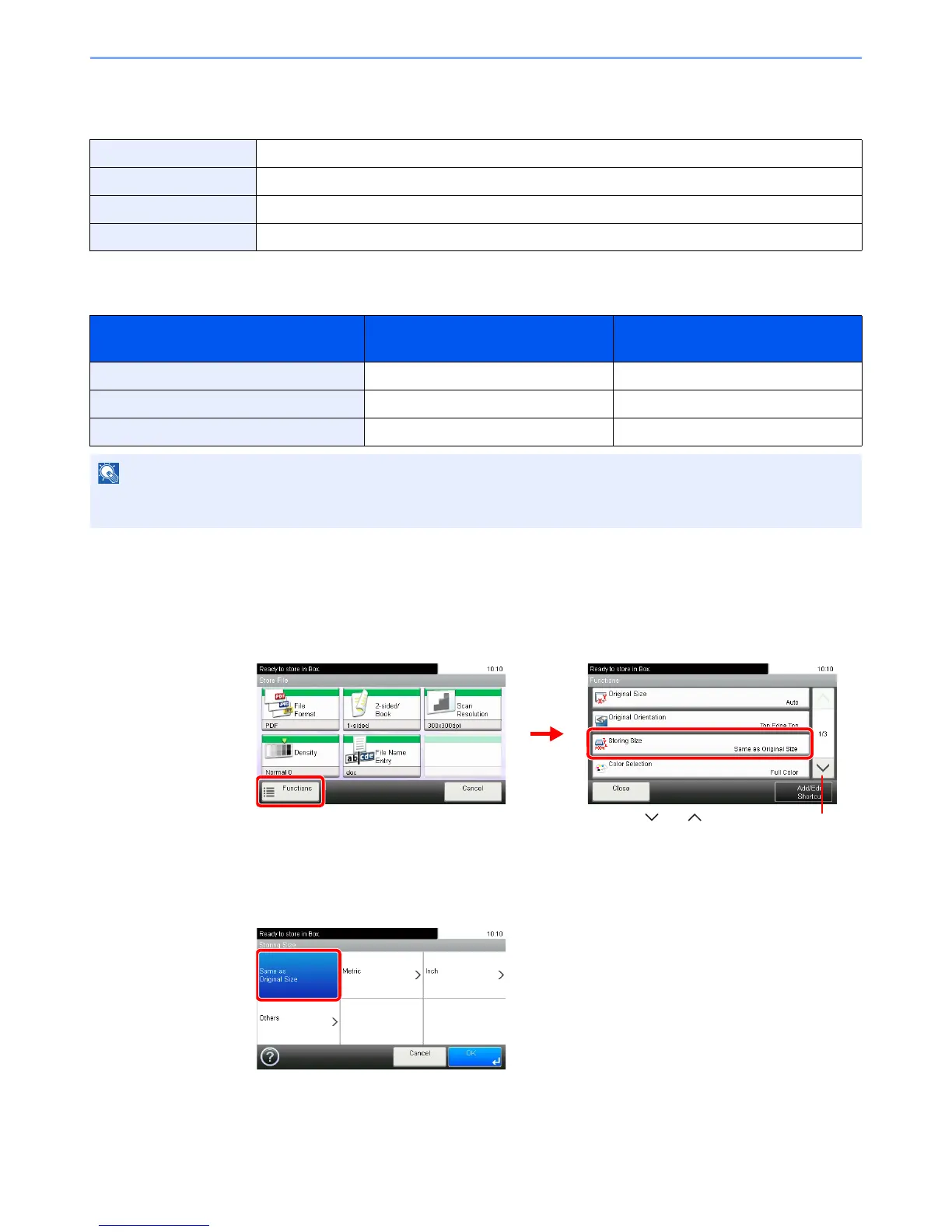
Storing Size
Select size of image to be stored.
Relationship between Original Size, Storing Size, and Zoom
Original Size (page 3-31), Storing Size, and Zoom (page 3-55) are related to each other. Refer to the following table.
1
Display the screen.
1 Referring to Saving Documents to USB Memory (Scan to USB) on page 7-5, display the
screen.
2
2
Select the storing size.
[Same as Original Size]
Same as Original Size Store an image the same size as the original.
Metric Select from A3, A4, A5, A5-R, B4, B5, B6, Folio or 216 × 340 mm.
inch Select from Ledger, Letter, Legal, Statement, 11 × 15" or Oficio II.
Others Select from 8K, 16K, Hagaki or Oufuku Hagaki,
Original Size and the size you wish to
store as are
the same different
Original Size Specify as necessary Specify as necessary
Storing Size Select [Same as Original] Select the required size
Zoom Select [100%] (or [Auto]) Select [Auto]
When you select Storing Size that is different from Original Size, and select the Zoom [100%], you can send the image
as the actual size (No Zoom).













 To Next Page