10-20
Troubleshooting > Responding to Error Messages
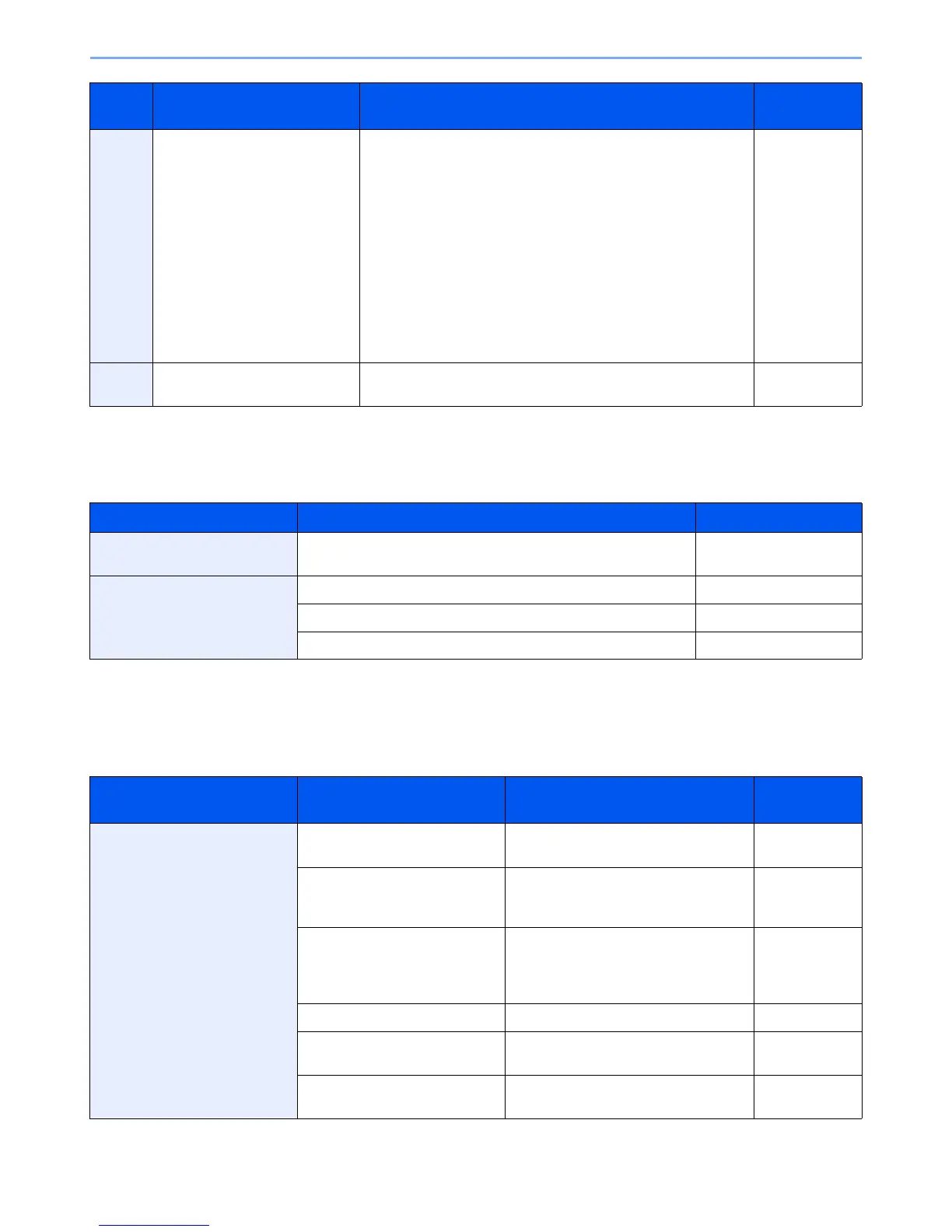
Responding to Authentication Server Connection Error
If an error occurs when connecting to the authentication server, check the error message and follow the corresponding
corrective action appears on the operation panel.
Responding to an Attention Indicator Flashes
If an attention indicator flashes, press [Status/Job Cancel] to check an error message. If the message is not indicated on
the touch panel when [Status/Job Cancel] is pressed or the attention indicator flashes for 1.5 seconds, check the
following.
0007
4201
4701
5101
5102
5103
5104
7101
7102
7103
720f
— Turn the main power switch off and back on. If this error occurs
several times, make a note of the displayed error code and
contact your service representative.
—
9181 — The scanned original exceeds the acceptable number of pages of
999. Send the excess pages separately.
—
Symptom Corrective Actions Reference Page
Cannot connect to authentication
server.
Set machine time to match the server’s time. 9-21
Cannot connect to authentication
server.
Check the domain name. 9-25
Check the host name. 9-25
Check the connection status with the server. —
Symptom Checkpoints Corrective Actions Reference
Page
Cannot send fax. Is the modular cord connected
correctly?
Connect the modular cord correctly. —
Is Permitted FAX No. or
Permitted ID No. registered
correctly?
Check Permitted FAX No. and Permitted
ID No.
FAX Operation
Guide
Has a communication error
occurred?
Check error codes in the TX/RX Result
Report and Activity Report. If the error
code starts with "U" or "E", perform the
corresponding procedure.
FAX Operation
Guide
Is the destination FAX line busy? Send again. —
Does the destination FAX
machine respond?
Send again. —
Is there an error other than
above?
Contact your Service Representative. —
Error
Code
Error Message Corrective Actions Reference
Page













 To Next Page