EasyManua.ls Logo

Kyocera TASKalfa 255 - System Menu

Kyocera TASKalfa 255
360 pages
Print Icon
To Next Page IconTo Next Page
To Previous Page IconTo Previous Page
Loading...
9-2
Setup, Registration, and User Management > System Menu
System Menu
Configure settings related to overall machine operation.
Operation Method
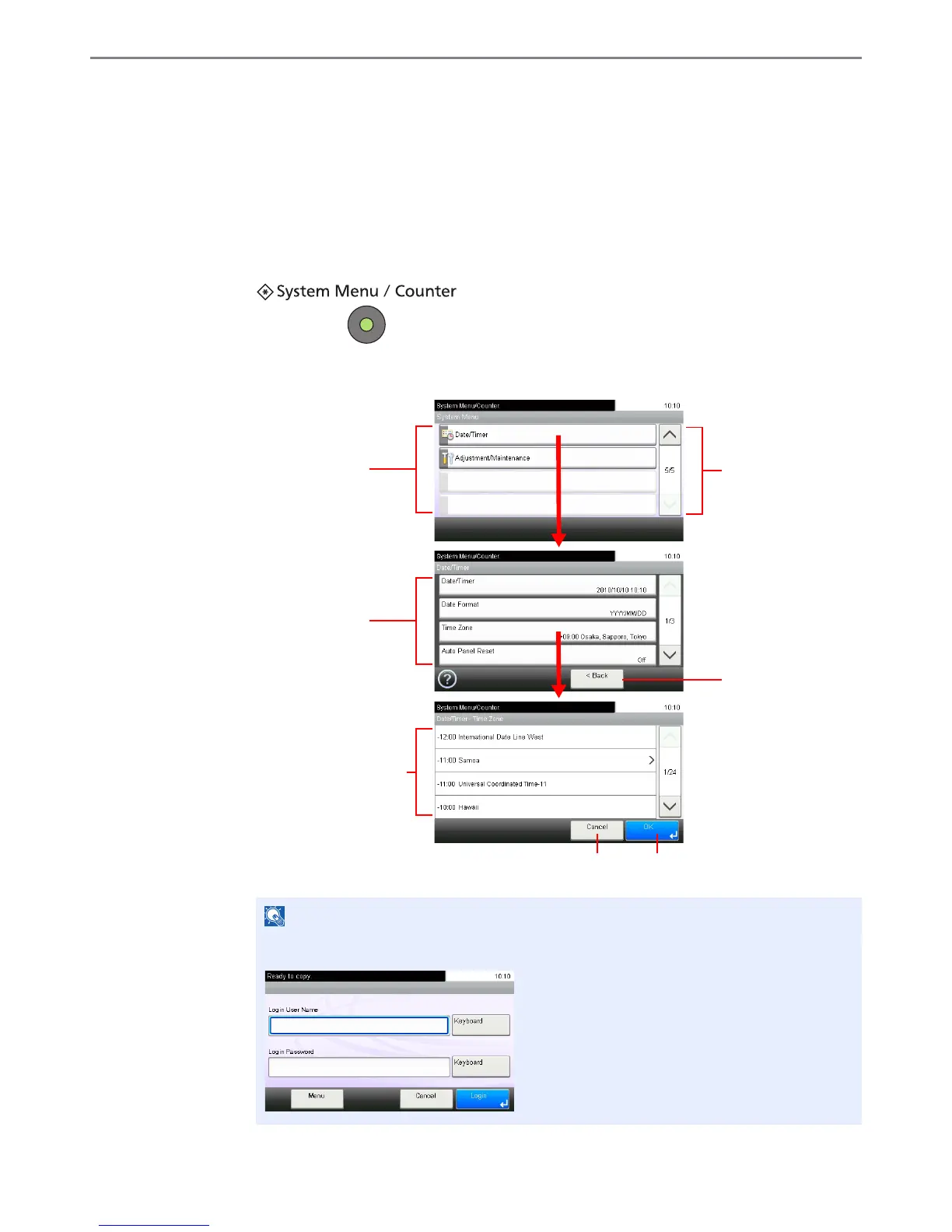
The system menu is operated as follows:
1
Display the screen.
2
Configure the function.
Refer to System Menu Settings on the following page and configure as needed.
NOTE
In order to change settings that require administer privileges, you must log in with
administrator privileges.
GB0614_00
Selecting a value it to be
accepted.
Returns to the original screen
without making any changes.
Accepts the settings and exits.
Displays available
functions.
GB0610_00
Return to the previous
screen.
Scrolls up and down
when the list of values
cannot be displayed in
its entirety on a single
screen.
GB0054_04
Displays available
functions.
GB0723_00

Table of Contents

Other manuals for Kyocera TASKalfa 255

Related product manuals