EasyManua.ls Logo

Kyocera TASKalfa 255 - Replacing Staples

Kyocera TASKalfa 255
360 pages
Print Icon
To Next Page IconTo Next Page
To Previous Page IconTo Previous Page
Loading...
10-5
Troubleshooting > Replacing Staples
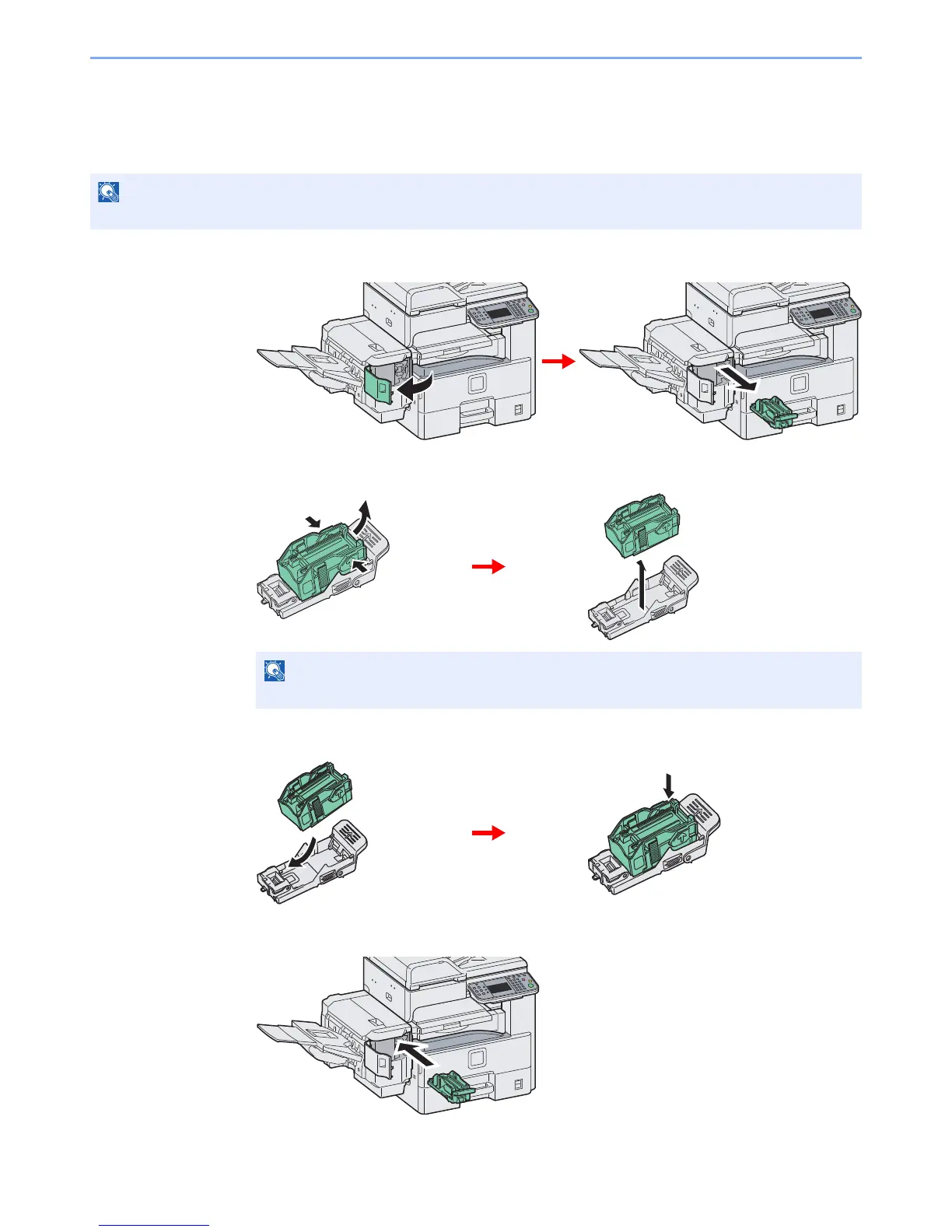
Replacing Staples
If a message displays indicating that staples have run out, the staple cartridge holder need to be replenished with
staples.
1
Remove the staple cartridge holder.
2
Remove the empty staple cartridge.
3
Insert the new staple cartridge.
4
Re-install the staple cartridge holder.
The staple cartridge holder will click into place when it has been inserted correctly.

NOTE
If the Staple Unit runs out of staples, contact your service representative or the place of purchase.
NOTE
The staple cartridge can only be removed when it contains no more staples.

Table of Contents

Other manuals for Kyocera TASKalfa 255

Related product manuals