3-31
Common Operations > Using Various Functions
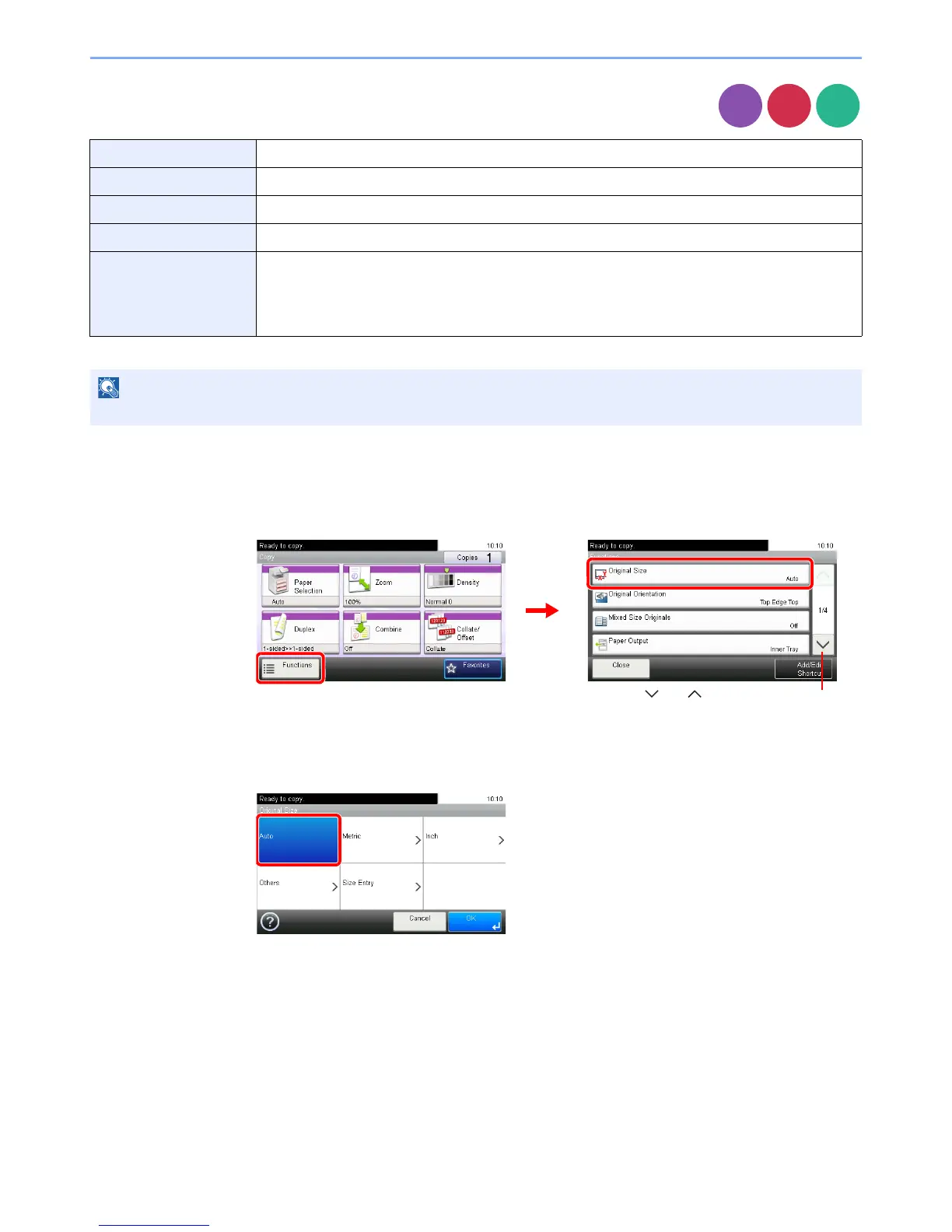
Original Size
Specify the original size to be scanned.
1
Display the screen.
1 Referring to Using Various Functions on page 3-29, display the screen.
2 Press [Functions] and then [Original Size].
2
Select the original size.
[Auto]
Auto Automatically detects the size of the original.
Metric Select from A3, A4-R, A4, A5-R, A5, A6-R, B4, B5-R, B5, B6-R, B6, Folio, or 216 × 340 mm.
inch Select from Ledger, Letter-R, Letter, Legal, Statement-R, Statement, 11 × 15", or Oficio II.
Others Select from 8K, 16K-R, 16K, Hagaki, Oufuku Hagaki, or Custom*
* For instructions on how to specify the custom original size, refer to Custom Original Size on page 9-9.
Size Entry Enter the size.
Inch models — Horizontal: 2 to 17" (in 0.01" increments), Vertical: 2 to 11.69" (in 0.01" increments)
Metric models — Horizontal: 50 to 432 mm (in 1 mm increments), Vertical: 50 to 297 mm (in 1 mm
increments)













 To Next Page