9-4
Setup, Registration, and User Management > System Menu
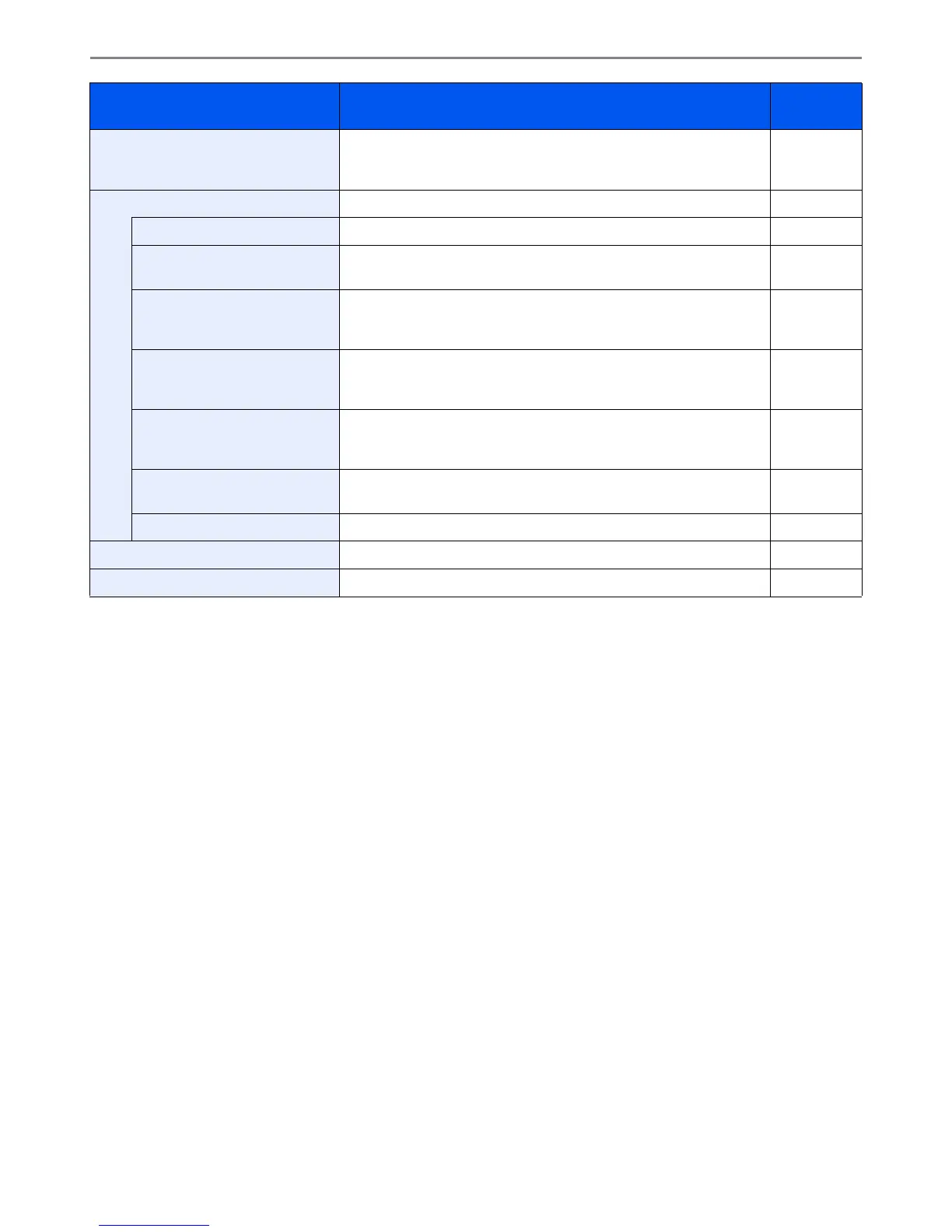
Printer Printing from computers, settings are generally made on the application
software screen. However, the following settings are available for
configuring the defaults to customize the machine.
9-16
System Configures machine system settings. 9-17
Network Configures network settings. 9-17
Interface Block Setting This allows you to protect this machine by blocking the interface with
external devices such as USB hosts or optional interfaces.
9-21
Security Level The Security Level setting is primarily a menu option used by service
personnel for maintenance work. There is no need for customers to use
this menu.
—
Restart Restart the CPU without turning the main power switch off. Use this to
deal with any unstable operation by the machine. (Same as the
computer restart.)
—
RAM Disk Setting When optional memory is installed, a RAM disk can be created and its
size can be set. Creating a RAM disk makes it possible to print from a
Job Box.
9-21
Memory Balance When optional memory is installed, select the memory allocation
scheme based on the application in which you are using the equipment.
9-21
Optional Function You can use the optional applications installed on this machine. 11-5
Date/Timer Configures settings related to the date and time. 9-21
Adjustment/Maintenance Adjust printing quality and conduct machine maintenance. 9-23
Item Description Reference
Page













 To Next Page