Home
Kyocera
All in One Printer
TASKalfa 255
Page 277
Kyocera TASKalfa 255 - Page 277
360 pages
Manual
Save Page as PDF
To Next Page
To Next Page
To Previous Page
To Previous Page
Loading...
9-47
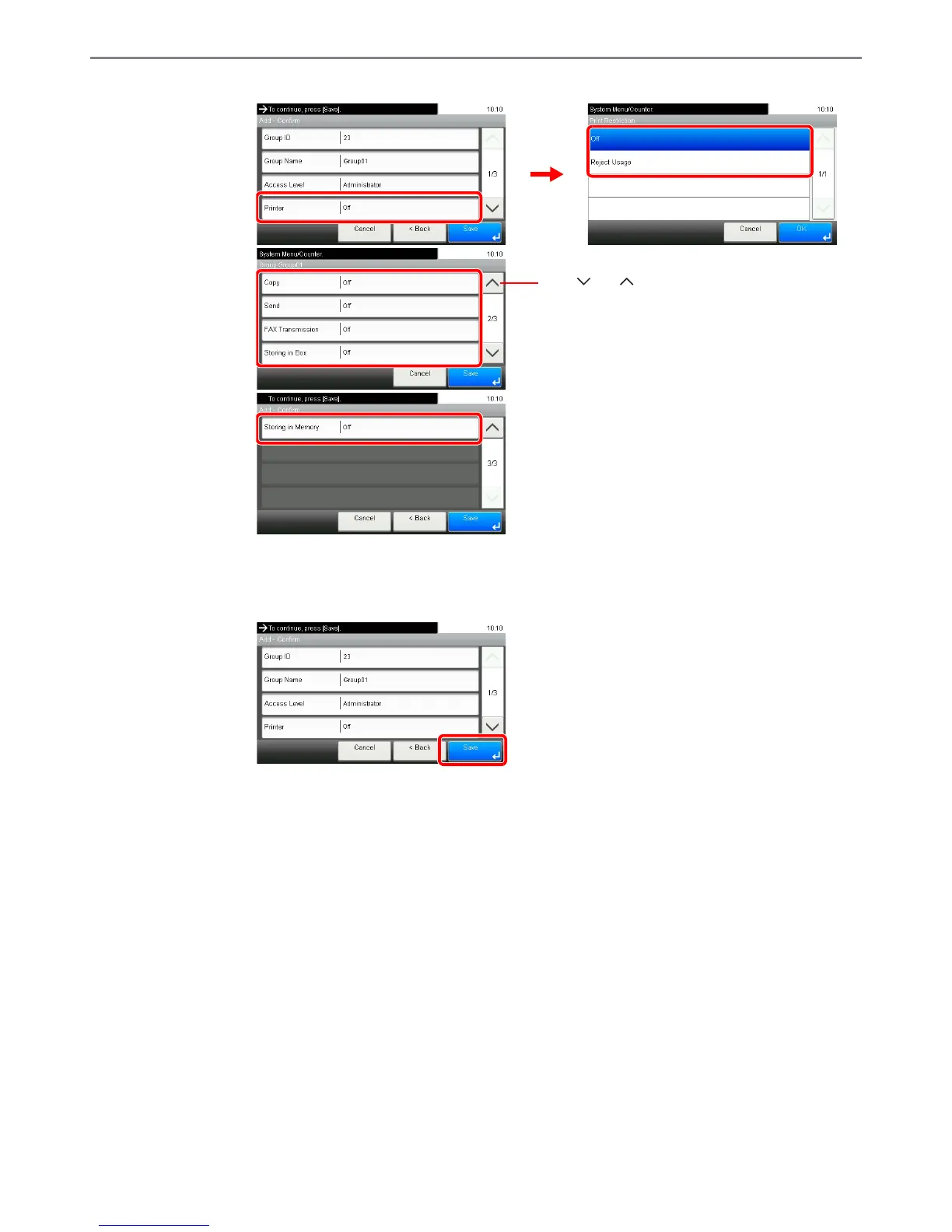
Setup, Registration, and Use
r Management > User Login Administr
ation
[Printer], [Co
py], [Send],
[F
AX T
ransmission],
[Storing in Box], [Storing in M
emory]
Change the restri
ctions as needed.
4
Register the group.
GB0460_00
GB0456_00
1
2
GB0460_01
Use [
] or [
] to scroll up and down.
GB0460_02
GB0460_00
276
278
Table of Contents
Main Page
Default Chapter
5
Table of Contents
5
Printing
11
To Send Documents
12
Menu Map
14
1 Preface
23
Notice
24
Safety Conventions in this Guide
24
Environment
25
Precautions for Use
25
Safety of Laser Beam
27
Optical Unit
27
Safety Instructions Regarding the Disconnection of Power
28
Radio Tag Technology
28
Legal Restriction on Copying/Scanning
30
Legal and Safety Information
31
Legal Information
31
Original Ssleay License
32
Monotype Imaging License Agreement
33
Energy Saving Control Function
34
Automatic 2-Sided Copy Function
34
Paper Recycling
34
Energy Star (ENERGY STAR®) Program
34
About this Operation Guide
35
Conventions in this Guide
35
Originals and Paper Sizes
37
2 Preparation before Use
39
Part Names
40
Machine
40
Operation Panel
44
Touch Panel
45
Determining the Connection Method and Preparing Cables
46
Connection Example
46
Preparing Necessary Cables
47
Connecting Cables
48
Connecting LAN Cable
48
Connecting USB Cable
49
Connecting the Power Cable
49
Power On/Off
50
Power on
50
Power off
50
Installing Software
52
Installing Printer Driver
52
Finish the Installation
53
Installing Printer Driver in Macintosh
54
Install Printer Driver
54
Setting TWAIN Driver
56
Setting WIA Driver (Windows 7, Windows Vista and Windows Server 2008)
57
Energy Saver Function
58
Low Power Mode and Auto Low Power Mode
58
Sleep and Auto Sleep
59
Machine Setup Wizard
60
COMMAND CENTER (Settings for E-Mail)
61
Sending E-Mail
62
3 Common Operations
65
Loading Paper
66
Before Loading Paper
66
Loading Paper in the Cassettes
67
Load Paper
68
Loading Paper in the Multi Purpose Tray
69
Loading Originals
71
Placing Originals on the Platen
71
Loading Originals in the Document Processor
72
Load Originals
73
Original Loaded Indicator
73
Checking the Equipment's Serial Number
74
Checking the Counter
75
Login/Logout
76
Login
76
Logout
77
Favorites
78
Registering Favorites
78
Editing and Deleting Favorites
81
Using Favorites
83
Shortcuts
85
Registering Shortcuts
85
Editing and Deleting Shortcuts
87
Using Shortcuts
88
Quick Setup Wizard
89
Help Screen
91
Canceling Jobs
92
Using Various Functions
93
Common Functionality
94
Original Size
95
Original Orientation
97
Mixed Size Originals
98
2-Sided/Book Original
100
Continuous Scan
102
Paper Selection
104
Paper Output
105
Collate/Offset
106
Margin
108
Staple
111
Density
113
Scan Resolution
114
Original Image
115
Sharpness
116
Background Density Adjust
117
Prevent Bleed-Through
118
Zoom
119
File Format
120
Color Selection
122
Job Finish Notice
123
File Name Entry
125
Priority Override
126
4 Copying
127
Basic Operation
128
Start Copying
129
Copying Functions
130
Zoom
131
Duplex
134
Combine
138
Ecoprint
141
Auto Image Rotation
142
Interrupt Copy
143
5 Printing
145
Printing from Applications
146
Printer Driver Help
147
Using a Job Box
148
Private Print
148
Proof and Hold Print Box
150
Automatic Delete Setting for Temporary Documents
153
6 Sending
156
Basic Operation
156
Place the Originals
157
Specifying Destination
157
Preparation for Sending a Document to a PC
159
Checking What to Enter for [Host Name]
159
Checking What to Enter for [Login User Name]
160
Creating a Shared Folder
161
Checking the [Path]
164
Configuring Windows Firewall (for Windows 7)
165
Specifying Destination
169
Choosing from the Address Book
169
Choosing by One Touch Key
171
Entering a New E-Mail Address
172
Specifying a New PC Folder
173
Checking and Editing Destinations
176
Sending to Different Types of Destinations (Multi Sending)
177
Registering Destinations in the Address Book
178
Adding a Contact
178
Adding a Group
182
Editing and Deleting Address Book Entries
185
Adding a Destination on One Touch Key
187
Adding a Destination
187
Editing and Deleting One Touch Key
189
Sending Functions
190
Sending Size
191
File Separation
193
E-Mail Subject/Body
194
FTP Encrypted TX
195
WSD Scan
196
Scanning Using TWAIN
199
7 Document Box
201
Printing Documents Stored in Removable USB Memory
202
Enter the Quantity
203
Start Printing
204
Saving Documents to USB Memory (Scan to USB)
205
Removing USB Memory
208
Functions for Document Box
209
Duplex
210
Encrypted PDF Password
211
JPEG/TIFF Print
212
XPS Fit to Page
213
Storing Size
214
8 Status / Job Cancel
217
Checking Job Status
218
Details of the Status Screens
219
Send Job Status Screen
220
Store Job Status Screen
221
Scheduled Job Screen
221
Checking Job History
222
Sending the Log History
223
Setting the Destination
224
Automatic Log History Transmission
225
Manual Log History Transmission
225
Setting E-Mail Subject
226
Check of Device Status
227
Checking the Remaining Amount of Toner and Paper
229
9 Setup, Registration, and User Management
231
System Menu
232
Operation Method
232
System Menu Settings
233
Language
235
Report
235
Result Report Settings
236
User Property
237
Cassette/Mp Tray Settings
238
Common Settings
239
Default Screen
239
Paper Settings
240
Function Defaults
242
Preset Limit
243
Error Handling
244
Keyboard Layout
244
Copy
245
Send
245
Printer
246
System
247
Secure Protocol
250
Lan Interface
250
Date/Timer
251
Adjustment/Maintenance
253
User Login Administration
255
First User Login Administration
255
User Login Settings
256
Enabling/Disabling User Login Administration
257
Local User Authorization
259
Adding a User
260
My Panel
264
Editing and Deleting Users
265
Simple Login
268
Group Authorization
274
Obtain Network User Property
278
Job Accounting
280
First Job Accounting Setup
280
Job Accounting Settings
282
Enabling/Disabling Job Accounting
283
Login/Logout
284
Adding an Account
285
Editing and Deleting Accounts
287
Restricting the Use of the Machine
289
Counting the Number of Pages Printed
291
Printing an Accounting Report
293
Job Accounting Default Setting
294
Unknown Login User Name Job
296
10 Troubleshooting
297
Toner Container Replacement
298
Waste Toner Box Replacement
300
Replacing Staples
301
Cleaning
302
Original Cover / Glass Platen
302
Document Processor
302
Solving Malfunctions
304
Responding to Error Messages
308
Responding to Send Error
314
Responding to an Attention Indicator Flashes
316
Clearing Paper Jams
317
Jam Location Indicators
317
Multi Purpose Tray
318
Inside the Right Cover 1
318
Cassette 1
319
Inside the Right Cover 3
320
Cassette 2 or 3
320
Optional Document Finisher
321
Optional Document Finisher Staple Jam
321
Bridge Unit
322
Document Processor
322
11 Appendix
325
Optional Equipment
326
Overview of Optional Equipment
326
Paper Feeder (Single Cassette)
327
Paper Feeder (Double Cassette)
327
Document Finisher
327
FAX Kit
327
Expansion Memory
327
Gigabit Ethernet Board
328
Optional Function
329
Character Entry Method
331
Entry Screens
331
Entering Characters
333
Paper
334
Basic Paper Specifications
335
Choosing the Appropriate Paper
335
Supported Paper Sizes
336
Moisture Content
337
Special Paper
338
Thick Paper
340
Colored Paper
340
Preprinted Paper
340
Recycled Paper
341
Specifications
342
Machine
342
Printer
343
Scanner
344
Document Processor
344
Paper Feeder (Single Cassette) (Option)
344
Paper Feeder (Double Cassette) (Option)
345
Document Finisher (Option)
345
Environmental Specifications
346
Glossary
347
Auto Paper Selection
347
Default Gateway
347
Ecoprint Mode
348
Ip Address
348
Printer Driver
349
Ra (Stateless)
349
Send as E-Mail
349
Subnet Mask
350
Index
351
Other manuals for Kyocera TASKalfa 255
User Guide
92 pages
Safety Guide
2 pages
Quick Installation Guide
32 pages
Related product manuals
Kyocera TASKalfa 250ci
488 pages
Kyocera TASKalfa 2550ci
532 pages
Kyocera TASKalfa 2552ci
681 pages
Kyocera TASKalfa 220
109 pages
Kyocera TASKalfa 221
149 pages
Kyocera TASKalfa 2321
28 pages
Kyocera TASKalfa 2021
28 pages
Kyocera TASKalfa 2200
213 pages
Kyocera TASKalfa 2201
268 pages
Kyocera TASKalfa 266ci
402 pages
Kyocera TASKalfa 1800
213 pages
Kyocera TASKalfa 5500i
558 pages













 To Next Page