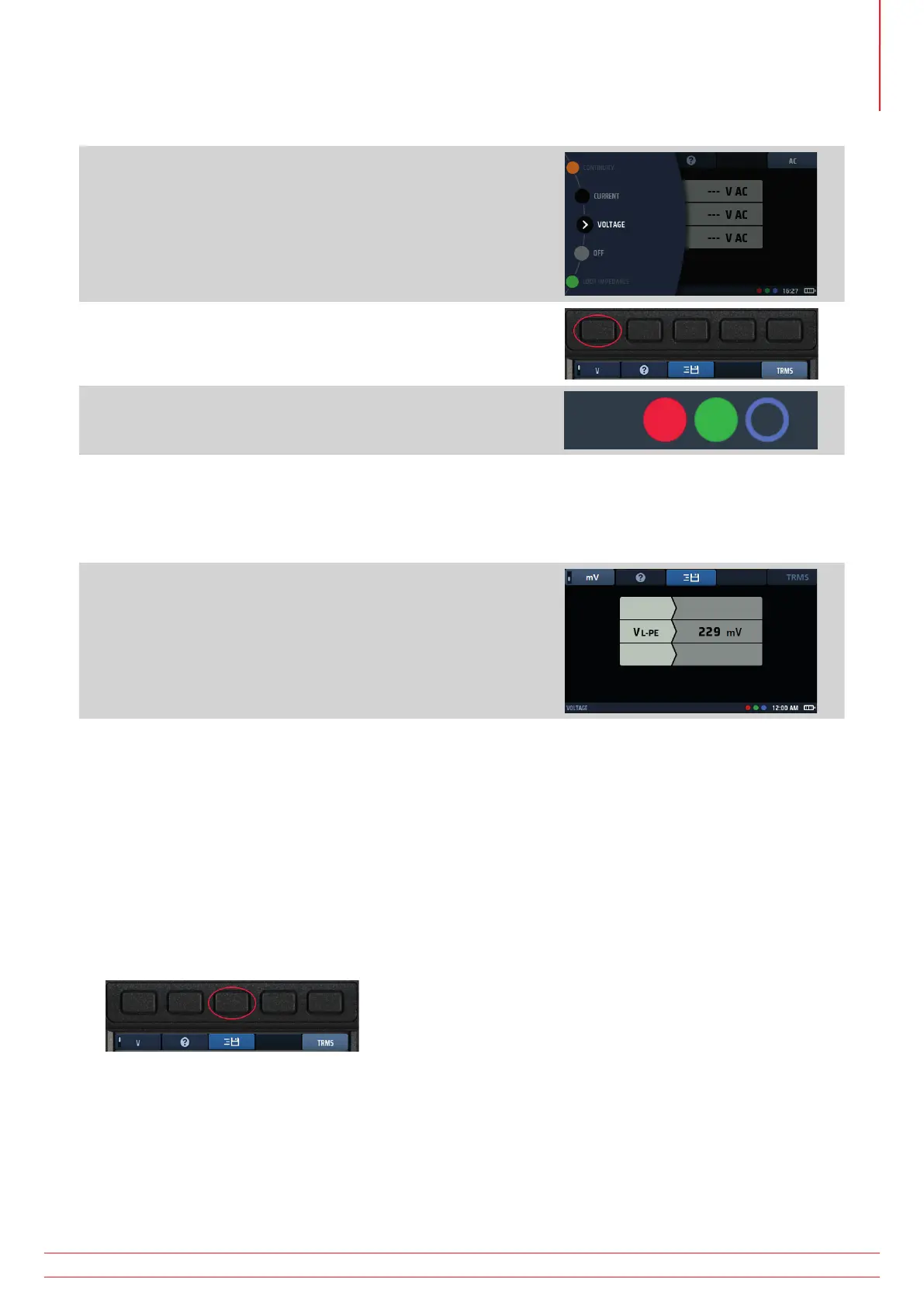
11.8 Millivolt measurements
1. Turn the left-hand rotary knob to the Voltage position (V).
The display illuminates and has a black background.
2. Press Hot key 1 until the box below it shows mV.
3. Plug the test leads into the red and green sockets.
4. Connect the red test-lead to the positive potential conductor, the green test-lead to the negative potential
conductor of the circuit to be measured.
You do not need to press the test button.
The test starts as soon as you connect your test-leads to the circuit you are testing.
5. The instrument displays a single voltage in millivolts up to a
limit of 1999 mV.
NOTE : The mV option is only available across the red and
green terminals of the instrument.
11.9 Frequency measurement
When making AC or TRMS measurements, the instrument automatically shows the supply frequency in the
bottom left of the display.
The frequency display is inhibited when DC voltages is selected.
11.10 Sending results to a Bluetooth
®
device
Press Hot key 3 at any time to send the results shown in the main area of the display to a connected Bluetooth
®
device such as a tablet or smartphone
Fig 36: Hot key 3
For information about connecting mobile devices with the MFT-X1,
Refer to 16. Download results to a
remote device on page 89.
www.megger.com MFT-X1
47
Voltage measurement



 To Next Page