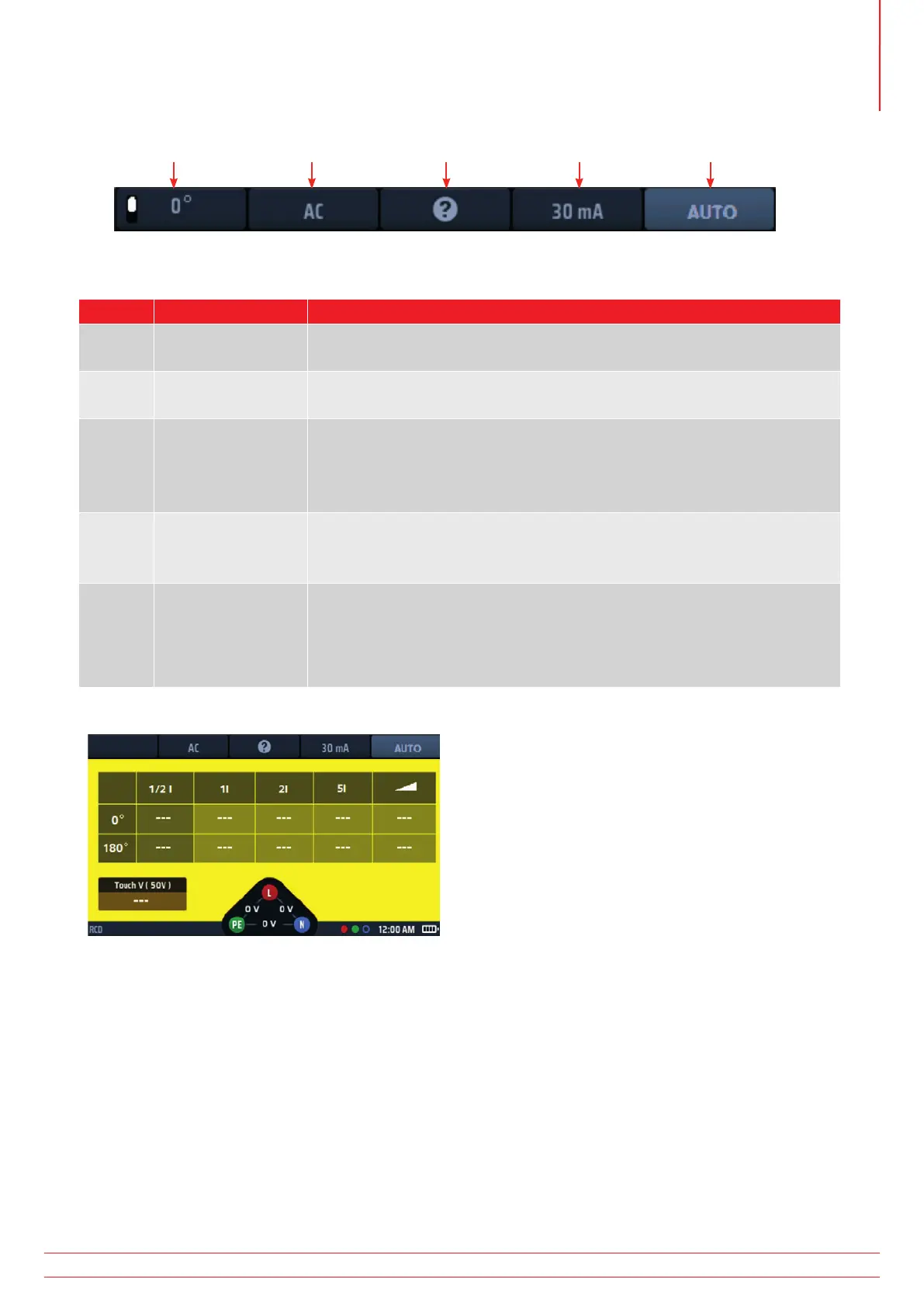
13.2 Hot keys for RCD tests
Hot key 1 Hot key 2 Hot key 3 Hot key 4 Hot key 5
Fig 42: RCD Hot keys
Hot key Function Description
1 0º/180º/AUTO
Press to select 180º testing, press again to select 0º testing.
This Hot key is disabled if the test type selected is “AUTO”.
2 RCD type
Press repeatedly to select the type of RCD you are testing.
Available options are: AC, AC-S, A, A-S, B, B-S, EV A/B, EV A/RDC
3 Help/Save
Before starting a test, press for help on RCD testing.
When the test is complete, press to send the results to a connected
Bluetooth
®
device, Refer to 16. Download results to a remote device
on page 89.
4 Current
Press repeatedly to select the current rating of the RCD you are testing.
Available options are: 10 mA, 30 mA, 100 mA, 300 mA, 500 mA, 650 mA,
1000 mA, VAR.
5 Test type
Press repeatedly to select the test type.
Available options are: AUTO, ½ x I, 1 x I, 2 x I, 5 x I, RAMP, Touch V.
NOTE : Selecting EV A/B or EV A/RDC on Hot key 2 will limit Hot key
5 option to AUTO only
13.3 Display layout for RCD tests (AUTO TEST example shown)
Fig 43: RCD auto test example start screen
13.4 Touch voltage – All RCD, RDC and touch voltage tests
A touch-voltage test is automatically carried out before any of the RCD or RDC tests start,
Refer to 13.8 Touch-voltage test on page 58.
If you use a three-wire connection to the circuit under test and the instrument detects that the live and neutral
connections are reversed, it displays a warning and inhibits the test. The test inhibit but not the warning, can be
disabled in set up, Refer to 15.7.1 Live voltage limit on page 83.
While the instrument is carrying out a test, all the Hot keys are disabled.
To test RCDs with a current rating that does not match any of the presets that the instrument offers, you can use
the VAR option, Refer to 13.9 VAR (Variable RCD) on page 59.
www.megger.com MFT-X1
53
Residual current device (RCD) testing



 To Next Page