14.11 R1 + R2 mode
ATTENTION : You can only select R1+R2 on Hot key 1 when you have L-PE selected on Hot key 5.
This is because R1+R2 is only used for the phase to earth impedances of final circuit measurements.
You can only measure R1+R2 if you have measured Zref first (Zref is automatically stored when made).
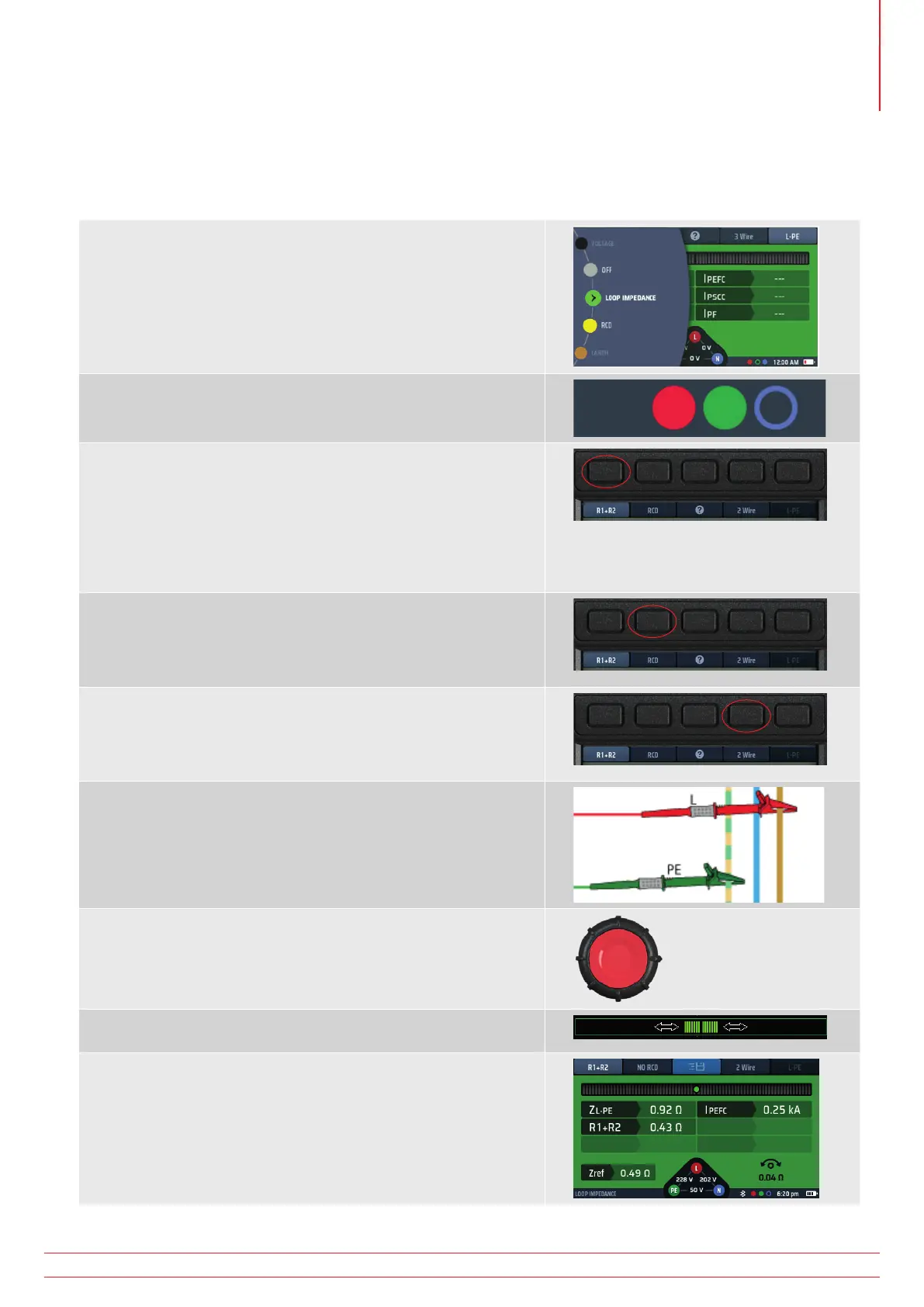
1. Turn the left-hand rotary knob to the Loop Impedance test
position.
2. The display illuminates with a green background.
3. Plug your L (red) test-lead into the red socket and your PE
(green) test-lead into the green socket.
4. Ensure you have Hot key 5 in L-PE mode before repeatedly
pressing Hot key 1 to select R1+R2.
4.1. Alternatively, press Hot key 1 once and use the right-
hand rotary knob to select R1+R2.
REMEMBER: Hot key 5 MUST be in L-PE to allow R1+R2 to be
selected on Hot key 1 or R1+R2 will not appear as an option!
5. Repeatedly press Hot key 2 to select No RCD or RCD if one is
present.
5.1. Alternatively, press Hot key 2 once and use the right-
hand rotary knob.
6. Repeatedly press Hot key 4 to select either 3 wire, 2 wire or 2
wire HR testing. This example is using 2 wire.
6.1. Alternatively, press Hot key 4 once and use the right-
hand rotary knob.
7. Connect your test-leads to the L and PE conductors of the
supply at the point where it enters the building.
8. If using the 3 wire mode connect all three test-leads
9. Press and release the test button
If AUTO START is enabled in settings press the test button BEFORE
connecting the test-leads.
10. The Confidence Meter™ bar reduces towards the middle as
the circuit is analyzed.
11. When the test is complete, the display shows the R1+R2 value
and the Zref used to calculate it.
www.megger.com MFT-X1
73
Earth Loop Impedance testing – TrueLoop™



 To Next Page