QX-830 Compact Industrial Scanner User’s Manual 7-9
Utilities
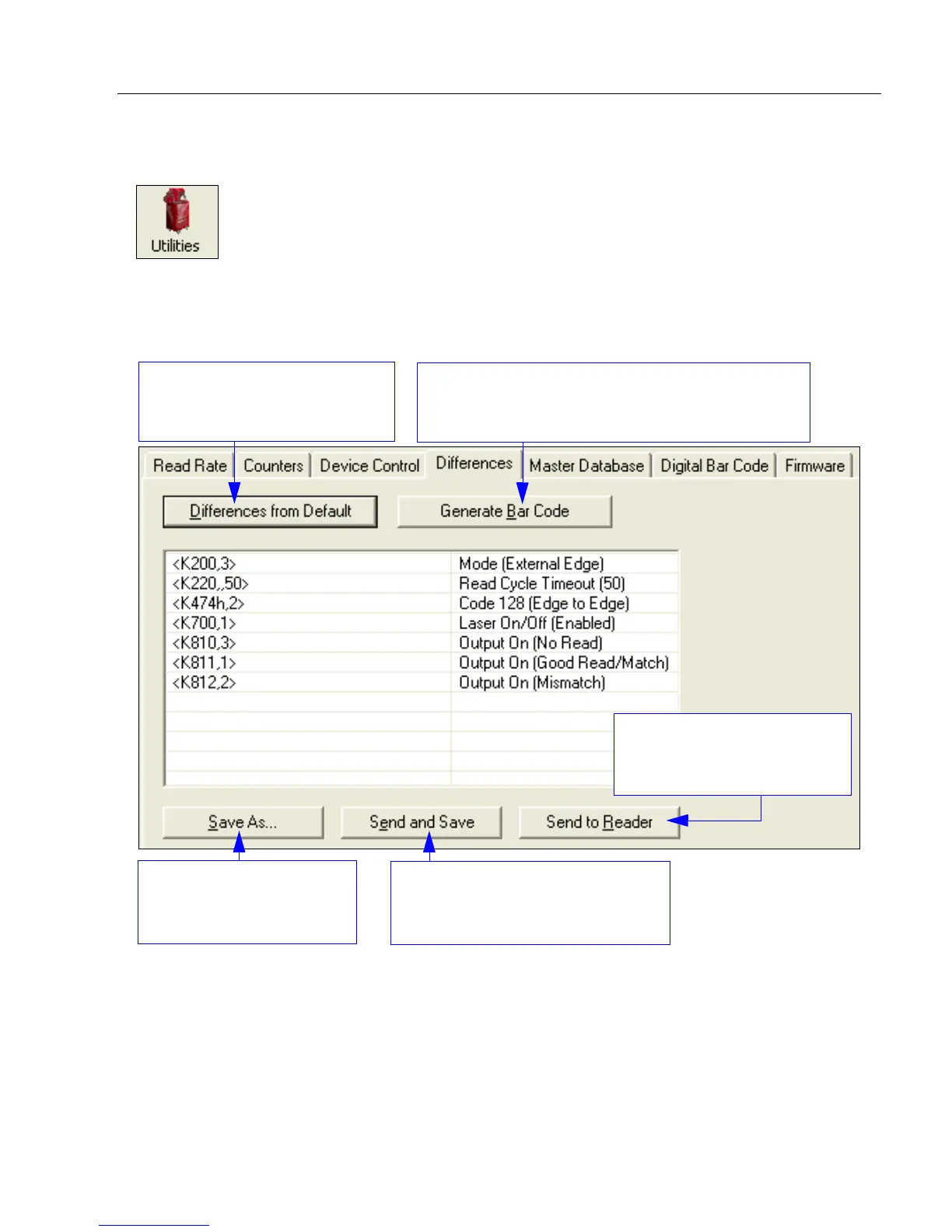
Differences from Default
Clicking the
Differences from Default
button will cause
ESP
to check all stored configuration
settings and compare them to default settings. All settings that are different than default
will appear in the left column (shown below), and descriptions of those settings will appear
in the right column.
• To create a symbol containing any of the command settings in the table, click Generate
Barcode.
• To save the Differences from Default report, either as plain text or as a tab-delimited
text file, click Save As.
• Click Send and Save to send the settings to the scanner and save them, or Send to
Reader to send the settings without saving them.
Important: To use Differences from Default, connect to the scanner and Receive
Reader Settings via the Send/Recv button on the toolbar.
Click the Utilities button and then the Differences tab
to display the Differences from Default view.
Click this button for a list of ESP
configuration settings that are
different than default settings.
Click Generate Barcode to display the
Bar Code
Dialog
. Then create configuration
symbols containing
the required configuration commands.
Send configuration settings to
the scanner without saving by
clicking Send to Reader.
Click Save As to save the
report as plain text or a
tab-delimited text file.
Send configuration settings to the
scanner and save in ESP by
clicking
Send and Save
.



 To Next Page