1-2 QX-830 Compact Industrial Scanner User’s Manual
Check Hardware
Step 1 — Check Hardware
Note: The QX-830 does not require an Ethernet crossover cordset, because the scanner
itself performs automatic internal crossover (transmit-to-receive switching). Microscan
offers a standard straight-through (un-crossed) Ethernet cordset (61-000160-01).
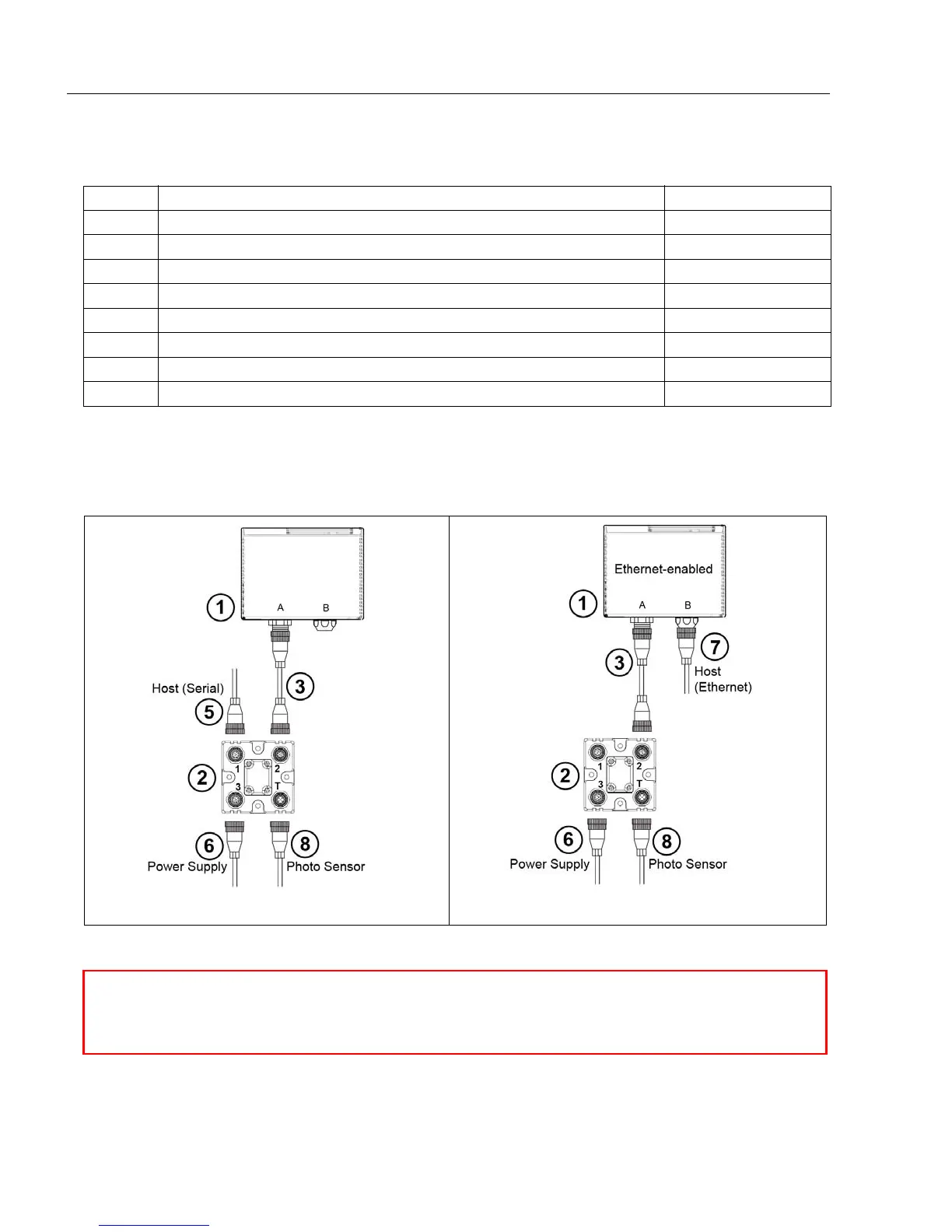
Item Description Part Number
1 QX-830 Compact Industrial Scanner FIS-0830-XXXXG
2 QX-1 Interface Device 98-000103-01
3 QX Cordset, Common, M12 12-pin Plug to M12 12-pin Socket, 1 m 61-000162-01
4 QX Cordset, Host, Serial, M12 12-pin Plug to DB9, 1 m 61-000152-01
5 QX Cordset, Host, Serial, M12 12-pin Socket to DB9, 1 m 61-000153-01
6 QX Power Supply, M12 12-pin Socket, 1.3 m 97-000003-01
7 QX Cordset, Host, Ethernet, M12 8-pin Plug to RJ45, 1 m 61-000160-01
8 QX Photo Sensor, M12 4-pin Plug, NPN, Dark On, 2 m 99-000020-02
Note:
Additional cordsets and accessories are available in the Microscan Product Pricing Catalog.
Hardware Required
Caution: Be sure that all connections are secure BEFORE applying power to
the system. Always power down BEFORE disconnecting any cables.
Serial Standalone (with QX-1)
Ethernet Standalone (with QX-1)



 To Next Page